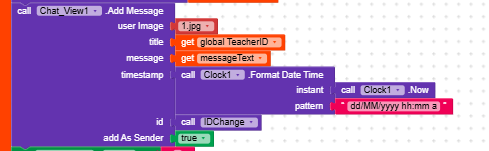
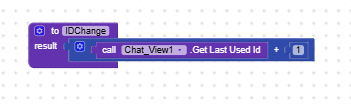
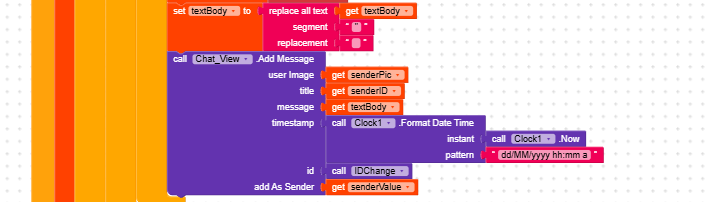
Hi, I’m making a Chat App. Well 2. Both usse the same firebase and refer to the same tag to see the saved messages and update each others apps when data is changed. How theres a problem I think I’ve identified with “id” parameter of the .addmessage in the chat component.
The Problem : Is that when either app closes, its counting of the ID seems to reset.so when i open it agan and send a message, it saves/adds a new message ontop of the currently active message 1/2. Which DOESN’T show a new message in the app because its only going to show new messagwes that were added. I don’t want older ones replaced so theres a history.
I think the way to fix this would be the save the ID whenever the app/page closes and make it continue from there whenever the app is opened again but I’m partially confused on how I’d do this.
Help would be appreciated.
I’d also like to poit out that i add messages around 3 times per one app, all with the same call ID procedure so idk if its correct. once for each person when the page intilizes for all the previous messages. when once per person whenever datachanges.
explainign how the ID parameter works in this function would help alot pls. wiki/docs did nothing
In this post, GetLastUsedId is used to scroll to the last message.
But I don’t think it’s needed to save the last message counter, also because the last message was created by a function, so you already know its value automatically without having to retrieve it from that block.
I hope I explained myself clearly.
A question: what are you using in Firebase.ProjectBucket?
That function returns the last message created, but if you created it, you already know its position
Maybe I explained myself badly but I remember that in this post I gave you two options,
which one did you use?
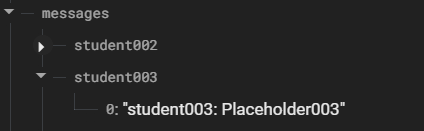
Also use fictitious names, I’m only interested in seeing how deep you go into the subnodes.
If you follow the example I gave you in this post, you can easily use a list and use ‘add item to list’ (you don’t even need to number the messages when sending them to Firebase because by sending a list, they already have the key that corresponds to their index in the list).
Oh yeah, I didn’t use either of the options you gave me actually. I used the same I was using before. the problem seemed to be using .appendtolist instead of .storeitem.
I think because i did it kinda differently from howu said ti to fix it in the preivous post, theres a misunderstanding my side, I’m still testing out how to fix it properly but I’ll show what ive done again
Well, if you’re more comfortable with your method, that’s fine.
I’d just remind you that if you have a Firebase.DataChanged block, on app access Firebase will return the node selected in the bucket, so you’d already have the history and could continue from that.
Alternatively, you can store the data in TinyDB:
create a global list variable history and
in Screen.Initialize set it to TinyDB.GetValue("history"), if value not found create empty list.
When you send/receive a message, add it to the history list and save it back to TinyDB.