IMPORTANT UPDATE: I was also able to implement KaTex to render mathematical expressions 
I was helping a friend
@solomon_zerihun
We’ll only need a few essential components:
- one TextBox,
- one Button,
- one WebViewer
- and one Web
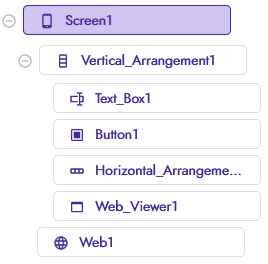
The other layout elements VA and HA were purely for “aesthetics” and are not necessary.
Additionally, we’ll need to add a few files to the assets folder (these will be included at the end of the guide).
Now, let’s set the WebViewer.HomeUrl to:
functions.html OLD
<!DOCTYPE html>
<html>
<head>

    <meta charset="UTF-8">
    <meta name="viewport" content="width=device-width, initial-scale=1.0">
    <script src="markdown-it.min.js"></script>
	<script src="markdown-it-emoji.min.js"></script>
	<script src="markdown-it-footnote.min.js"></script>
	<script src="markdown-it-deflist.min.js"></script>
	<script src="markdown-it-mark.min.js"></script>
	<script src="markdown-it-ins.min.js"></script>
	<script src="markdown-it-container.min.js"></script>
	<script src="markdown-it-sub.min.js"></script>
	<script src="markdown-it-sup.min.js"></script>
	<script src="markdown-it-abbr.min.js"></script>
	<link rel="stylesheet" href="github.css">
	<script src="highlight.min.js"></script>

	<style>
		html, body {
			margin: 0;
			padding: 0;
			overflow-x: hidden;
			overflow-y: auto;
		}

		#content {
			max-width: 100%;
			box-sizing: border-box;
			padding: 1em;
		}


		img {
			max-width: 100%;
			height: auto;
			display: block;
		}

		code {
			background-color: #f0f0f0;
			color: #000;
			padding: 2px 4px;
			font-size: 90%;
			border-radius: 4px;
			font-family: monospace;
		}

		pre {
			border-radius: 8px;
			padding: 0.5em;
			overflow: auto;
		}

		table {
			border-collapse: collapse;
			width: 100%;
		}

		table tr:nth-child(even) {
			background-color: #f2f2f2;
		}

		table, th, td {
			border: 1px solid #ddd;
			padding: 8px;
		}

		blockquote {
			background-color: #f0f0f0;
			border-left: 4px solid #ccc;
			padding: 10px 15px;
			margin: 10px 0;
			color: #333;
			border-radius: 4px;
		}
	</style>

</head>
<body>
    <div id="content"></div>
    <script>

        function displayMarkdown(markdownText) {
			const md = window.markdownit({
				linkify: true,
				typographer: true
			})
			.use(window.markdownitEmoji)
			.use(window.markdownitFootnote)
			.use(window.markdownitDeflist)
			.use(window.markdownitMark)
			.use(window.markdownitIns)
			.use(window.markdownitContainer, 'warning')
			.use(window.markdownitSub)
			.use(window.markdownitSup)
			.use(window.markdownitAbbr);
            const out = document.getElementById('content');
            const fixedTex = markdownText.replace(/\+/g, ' ');
            const decodedTex = decodeURIComponent(fixedTex);
            const htmlResult = md.render(decodedTex);
            out.innerHTML = htmlResult;
			hljs.highlightAll();
            return 'markdownApplied';
        }

    </script>

</body>
</html>
functions.html + KaTeX
<!DOCTYPE html>
<html>
<head>

    <meta charset="UTF-8">
    <meta name="viewport" content="width=device-width, initial-scale=1.0">
    <script src="markdown-it.min.js"></script>
	<script src="markdown-it-emoji.min.js"></script>
	<script src="markdown-it-footnote.min.js"></script>
	<script src="markdown-it-deflist.min.js"></script>
	<script src="markdown-it-mark.min.js"></script>
	<script src="markdown-it-ins.min.js"></script>
	<script src="markdown-it-container.min.js"></script>
	<script src="markdown-it-sub.min.js"></script>
	<script src="markdown-it-sup.min.js"></script>
	<script src="markdown-it-abbr.min.js"></script>
	<script src="markdown-it-texmath.min.js"></script>
	<link rel="stylesheet" href="texmath.min.css">

	<link rel="stylesheet" href="github.css">
	<script src="highlight.min.js"></script>

	<script src="katex.min.js"></script>
	<link  rel="stylesheet" href="katex.min.css">


	<style>
		html, body {
			margin: 0;
			padding: 0;
			overflow-x: hidden;
			overflow-y: auto;
		}

		#content {
			max-width: 100%;
			box-sizing: border-box;
			padding: 1em;
		}


		img {
			max-width: 100%;
			height: auto;
			display: block;
		}

		code {
			background-color: #f0f0f0;
			color: #000;
			padding: 2px 4px;
			font-size: 90%;
			border-radius: 4px;
			font-family: monospace;
		}

		pre {
			border-radius: 8px;
			padding: 0.5em;
			overflow: auto;
		}

		table {
			border-collapse: collapse;
			width: 100%;
		}

		table tr:nth-child(even) {
			background-color: #f2f2f2;
		}

		table, th, td {
			border: 1px solid #ddd;
			padding: 8px;
		}

		blockquote {
			background-color: #f0f0f0;
			border-left: 4px solid #ccc;
			padding: 10px 15px;
			margin: 10px 0;
			color: #333;
			border-radius: 4px;
		}
	</style>

</head>
<body>
    <div id="content"></div>
    <script>

    function displayMarkdown(markdownText) {
    const md = window.markdownit({
        linkify: true,
        typographer: true,
        html: true
    })
    .use(window.markdownitEmoji)
    .use(window.markdownitFootnote)
    .use(window.markdownitDeflist)
    .use(window.markdownitMark)
    .use(window.markdownitIns)
    .use(window.markdownitContainer, 'warning')
    .use(window.markdownitSub)
    .use(window.markdownitSup)
    .use(window.markdownitAbbr)
    .use(window.texmath, {
        engine: window.katex,
        delimiters: 'dollars',
        katexOptions: {
            throwOnError: false,
            macros: {
                "\\RR": "\\mathbb{R}"
            }
        }
    });

    const out = document.getElementById('content');
    const fixedTex = markdownText.replace(/\+/g, ' ');
    const decodedTex = decodeURIComponent(fixedTex);
    const htmlResult = md.render(decodedTex);
    out.innerHTML = htmlResult;

    hljs.highlightAll();
    return 'markdownApplied';
}

    </script>

</body>
</html>
HTML explanation
To avoid creating a very long post, below I leave all the html commented so that you can understand what each part of the code does for those interested.
(using the kodular codeblock it was not possible to read clearly)
html explanation.pdf (182.4 KB)
Other useful plugins can be found here
Other css style for higlight.js can be found here
highlightjs-themes CDN by jsDelivr - A CDN for npm and GitHub
github.css

monokai.css

remember to edit <link rel="stylesheet" href="file.css"> part in the html.
How to Use
To render a Markdown string, just call:
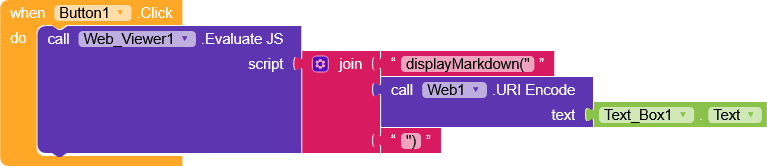
evaluateJS(displayMarkdown("encodedMarkdownText"))
Where encodedMarkdownText is URI-encoded.
The function takes care of decoding and formatting everything automatically.
These are all my blocks 
The whole package is lightweight (108,6KB - 189,8KB w KaTeX)
No extension
And it also works offline
perfect for embedding Markdown rendering directly into webViewer.
assets_files:
Markdown-it.zip (108.6 KB)
Markdown-it w KaTeX.zip (189.8 KB)
.aia project
Markdown.aia (116.7 KB)
Markdown w KaTeX.aia (201.5 KB)
Example of markdown text I used in my project.
(actually I used exampleText.txt file because if I had inserted the text directly into the textbox \n \r \t it would have caused problems.)
exampleText.txt (7.5 KB)
markdown-it (Github)
highlights.js
KaTeX
Hope this can be helpful to someone  .
.
Happy  oding!!!
