Waiting for updates, temporarily removed
Thank you for your contribution
Please create helper blocks for this
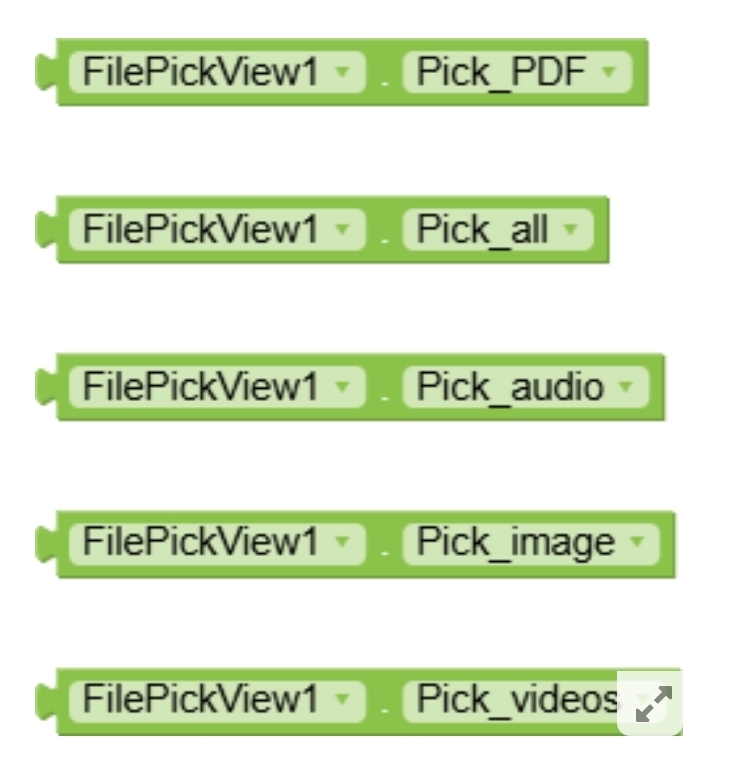
and also follow the naming conventions for these blocks
Adding Helper Blocks to a Component and How to add a Dropdown Block to a Component
Taifun
PS: thread unlisted meanwhile
Thank you so much @Taifun for taking the time to respond — I genuinely appreciate your feedback and the work you do for this community. 
I also want to thank you for pointing out the need for helper blocks. That’s a great suggestion and I absolutely agree it would make the extension more user-friendly, especially for beginners or those who may not be familiar with MIME types or manual strings. I’ve taken that feedback seriously and I do plan to implement it — but I’ve got quite a few things on my plate right now. I will definitely update the extension and include helper blocks once I get some free time.
That said, I was a little surprised to find the post had been unlisted, especially without a clear explanation. I understand the importance of maintaining quality on the platform, and I’m not arguing that. But I would’ve appreciated a brief reason, even just a message. I’ve worked hard to build this — not as an expert, but as a learner who is constantly trying to improve. With my limited coding experience, it took a lot of effort to make the extension work reliably, without requesting permissions, and using only safe, system-based methods like the content picker and ContentResolver.
If the extension has a critical issue that makes it unsuitable for the community right now, please don’t hesitate to tell m even a simple Yes, it’s wrong would be more than enough. I’ll gladly take it down and come back with a better version once I’ve made improvements.
I’m not here to break rules or share incomplete work. I’m here to learn, grow, and contribute back to a community that has helped me learn a lot already. I’m proud of what I managed to put together, even if it’s not perfect yet, and I want to continue improving based on feedback like yours. I guess on unlisted wasn’t necessary.
Thanks again for your input and for setting a high bar, it motivates me to keep getting better.
Kind regards,
@Ibrahim_Jamar
Instead of writing this, you could have taken the same time to add the helper blocks and follow the naming conventions, it’s really not a big deal
Unlisting this thread helps you to do the requested changes soon.. doing the changes later one day sometines is never and we do not want that
Taifun
as i said
I don’t mean disrespect
I do coding in when i am around my house, am way for now which is 2 weeks to be back, so its not a big deal if i was there, this extension was created on 11 and 12 July but i didn’t publish it because i waiting was for the owner to get his project back which i exported it today through my mobile phone. so for now i will remove it if you say so, because i won’t be able to do that now
Thanks
Just talk to someone home may it be added soon

@SimpleFunction(description = “Returns the string value to pick video files.”)
public String PickVideos() {
return “video”;
Is this what you are referring to, am not familiar with helpers
No, a helper block looks like this

Read the provided documents and example
Adding Helper Blocks to a Component and How to add a Dropdown Block to a Component
Taifun
Oky i understand but is my recent block don’t have that? What if I leave them like that, for example in exoplayer there’s similar blocks, like is paused
Anyway I will try letter when I get back else if my friend
Here is an open source project that uses helper blocks. You might take a look into it.
Thanks @JEWEL but instead of taking me here and there, could you guys just tell me what to add in my code, I wonder why things going in difficult ways, though I already struggled to release it,
Please guyz


The red drop-down blocks called helper blocks. You might also take a look at the below extension topic, this is very same with your extension.
@JEWEL now you talk  this was crashing my head. I understand
1 Like
@JEWEL am try to add the helper in my project but am having issue with the compiler to get fixed result out, am away with my house now so i just created sample in Niotrone IDE for testing but am getting error, is my sample code wrong
package com.dropdownsample;

import com.google.appinventor.components.annotations.*;
import com.google.appinventor.components.common.ComponentCategory;
import com.google.appinventor.components.common.OptionList;
import com.google.appinventor.components.runtime.*;

@DesignerComponent(
    version = 1,
    description = "Dropdown helper demo extension",
    category = ComponentCategory.EXTENSION,
    nonVisible = true,
    iconName = ""
)
@SimpleObject(external = true)
public class DropdownSample extends AndroidNonvisibleComponent {

    public DropdownSample(ComponentContainer container) {
        super(container.$form());
    }

    @SimpleFunction(description = "Select an option from dropdown")
    public void SelectOption(@Options(MyOption.class) String option) {
        OptionSelected(option);
    }

    @SimpleEvent(description = "Triggered when an option is selected")
    public void OptionSelected(String optionName) {
        EventDispatcher.dispatchEvent(this, "OptionSelected", optionName);
    }


    public enum MyOption implements OptionList<String> {
        OptionA("OptionA"),
        OptionB("OptionB"),
        OptionC("OptionC");

        private final String value;

        MyOption(String value) {
            this.value = value;
        }

        @Override
        public String toUnderlyingValue() {
            return value;
        }

        public static MyOption fromUnderlyingValue(String value) {
            for (MyOption opt : values()) {
                if (opt.value.equals(value)) {
                    return opt;
                }
            }
            return null;
        }
    }
}@Taifun I wanted to inform you that I’ve temporarily removed the FilePickView.aix extension from the community. The reason is that I’m currently away from home and don’t have access to my development environment to properly implement and test the full dropdown helper functionality (such as the red dropdown block for selecting file types like “Image”, “PDF”, etc.).
Since the current version doesn’t fully support the dropdown helper as intended (which requires compiling with specific internal libraries), I believe it’s best to hold off on publishing it until it works as expected.
I plan to republish the improved version on July 31st, 2025 — that’s exactly when i will be back.
Thanks for the feedback and support — I’ll keep you posted as soon as I’m back at my setup.
You’ve to write helper classes under your base package like below:
com/dropdownsample/helpers/MyOption.java