Hi, I have a test project where I want to enter voice commands and have them change a table.
For the test the table is hardcoded.
Text is successfuly captured and shown on a text box.
The idea is that butom colors should change according to the command.
Got some help from ChatGPT but it is not working.
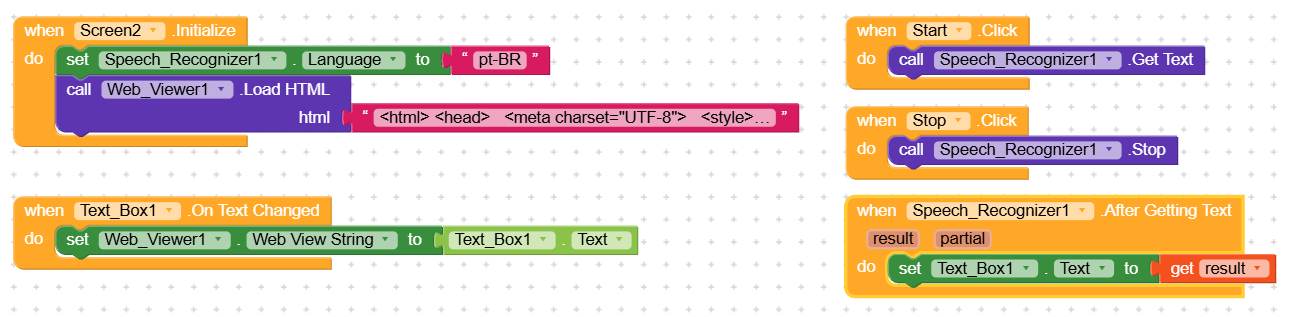
the html code used to create the table is as bellow:
<html>
<head>
  <meta charset="UTF-8">
  <style>
    body { padding: 10px; }
    table { border-collapse: collapse; width: 80%; margin: auto; font-size: 20px; }
    td, th {
      border: 1px solid black; padding: 12px; text-align: left; font-size: 35px;
    }
    th { background-color: #f0f0f0; font-weight: bold; }
    button { font-size: 32px; padding: 8px 16px; }
    .led { display: inline-block; width: 0.8em; height: 0.8em; border-radius: 50%; box-shadow: 0 0 5px #888; }
    .led.green { background-color: green; box-shadow: 0 0 5px green; }
    .led.red { background-color: red; box-shadow: 0 0 5px red; }
    .led.grey { background-color: lightgrey; box-shadow: 0 0 3px #aaa; }
  </style>
  <script>
    let lastCommand = "";

    function callKodular(value) {
      window.AppInventor.setWebViewString(value);
    }

    function checkCommand() {
      try {
        let cmd = window.AppInventor.getWebViewString().toLowerCase();
        if (cmd !== lastCommand) {
          lastCommand = cmd;
          if (cmd.includes("liga painel led")) {
            document.querySelector("button[onclick*='CLOSE']").style.backgroundColor = "green";
            document.querySelector("button[onclick*='OPEN']").style.backgroundColor = "red";
          } else if (cmd.includes("desliga painel led")) {
            document.querySelector("button[onclick*='CLOSE']").style.backgroundColor = "red";
            document.querySelector("button[onclick*='OPEN']").style.backgroundColor = "green";
          }
        }
      } catch (e) {
        // para casos onde window.AppInventor ainda não está pronto
      }
    }

    setInterval(checkCommand, 500); // checa a cada 500ms
  </script>
</head>
<body>
  <table border="1">
    <tr>
      <th>Localização</th>
      <th colspan="2" style="text-align: center;">Ação</th>
      <th style="text-align: center;">Status</th>
    </tr>
    <tr>
      <td nowrap>Painel LED</td>
      <td style="text-align: center;">
        <button onclick="callKodular('84F3EB66FD1E:CLOSE')">Liga</button>
      </td>
      <td>
        <button onclick="callKodular('84F3EB66FD1E:OPEN')">Desliga</button>
      </td>
      <td style="text-align: center;">
        <span id="status_84F3EB66FD1E" class="led grey"></span>
      </td>
    </tr>
  </table>
</body>
</html>
The problem is likely even before javascript even enters the picture:
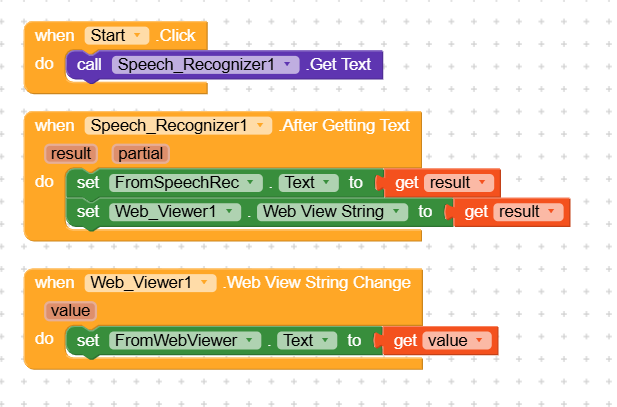
TextBox FromWebViewer string change is either never triggered or value is empty!
Am I doing something wrong?
Thanks