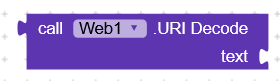
How to use this block?
How to use this block?
 Main use of Decode Text block
The block converts encoded strings (Base64, URI/URL, HTML entities) into normal text.
But it only works on text → so if you have a list, you need to decode each item separate
Example with a list
Suppose Firebase or Airtable gives you this list:
[“SGVsbG8=”, “V29ybGQ=”, “U29mdHdhcmU=”]
This is Base64 encoded.
If you use Decode Text on each item, you get:
[“Hello”, “World”, “Software”]
How to use in blocks
You’d do something like this
Use a for each item in list block.
Inside the loop, use Decode Text block on each item.
Add the decoded result into a new list.
Example
for each item in list (encodedList)
set decodedItem = Decode Text (item, Base64)
add decodedItem to decodedList
Result:
decodedList = [“Hello”, “World”, “Software”]
-In short,
Decode Text works on single text.
For lists, you loop through items and decode each one.
Very useful when Firebase/Airtable sends Base64-encoded lists of data (like names, images, messages
Do you have any things needed to this block?
Why the list example? makes it all more complex 
URL encoding converts characters into a format that can be transmitted over the Internet.
URI Decode receives to the right of the text encoded as “Hello+world%21%221” and returns to the left the decoded text “Hello world!!!”
@RaYzZz when I was replying i forgot it’s decode tex, then I was thinking of decode JSON
This is useful when working with web APIs or links that send data in encoded format.
Have my apology @AppyBy_Sahil 