Help to Open website’s external links directly in their default apps

Hey everyone!

I need some advice. I’ve created an app that displays my website inside a WebView, but there’s an issue:

My website contains several social media and external links, and I want those links to open in their respective default apps (like Instagram, YouTube, WhatsApp, etc.) instead of opening inside the WebView.

Can anyone guide me on how to properly redirect these links to their default apps?

Thanks in advance! :folded_hands:

My used blocks Screenshot -

Option A

Set the webview use external browser to true

The image shows a block from a visual programming interface setting the 'Use External Browser' property of 'Web Viewer' to true. (Captioned by AI)

Option B
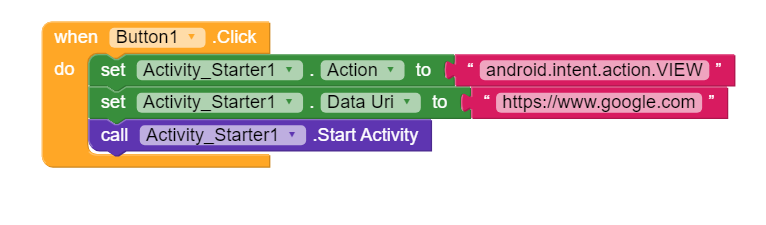
Activity starter

Option C

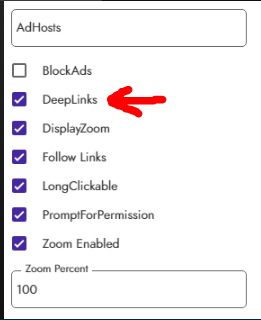
Deep links

https://community.kodular.io/search?context=topic&context_id=307730&q=Deep%20link&skip_context=true

Recommend :backhand_index_pointing_down:

1 Like

It allows your app to be opened through a deep link, Ashish needs to open deep links to other apps.

And you could use Sunny’s CustomWebViewer, which has a specific parameter for opening deep links.

1 Like

Hey if I used custom webview extansion then can you please advice me to adjust the blocks accordingly to my website

just

1 Like

There is no needs any blocks even if someone clicked on my website webpages then they are also be open external but I want open website webpages in webview

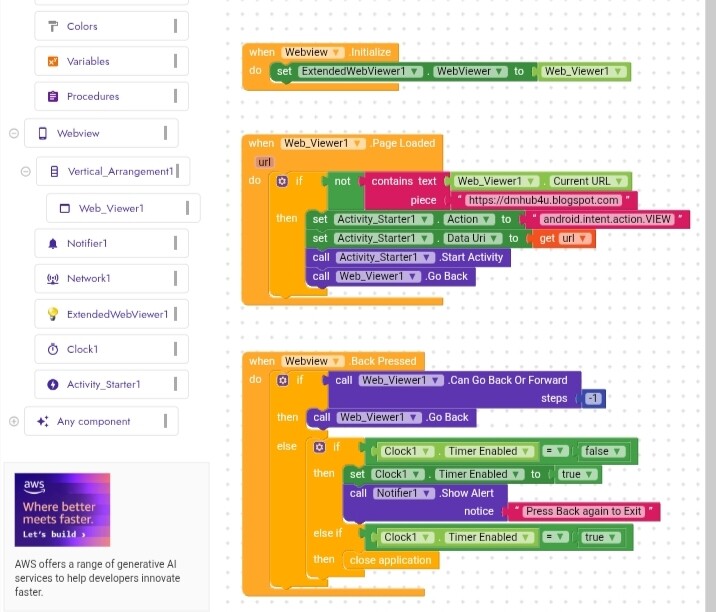
Try like this

in this post I had created a custom WebView that loaded a Google document with some deep links that opened correctly.

Aia example

1 Like

Ok thank u so much, let try it :grinning_face_with_smiling_eyes::smiling_face:.