Hi everyone, I’m trying to upload this SQLite file to Kodular, but it won’t let me. Can someone explain or help me? The link I’m sharing from Drive is the SQLite file.
Hi dear,
Unfortunately Kodular doesn’t support the direct import of an SQLite file.
Try using this extension by  Taifun, which includes the import block.
Ok. Thanks for the information.
did you test this extension of mine.
Hey, to conclude, I can’t upload SQLite to Kodular Assets.
Due to this response i can say definitely not possible
I apologize, maybe I didn’t explain myself well.
You can add a file with the .sqlite extension in the assets, but it’s not possible to make it readable with Kodular’s native SQLite component (it can be done through an extension).
The problem I’m having is that I’m trying to upload it, but it won’t let me. I don’t know if it’s because I have the free version. I tried with 6 MB HTML, and it did. Then I tried with 6 MB SQLite, but it wouldn’t let me.
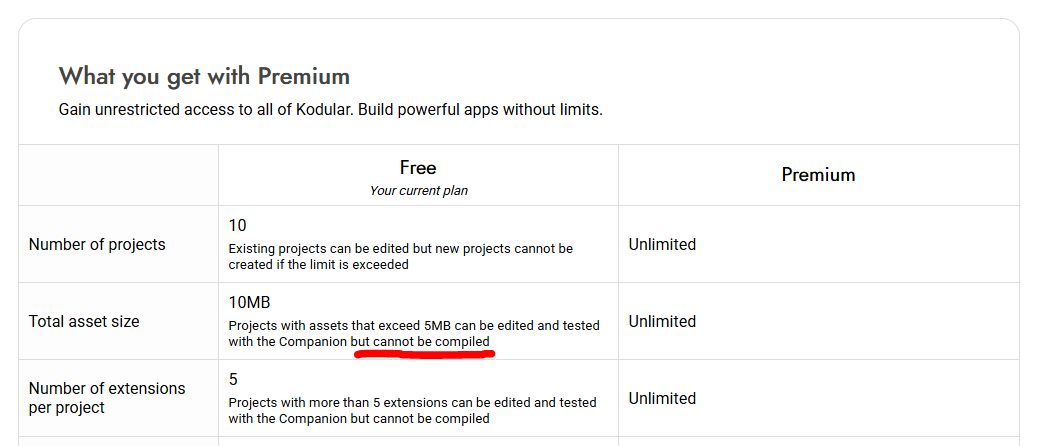
No, the free version allows you to upload assets larger than 15MB, but it doesn’t let you compile the APK.
As you can see, I managed to upload it

He still uploading the SQLite file not AIX
If you have a weak connection, you might experience uploading issues.
- Download the AIA (it’s a compressed file, use 7zip, WinRar, or WinZip to open it)
- inside the main folder, create an “assets” folder
- then, place the SQLite file inside it and re-upload the project to Kodular
Due to size he mentioned here its not an aix definitely that the file, i thinks so
I do the same thing. I refresh the page and it no longer appears.
It works just like you said. Look, these are my blocks, but it’s not working. Could you please review and tell me where I’m going wrong? Thanks.
Biblesqlite (1).aia (5.7 MB)
Hi,
Well!
Here’s the issue I mentioned at the beginning.
Kodular doesn’t have a function to import the database into SQLite, so an extension needs to be used 
I found this free extension that has the import function, but the blocks would need to be adjusted.
2 Likes