I’m asking how I can save a file in the Downloads folder, because the times I tried using the file function, nothing was created. For context, I’m using Android 15.
Hi dear,
Please always use English in the community, thank you.
I assume you downloaded a file and it was saved in the app’s folder, and now you’re trying to move it to the Downloads folder.
Try taking a look at my reply in another similar topic, you just need to point to Downloads instead of Pictures.
I’m using the file command, but it’s not generating any file.
It would really help if you provided a screenshot your relevant blocks, so we can see what you are trying to do, and where the problem may be.
To get an image of your blocks, right click in the Blocks Editor and select “Download Blocks as Image”. You might want to use an image editor to crop etc. if required. Then post it here in the community.
Taifun
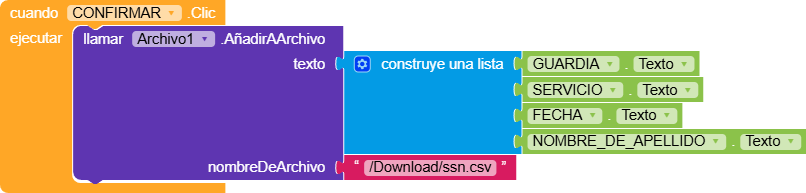
Your file is stored into ASD - application specific storage
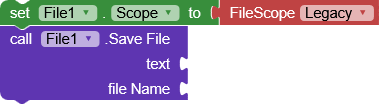
To store it in shared storage, set file scope property to Legacy before saving the file
Taifun
PS: next time please switch the language to English before taking a screenshot
Hi,
I’m not entirely sure which block you’re using, but if you want to save a file as CSV, you should use the SaveFile block from the File component.
It’s also important to convert the list to CSV first, otherwise it will be saved using LISP formatting like (item1 item2 item3).


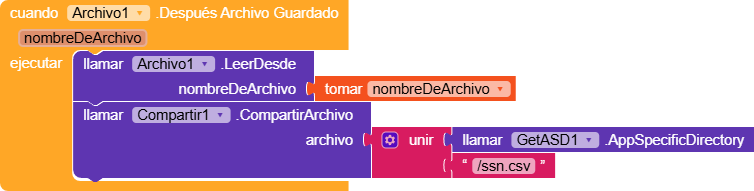

Read my previous answer again
And switch the language to English before taking a screenshot and sharing it here
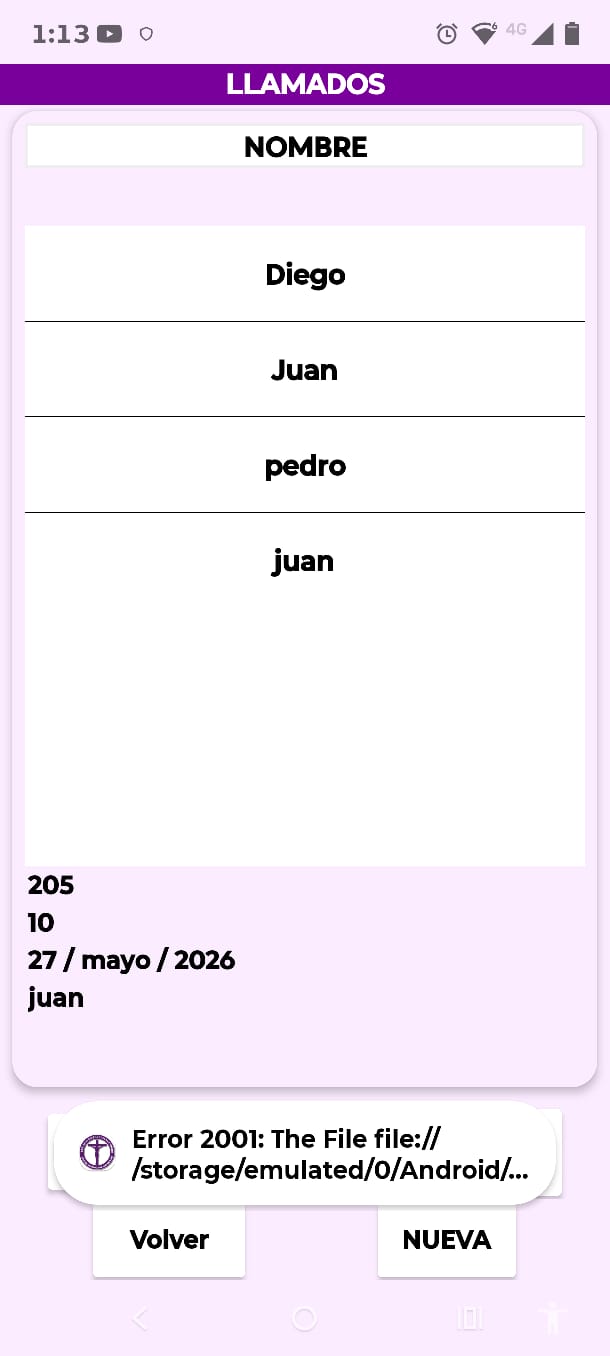
Also provide the complete error message
Taifun
Fix
1. Set File Scope to Shared
In Designer:
File1.Scope = Shared
NOT:
- App
- Asset
- Cache
If Shared does not work on your Kodular version, try:
Legacy
(but Shared is preferred for Android 13–15)
2. Use SaveFile instead of AppendToFile
Instead of:
AñadirArchivo
use:
GuardarArchivo / SaveFile
because you are creating a CSV file, not appending line-by-line initially.
3. Use proper Downloads path
Try:
Download/ssn.csv
or
/Download/ssn.csv
NOT just:
/ssn.csv
4. Convert list to CSV text first
RaYzZz was correct.
Use:
list to csv table
before saving.
Your current conversion looks correct.
Correct flow
call File1.SaveFile text = list to csv table(...) fileName = "Download/ssn.csv"
5. Request permissions
Before saving:
android.permission.WRITE_EXTERNAL_STORAGEandroid.permission.READ_EXTERNAL_STORAGE
Even though Android 13+ changed storage handling, Kodular still sometimes needs these.
Why error 2001 happens
Usually one of these:
- Invalid path
- No permission
- Wrong File Scope
- Trying to write outside allowed storage
- Using AppendToFile on non-existing shared file
Recommended setup for Android 15
Designer
File1.Scope = Shared
Blocks
call File1.SaveFile text = list to csv table(...) fileName = "Download/ssn.csv"