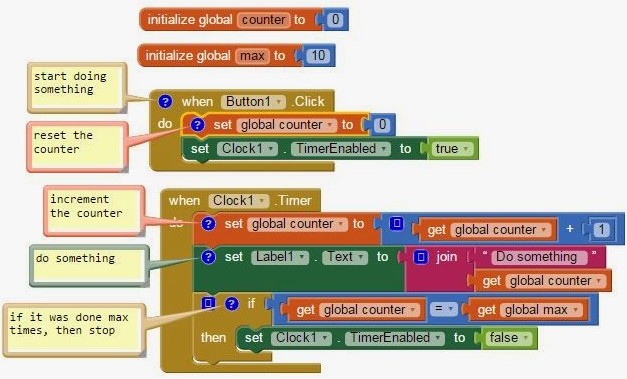
I need a short Delay in a loop in my code,
and after searching google for such a thing in Kodular,
is the answer really that there isn’t such a functionality built in,
and you must use an Extension for that?
Or maybe things have changed in the time that passed between those google results..
Thank you Taifun,
was not aware of that Clock component.
I thought about it now,
and it seems that using it for my current purpose, would make the code a bit messier,
since it will split the code too 2 different procedures.
So I will use the Clock component in other places, but just not specifically here.
BTW, really nice that it has a TimerAlwaysFires property
(When true, will fire even when application is not showing on the screen)
Regarding my specific need here,
maybe there’s a workaround for a single command that performs a Wait:
Is there maybe another command, that is not a Wait command, but a command that does something,
and that thing takes 1 or 2 second?
That way, I can use that command whenever I need a short delay,
ignoring the other (original) result that it provides,
and benefitting only from the delay that occurs there.
Yeah that’s what I meant:
the code splits to 2 different procedures.
You know what,
maybe If I tel you why I need that wait here,
there might be a more focussed solution for that.
I am using WiFi component, to turn Wi-Fi On.
The problem is that the WiFi.Enable method returns immediately after it is called,
while the WiFi actually needs several seconds in order to actually connect to the WLAN.
So If I do WiFi.Enable and then put after it the command that I need to use the internet,
it won’t work.
So what I wanted to do is a While loop, that delays for 1 seond in each iteration,
and checked the WiFi-IsEnabled property,
until it is on, which then the While loop ends.
I am not developing apps for the marketplace,
I am creating autmations for myself.
So the only Android version I have to worry about, is my current phone.
When I do switch to a new phone, then that would be a problem.
Turning Wi-Fi on is quite a useful feature..
Overview of Sequential vs. Event-Oriented Programming Languages
Sequential programming languages execute instructions in a linear order, while event-oriented programming languages respond to events and changes in state, allowing for more flexible and dynamic applications. Below, I break down their characteristics, benefits, and use cases.
Sequential Programming Languages
Characteristics
Linear Execution: Code is run in the order it is written, from top to bottom.
Control Structures: Utilizes loops, conditionals, and subroutine calls for flow control.
Data Flow: Data is processed in a straightforward manner, typically through direct variable access.
Benefits
Simplicity: Easier for beginners to understand and implement.
Predictability: The flow of execution is generally straightforward and predictable.
Debugging: Easier to debug since the control flow is simple.
Common Use Cases
Batch Processing: Suitable for tasks that can be processed without user interaction (e.g., data analysis, file manipulation).
Scientific Computing: Applications where a clear sequence of operations is essential.
Event-Oriented Programming Languages
Characteristics
Event-Driven Execution: The flow is determined by user actions (mouse clicks, key presses) or other events (data arrival).
Callbacks and Handlers: Functions (callbacks) are registered to handle specific events when they occur.
State Management: Maintains different states based on events, allowing for responsive applications.
Benefits
Responsiveness: Ideal for applications that require real-time interactions.
Modularity: Promotes the use of reusable event handlers and components.
Scalability: Easier to extend; new events can be added without modifying existing code.
Common Use Cases
Graphical User Interfaces (GUIs): Applications that need to respond to user actions (e.g., web browsers, mobile apps).
Asynchronous Systems: Ideal for applications that handle multiple tasks simultaneously, like servers handling multiple requests.
Comparison Summary
Execution Flow: Sequential languages follow a set flow, while event-oriented languages react to events.
Development Complexity: Sequential programming may be simpler initially, but event-oriented programming offers greater flexibility and scalability for complex applications.
Performance Considerations: Depending on the application type, event-driven systems can add overhead due to managing events and callbacks, while sequential systems often have more predictable performance.
In conclusion, the choice between sequential and event-oriented programming largely depends on the specific requirements of the project. Sequential programming may suit simpler applications, while event-oriented programming excels in interactive and responsive contexts.
Actually C# is Event Driven,
especially when you create a GUI.
And even there,
you have the option to do return(), to stop execution of the current function or event handler,
or Thread.Sleep(duration), to perform a small delay.
Those are pretty basic needs when programming
They truly are needed in Kodular,
I hope the developers can consider adding these 2..
I understand what you mean,
but when you are performing something that consists of several operations and contains a small delay in the middle,
then making the UI freely available for starting other things, is also not exactly the recommended behavior.
The program is doing one thing, and is currently in the middle of it,
so you see what I mean?