JSON Tree Viewer in WebViewer (Without Extensions)

Hi everyone :partying_face:

Today I’d like to share a method for visualizing a JSON/dictionary in a tree format with a web viewer.

I’d like to point out that I’ve tested several approaches, and this guide will be divided into multiple parts due to some limitations.

So, it will be organized into three sections:

  • stable_json-viewer_no-highlight: this is probably the best option overall, but unfortunately it doesn’t support highlighting modified key (like Firebase Database does when a node changes).

  • unstable_json-viewer_with-highlight: this method uses the same library as the previous one, but I don’t consider it a stable solution.
    It’s not very professional, and wouldn’t consider it a robust or production-ready approach.
    The main advantage here is that highlighting works perfectly.

  • stable_react-json-view_less-props: this section is a mix of the previous two.
    It use a different library and supports highlighting, but offers fewer configuration options for customizing the tree.

So, it’s up to you to choose the best trade-off for your needs.
Now, let’s not waste any time and see how to implement it.

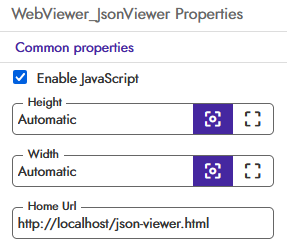
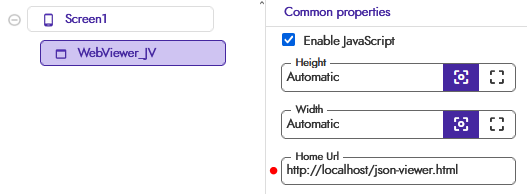
One thing common to all approaches is the use of an HTML file, which needs to be added to your assets and then set as the URL in WebViewer.HomeUrl, as shown below.

http://localhost/ + file_name.html

http://localhost/stable_json-viewer_no-higlight.html


:green_square: STABLE textea/json-viewer (no highlight)

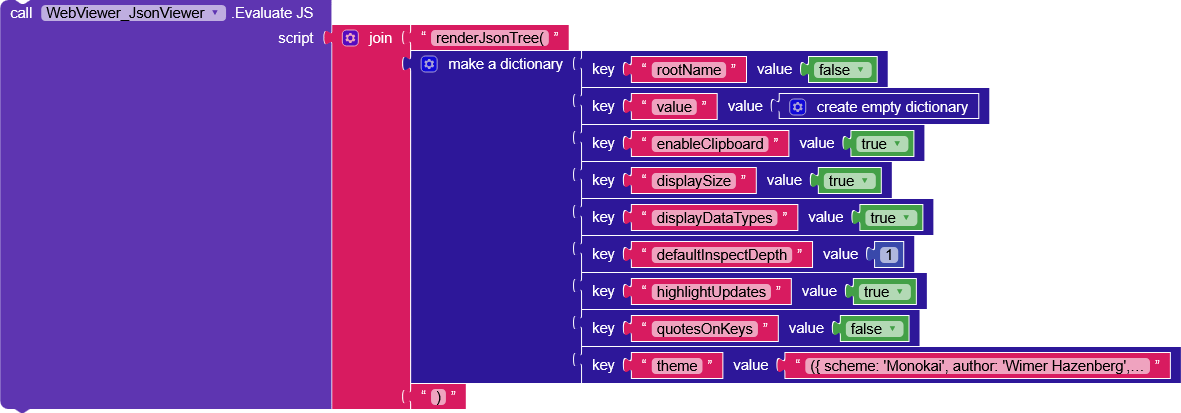
The main blocks are WebViewer.PageLoaded, which triggers the tree creation as soon as the page has finished loading, and WebView.WebViewStringChange, which It will be useful for managing interactions with the structure, as we’ll see shortly.

WebViewer.PageLoaded

Let’s bypass the dictionary variable that just converts a JSON string into a dictionary.
WebViewer.EvaluateJS receives a string containing renderJsonTree(props).
props is a dictionary containing the various parameters we want to use to create the tree.

Below is the full list taken directly from the official documentation.

Props
Name Type Default Description
value any - Your input data. Any value, object, Array, primitive type, even Map or Set.
rootName string or false “root” The name of the root value.
theme "light"
| "dark"
| "auto"
| Base16
"light" Color theme.
className string - Custom class name.
style CSSProperties - Custom style.
sx SxProps - The sx prop lets you style elements inline, using values from the theme.
indentWidth number 3 Indent width for nested objects
keyRenderer {when: (props) => boolean} - Customize the rendering of key when keyRenderer.when returns true. Render null in keyRenderer will cause the colons to be hidden.
valueTypes ValueTypes - Customize the definition of data types. See Defining Data Types
enableAdd boolean |
(path, currentValue) => boolean
false Whether enable add feature. Provide a function to customize this behavior by returning a boolean based on the value and path.
enableDelete boolean |
(path, currentValue) => boolean
false Whether enable delete feature. Provide a function to customize this behavior by returning a boolean based on the value and path.
enableClipboard boolean false Whether enable clipboard feature.
editable boolean |
(path, currentValue) => boolean
false Whether enable edit feature. Provide a function to customize this behavior by returning a boolean based on the value and path.
onChange (path, oldVal, newVal) => void - Callback when value changed.
onCopy (path, value) => void - Callback when value copied, you can use it to customize the copy behavior.
*Note: you will have to write the data to the clipboard by yourself.
onSelect (path, value) => void - Callback when value selected.
onAdd (path) => void - Callback when the add button is clicked. This is the function which implements the add feature. Please see the DEMO for more details.
onDelete (path) => void - Callback when the delete button is clicked. This is the function which implements the delete feature. Please see the DEMO for more details.
defaultInspectDepth number 5 Default inspect depth for nested objects.

* If the number is set too large, it could result in performance issues.
defaultInspectControl (path, currentValue) => boolean - Whether expand or collapse a field by default. Using this will override defaultInspectDepth.
maxDisplayLength number 30 Hide items after reaching the count.
Array and Object will be affected.

* If the number is set too large, it could result in performance issues.
groupArraysAfterLength number 100 Group arrays after reaching the count.
Groups are displayed with bracket notation and can be expanded and collapsed by clicking on the brackets.
collapseStringsAfterLength number 50 Cut off the string after reaching the count. Collapsed strings are followed by an ellipsis.

String content can be expanded and collapsed by clicking on the string value.
objectSortKeys boolean false Whether sort keys through String.prototype.localeCompare()
quotesOnKeys boolean true Whether add quotes on keys.
displayDataTypes boolean true Whether display data type labels.
displaySize boolean |
(path, currentValue) => boolean
true Whether display the size of Object, Array, Map and Set. Provide a function to customize this behavior by returning a boolean based on the value and path.
displayComma boolean true Whether display commas at the end of the line.
highlightUpdates boolean true Whether to highlight updates.

I won’t cover all the parameters since they are fairly self-explanatory, but I’d like to explain how onChange, onCopy, onSelect, onAdd, and onDelete work, where instead of passing a string, bool, or int, we pass a function.

I’ll explain only onChange because the others work in exactly the same way.
Each of these props needs to be enabled with another prop, and below I’ll show you the association.

onChange >> editable
onCopy >> enableClipboard
onSelect >> not necessary
onAdd >> enableAdd
onDelete >> enableDelete
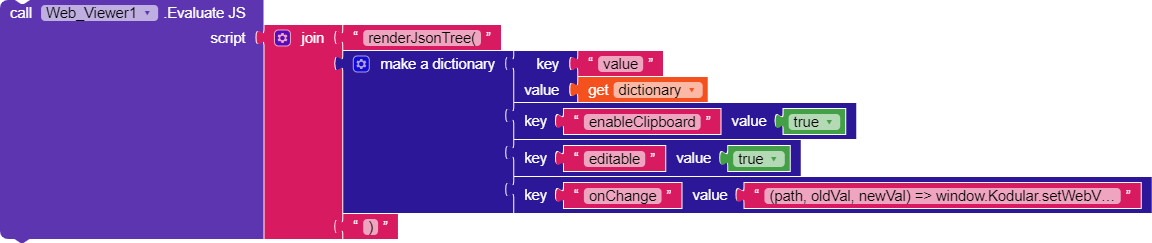
We will assign this function as the value for the onChange key.

(path, oldVal, newVal) => window.Kodular.setWebViewString(JSON.stringify({action: ‘onChange’, path: path, oldVal: oldVal, newVal: newVal}))

This will trigger the WebView.WebViewStringChange event, passing a dictionary containing:

{
	"action": "onChange",
	"path": "path of the change",
	"oldVal": "old value",
	"newVal": "new value"
}

So, every time a value in the tree is modified, WebViewStringChange will be triggered, giving us a way to understand how the user interacted with the WebView/structure.

WebView.WebViewStringChange
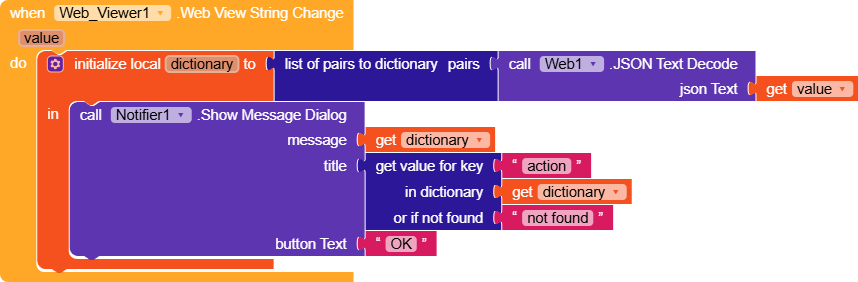
On each change, we convert the WebViewString (text) into a dictionary, and from there it’s up to you to implement the desired behaviors.
I left a message dialog to clearly show what is received as a response.

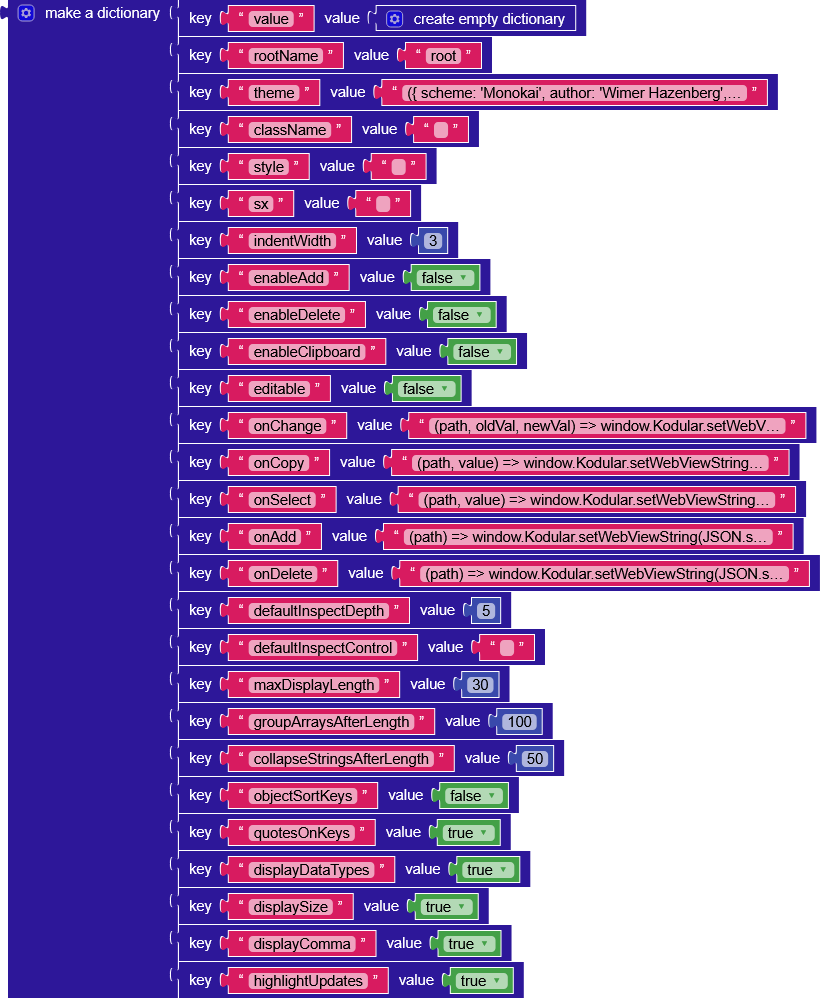
For your convenience, I’m also including in the project a dictionary containing all the available props.

Html
stable_json-viewer_no-higlight.html (601 Bytes)

AIA
stable_json_viewer_no_highlight.aia (58.9 KB)


:orange_square: UNSTABLE textea/json-viewer (with highlight)

This section is identical to the point above, the only thing that changes is the HTML file, so I’m not including images or explanations.

If there’s interest in understanding what changes between one HTML file and another, I’ll be happy to explain, but I’m not adding it here to avoid creating a wall of text.

Html
unstable_json-viewer_with-highlight.html (902 Bytes)

AIA
unstable_json_viewer_with_highlight.aia (59.1 KB)


:green_square: STABLE uiwjs/react-json-view (less props)

This section is dedicated to a different library that performs exactly the same task as the previous ones, combining stability with the presence of a highlight feature, however, it does not include all the parameters of the previous library.

The behavior is identical, so the explanation from the first section applies here as well.

Props

{
/** This property contains your input JSON */
value?: T;

/** Define the root node name. @default undefined */
keyName?: string | number;

/** Whether sort keys through String.prototype.localeCompare() @default false */
objectSortKeys?: boolean | ((keyA: string, keyB: string, valueA: T, valueB: T) => number);

/** Set the indent-width for nested objects @default 15 */
indentWidth?: number;

/** When set to true, objects and arrays are labeled with size @default true */
displayObjectSize?: boolean;

/** When set to true, data type labels prefix values @default true */
displayDataTypes?: boolean;

/** The user can copy objects and arrays to clipboard by clicking on the clipboard icon. @default true */
enableClipboard?: boolean;

/** When set to true, all nodes will be collapsed by default. Use an integer value to collapse at a particular depth. @default false */
collapsed?: boolean | number;

/** Determine whether the node should be expanded on the first render, or you can use collapsed to control the level of expansion (by default, the root is expanded). */
shouldExpandNodeInitially?: ShouldExpandNodeInitially;

/** Whether to highlight updates. @default true */
highlightUpdates?: boolean;

/** Shorten long JSON strings, Set to 0 to disable this feature @default 30 */
shortenTextAfterLength?: number;

/** When the text exceeds the length, ... will be displayed. Currently, this ... can be customized. @default “…” */
stringEllipsis?: number;

/** Callback function for when a treeNode is expanded or collapsed */
onExpand?: (props: { expand: boolean; value?: T; keyid: string; keyName?: string | number }) => void;

/** Fires event when you copy */
onCopied?: (text: string, value?: T) => void;
}

Html
stable_react-json-view_less-props.html (915 Bytes)

AIA
stable_react_json_view_less_props.aia (58.1 KB)


Highlight Updates

For the sections where the update highlight works, the process is very simple, you add the key-value pair "highlightUpdates": true, modify the "value" prop and call EvaluateJS again, passing the updated "value" as the value parameter, and the library will handle detecting which node has changed and will highlight it.


Offline script

As explained earlier, there is the option to use the script offline, and you simply need to:

  • Save the script in a .js file (json-viewer.min.js)
  • Import it into the assets
  • Replace it in the HTML

from
<script src="https://cdn.jsdelivr.net/npm/@textea/json-viewer@3"></script>
to
<script src="json-viewer.min.js"></script>

Script
json-viewer.js (244.1 KB)


Builder corversion issue

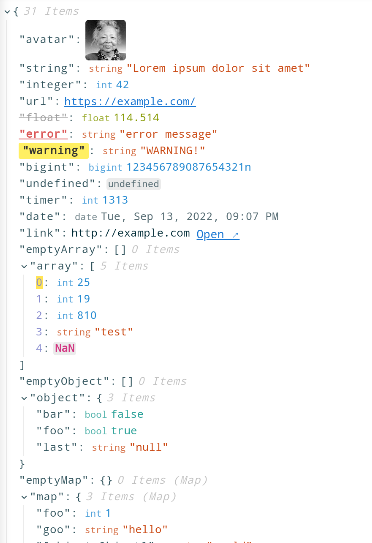
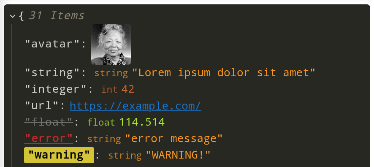
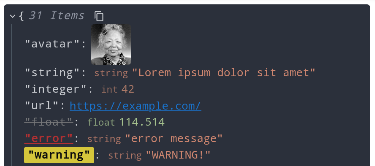
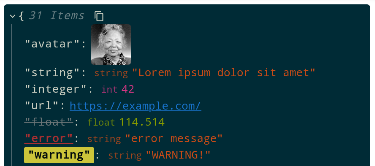
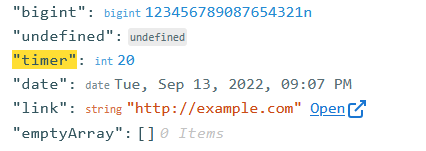
The more attentive of you may have noticed that some data types in the library are not displayed correctly.
The most obvious example is probably a null value.

image
image

Why does this happen?
Kodular, during the conversion from text to dictionary, wraps all elements in "", so an actual null value becomes "null"/"NaN", which is just a simple string.

So, is it possible to view the JSON correctly?
Yes, but only if the JSON is not processed by the builder.
In other words, if we receive a response from a database or another source and pass it directly to the JSON viewer, everything works perfectly.
However, as soon as it is converted into a dictionary using

JSONTextDecode >> listOfPairsToDictionaryPairs

it gets processed and is therefore displayed incorrectly.

There are also other data types that I wasn’t able to implement correctly, such as:

  • loopObject
  • function
  • avatar (image)

They’re not essential, but since we’re a community, I hope someone with more experience can help us implement them all.

How is it possible to view the JSON correctly?
In the project below, I simply uploaded a data.json file into the assets containing well-formatted JSON and read it using the File component.
Through the File component, the file is read as-is and passed directly to the function without being modified.

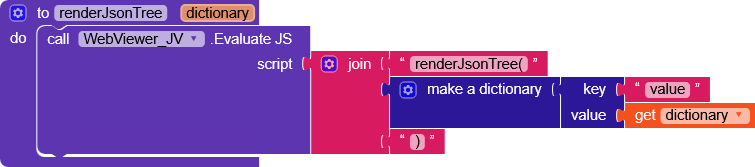
An important note is that, since we cannot manipulate anything we pass to the renderJsonTree() function, we need to provide the full props dictionary directly to the function,


which in other projects was created using dictionary blocks.
blocks (8)

AIA
JsonViewer_offline_visual_fix.aia (142.6 KB)

JSON
data.json (10.1 KB)

JSON
{
	"value": {
		"avatar": "https://i.imgur.com/1bX5QH6.jpg",
		"string": "Lorem ipsum dolor sit amet",
		"integer": 42,
		"url": "https://example.com",
		"float": 114.514,
		"bigint": 123456789087654321n,
		undefined,
		"timer": 47,
		"date": new Date("2022-09-13T19:07:44.000Z"),
		"link": "http://example.com",
		"emptyArray": [],
		"array": [
			19,
			19,
			810,
			"test",
			NaN
		],
		"emptyObject": {},
		"object": {
			"foo": true,
			"bar": false,
			"last": null
		},
		"emptyMap": new Map(),
		"map": {},
		"emptySet": new Set(),
		"set": [
			1,
			2,
			3
		],
		"loopObject": {
			"foo": 42,
			"goo": "Lorem Ipsum",
			"self": "[Circular]"
		},
		"loopArray": [
			{
				"foo": 42,
				"goo": "Lorem Ipsum",
				"self": "[Circular]"
			},
			"[Circular]"
		],
		"longArray": [
			0,
			1,
			2,
			3,
			4,
			5,
			6,
			7,
			8,
			9,
			10,
			11,
			12,
			13,
			14,
			15,
			16,
			17,
			18,
			19,
			20,
			21,
			22,
			23,
			24,
			25,
			26,
			27,
			28,
			29,
			30,
			31,
			32,
			33,
			34,
			35,
			36,
			37,
			38,
			39,
			40,
			41,
			42,
			43,
			44,
			45,
			46,
			47,
			48,
			49,
			50,
			51,
			52,
			53,
			54,
			55,
			56,
			57,
			58,
			59,
			60,
			61,
			62,
			63,
			64,
			65,
			66,
			67,
			68,
			69,
			70,
			71,
			72,
			73,
			74,
			75,
			76,
			77,
			78,
			79,
			80,
			81,
			82,
			83,
			84,
			85,
			86,
			87,
			88,
			89,
			90,
			91,
			92,
			93,
			94,
			95,
			96,
			97,
			98,
			99,
			100,
			101,
			102,
			103,
			104,
			105,
			106,
			107,
			108,
			109,
			110,
			111,
			112,
			113,
			114,
			115,
			116,
			117,
			118,
			119,
			120,
			121,
			122,
			123,
			124,
			125,
			126,
			127,
			128,
			129,
			130,
			131,
			132,
			133,
			134,
			135,
			136,
			137,
			138,
			139,
			140,
			141,
			142,
			143,
			144,
			145,
			146,
			147,
			148,
			149,
			150,
			151,
			152,
			153,
			154,
			155,
			156,
			157,
			158,
			159,
			160,
			161,
			162,
			163,
			164,
			165,
			166,
			167,
			168,
			169,
			170,
			171,
			172,
			173,
			174,
			175,
			176,
			177,
			178,
			179,
			180,
			181,
			182,
			183,
			184,
			185,
			186,
			187,
			188,
			189,
			190,
			191,
			192,
			193,
			194,
			195,
			196,
			197,
			198,
			199,
			200,
			201,
			202,
			203,
			204,
			205,
			206,
			207,
			208,
			209,
			210,
			211,
			212,
			213,
			214,
			215,
			216,
			217,
			218,
			219,
			220,
			221,
			222,
			223,
			224,
			225,
			226,
			227,
			228,
			229,
			230,
			231,
			232,
			233,
			234,
			235,
			236,
			237,
			238,
			239,
			240,
			241,
			242,
			243,
			244,
			245,
			246,
			247,
			248,
			249,
			250,
			251,
			252,
			253,
			254,
			255,
			256,
			257,
			258,
			259,
			260,
			261,
			262,
			263,
			264,
			265,
			266,
			267,
			268,
			269,
			270,
			271,
			272,
			273,
			274,
			275,
			276,
			277,
			278,
			279,
			280,
			281,
			282,
			283,
			284,
			285,
			286,
			287,
			288,
			289,
			290,
			291,
			292,
			293,
			294,
			295,
			296,
			297,
			298,
			299,
			300,
			301,
			302,
			303,
			304,
			305,
			306,
			307,
			308,
			309,
			310,
			311,
			312,
			313,
			314,
			315,
			316,
			317,
			318,
			319,
			320,
			321,
			322,
			323,
			324,
			325,
			326,
			327,
			328,
			329,
			330,
			331,
			332,
			333,
			334,
			335,
			336,
			337,
			338,
			339,
			340,
			341,
			342,
			343,
			344,
			345,
			346,
			347,
			348,
			349,
			350,
			351,
			352,
			353,
			354,
			355,
			356,
			357,
			358,
			359,
			360,
			361,
			362,
			363,
			364,
			365,
			366,
			367,
			368,
			369,
			370,
			371,
			372,
			373,
			374,
			375,
			376,
			377,
			378,
			379,
			380,
			381,
			382,
			383,
			384,
			385,
			386,
			387,
			388,
			389,
			390,
			391,
			392,
			393,
			394,
			395,
			396,
			397,
			398,
			399,
			400,
			401,
			402,
			403,
			404,
			405,
			406,
			407,
			408,
			409,
			410,
			411,
			412,
			413,
			414,
			415,
			416,
			417,
			418,
			419,
			420,
			421,
			422,
			423,
			424,
			425,
			426,
			427,
			428,
			429,
			430,
			431,
			432,
			433,
			434,
			435,
			436,
			437,
			438,
			439,
			440,
			441,
			442,
			443,
			444,
			445,
			446,
			447,
			448,
			449,
			450,
			451,
			452,
			453,
			454,
			455,
			456,
			457,
			458,
			459,
			460,
			461,
			462,
			463,
			464,
			465,
			466,
			467,
			468,
			469,
			470,
			471,
			472,
			473,
			474,
			475,
			476,
			477,
			478,
			479,
			480,
			481,
			482,
			483,
			484,
			485,
			486,
			487,
			488,
			489,
			490,
			491,
			492,
			493,
			494,
			495,
			496,
			497,
			498,
			499,
			500,
			501,
			502,
			503,
			504,
			505,
			506,
			507,
			508,
			509,
			510,
			511,
			512,
			513,
			514,
			515,
			516,
			517,
			518,
			519,
			520,
			521,
			522,
			523,
			524,
			525,
			526,
			527,
			528,
			529,
			530,
			531,
			532,
			533,
			534,
			535,
			536,
			537,
			538,
			539,
			540,
			541,
			542,
			543,
			544,
			545,
			546,
			547,
			548,
			549,
			550,
			551,
			552,
			553,
			554,
			555,
			556,
			557,
			558,
			559,
			560,
			561,
			562,
			563,
			564,
			565,
			566,
			567,
			568,
			569,
			570,
			571,
			572,
			573,
			574,
			575,
			576,
			577,
			578,
			579,
			580,
			581,
			582,
			583,
			584,
			585,
			586,
			587,
			588,
			589,
			590,
			591,
			592,
			593,
			594,
			595,
			596,
			597,
			598,
			599,
			600,
			601,
			602,
			603,
			604,
			605,
			606,
			607,
			608,
			609,
			610,
			611,
			612,
			613,
			614,
			615,
			616,
			617,
			618,
			619,
			620,
			621,
			622,
			623,
			624,
			625,
			626,
			627,
			628,
			629,
			630,
			631,
			632,
			633,
			634,
			635,
			636,
			637,
			638,
			639,
			640,
			641,
			642,
			643,
			644,
			645,
			646,
			647,
			648,
			649,
			650,
			651,
			652,
			653,
			654,
			655,
			656,
			657,
			658,
			659,
			660,
			661,
			662,
			663,
			664,
			665,
			666,
			667,
			668,
			669,
			670,
			671,
			672,
			673,
			674,
			675,
			676,
			677,
			678,
			679,
			680,
			681,
			682,
			683,
			684,
			685,
			686,
			687,
			688,
			689,
			690,
			691,
			692,
			693,
			694,
			695,
			696,
			697,
			698,
			699,
			700,
			701,
			702,
			703,
			704,
			705,
			706,
			707,
			708,
			709,
			710,
			711,
			712,
			713,
			714,
			715,
			716,
			717,
			718,
			719,
			720,
			721,
			722,
			723,
			724,
			725,
			726,
			727,
			728,
			729,
			730,
			731,
			732,
			733,
			734,
			735,
			736,
			737,
			738,
			739,
			740,
			741,
			742,
			743,
			744,
			745,
			746,
			747,
			748,
			749,
			750,
			751,
			752,
			753,
			754,
			755,
			756,
			757,
			758,
			759,
			760,
			761,
			762,
			763,
			764,
			765,
			766,
			767,
			768,
			769,
			770,
			771,
			772,
			773,
			774,
			775,
			776,
			777,
			778,
			779,
			780,
			781,
			782,
			783,
			784,
			785,
			786,
			787,
			788,
			789,
			790,
			791,
			792,
			793,
			794,
			795,
			796,
			797,
			798,
			799,
			800,
			801,
			802,
			803,
			804,
			805,
			806,
			807,
			808,
			809,
			810,
			811,
			812,
			813,
			814,
			815,
			816,
			817,
			818,
			819,
			820,
			821,
			822,
			823,
			824,
			825,
			826,
			827,
			828,
			829,
			830,
			831,
			832,
			833,
			834,
			835,
			836,
			837,
			838,
			839,
			840,
			841,
			842,
			843,
			844,
			845,
			846,
			847,
			848,
			849,
			850,
			851,
			852,
			853,
			854,
			855,
			856,
			857,
			858,
			859,
			860,
			861,
			862,
			863,
			864,
			865,
			866,
			867,
			868,
			869,
			870,
			871,
			872,
			873,
			874,
			875,
			876,
			877,
			878,
			879,
			880,
			881,
			882,
			883,
			884,
			885,
			886,
			887,
			888,
			889,
			890,
			891,
			892,
			893,
			894,
			895,
			896,
			897,
			898,
			899,
			900,
			901,
			902,
			903,
			904,
			905,
			906,
			907,
			908,
			909,
			910,
			911,
			912,
			913,
			914,
			915,
			916,
			917,
			918,
			919,
			920,
			921,
			922,
			923,
			924,
			925,
			926,
			927,
			928,
			929,
			930,
			931,
			932,
			933,
			934,
			935,
			936,
			937,
			938,
			939,
			940,
			941,
			942,
			943,
			944,
			945,
			946,
			947,
			948,
			949,
			950,
			951,
			952,
			953,
			954,
			955,
			956,
			957,
			958,
			959,
			960,
			961,
			962,
			963,
			964,
			965,
			966,
			967,
			968,
			969,
			970,
			971,
			972,
			973,
			974,
			975,
			976,
			977,
			978,
			979,
			980,
			981,
			982,
			983,
			984,
			985,
			986,
			987,
			988,
			989,
			990,
			991,
			992,
			993,
			994,
			995,
			996,
			997,
			998,
			999
		],
		"nestedArray": [
			[
				1,
				2
			],
			[
				3,
				4
			]
		],
		"superLongString": "1111111111111111111111111111111111111111111111111111111111111111111111111111111111111111111111111111111111111111111111111111111111111111111111111111111111111111111111111111111111111111111111111111111111111111111111111111111111111111111111111111111111111111111111111111111111111111111111111111111111111111111111111111111111111111111111111111111111111111111111111111111111111111111111111111111111111111111111111111111111111111111111",		
		"string_number": "1234"
	}
}

Json Viewer dialog


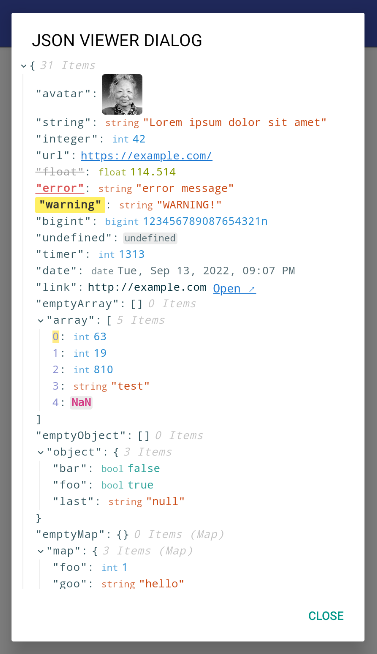
This section could be very useful for those who often display dictionaries in a dialog and struggle to read them correctly.
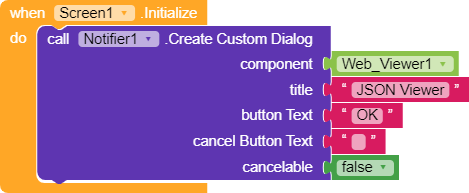
Nothing simpler, at screen initialization, we mount the WebViewer in a custom dialog,

and it’s done.

For convenience, I’m leaving a project with a procedure dedicated to this function.


blocks (12)

AIA
JsonViewer_dialog.aia (139.3 KB)


Credits

2 Likes