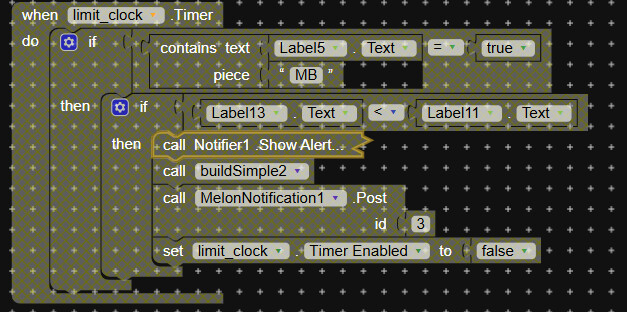
First of all, thank you my friend.for helping me.
The mistake is actually as you guessed.
When I closed that block related to the melon plugin, the error went away but a new error was triggered.
I thought this error might be because the clocks were working too fast and I created another support block.
Coming to your question, this is an application that calculates instant internet usage. When the application is running, all clocks start working in an organized manner.
I solved the problem with the clock that runs the melon plugin and it works stably now.Thank you for your interest
Also, as an additional information, the melon plugin works with a 100 millisecond clock, but it can give a time error, at least 250 milliseconds is recommended.
Now the package name problem is fixed, new errors occured
but none of these errors occurred when the application did not yet have a package name…
video:
This error I mentioned in the video was not present when the application did not have a package name and the application was working stably.
But still cannot be acceptable that due to app pacage name only it is happening. If you add any name make sure it is different than melon notification screen name
Isn’t? Just by using simple if then else we can set know
When Web1.GotText
    set UsedDataBytes to UsedDataBytes + length of (response content in bytes)

to convert to KB
    set UsedDataKB to UsedDataBytes / 1024

to convert to MB
    set UsedDataMB to UsedDataBytes / (1024 * 1024)

to convert to GB
    set UsedDataGB to UsedDataBytes / (1024 * 1024 * 1024)