🏃♂️ OneSignal Message
An extension for Kodular, to send and view Push notifications, Emails and SMS using OneSignal API. Specifications
 Package: in.sarthakdev.onesignalmessage
 Size: 45.94 KB
 Version: 1.0
 Minimum API Level: 14
 Updated On: 2025-10-13T18:30:00Z
 Built & documented using: FAST v5.2.1
 Multi-Components

 OneSignal
Main component to initialize the OneSignal SDK for all other OneSignal components.

Method:
OneSignal has total 1 method.
1. Initialize
Initialize the OneSignal SDK. This must be called before using any other OneSignal component.
| Parameter | Type |
|---|---|
| restApiKey | text |
| appId | text |
Getters:
OneSignal has total 3 getter properties.
1. IsInitialized
Returns true if the SDK has been initialized.
- Return type:
boolean
2. RestApiKey
The OneSignal REST API Key you have provided.
- Return type:
text
3. AppId
The OneSignal App ID you have provided.
- Return type:
text
OneSignalEmail
Send transactional emails via OneSignal. Requires the main OneSignal component to be initialized.
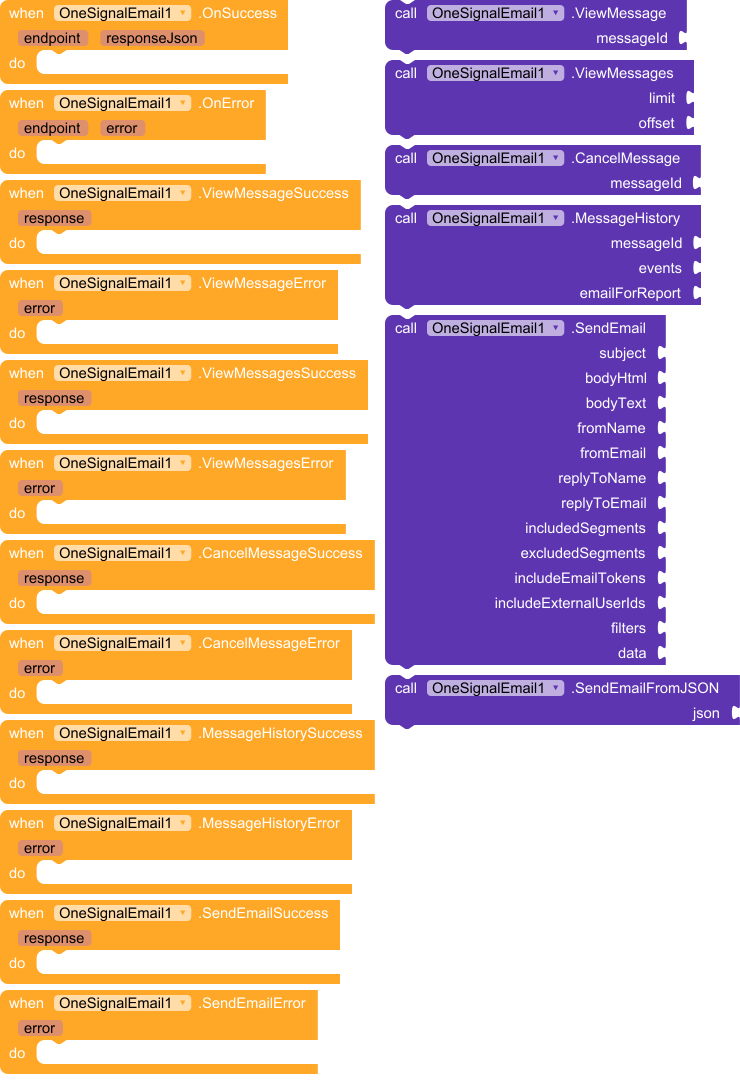
Events:
OneSignalEmail has total 12 events.
1. OnSuccess
A generic success event for API calls.
| Parameter | Type |
|---|---|
| endpoint | text |
| responseJson | text |
2. OnError
A generic error event for API calls.
| Parameter | Type |
|---|---|
| endpoint | text |
| error | text |
3. ViewMessageSuccess
Event raised when a message is viewed successfully.
| Parameter | Type |
|---|---|
| response | text |
4. ViewMessageError
Event raised when viewing a message fails.
| Parameter | Type |
|---|---|
| error | text |
5. ViewMessagesSuccess
Event raised when messages are viewed successfully.
| Parameter | Type |
|---|---|
| response | text |
6. ViewMessagesError
Event raised when viewing messages fails.
| Parameter | Type |
|---|---|
| error | text |
7. CancelMessageSuccess
Event raised when a message is canceled successfully.
| Parameter | Type |
|---|---|
| response | text |
8. CancelMessageError
Event raised when canceling a message fails.
| Parameter | Type |
|---|---|
| error | text |
9. MessageHistorySuccess
Event raised when message history is retrieved successfully.
| Parameter | Type |
|---|---|
| response | text |
10. MessageHistoryError
Event raised when retrieving message history fails.
| Parameter | Type |
|---|---|
| error | text |
11. SendEmailSuccess
Event raised when an email is sent successfully.
| Parameter | Type |
|---|---|
| response | text |
12. SendEmailError
Event raised when sending an email fails.
| Parameter | Type |
|---|---|
| error | text |
Methods:
OneSignalEmail has total 6 methods.
1. ViewMessage
View a single message (push/email/sms) by ID.
| Parameter | Type |
|---|---|
| messageId | text |
2. ViewMessages
View messages with pagination.
| Parameter | Type |
|---|---|
| limit | number |
| offset | number |
3. CancelMessage
Cancel a scheduled message by ID.
| Parameter | Type |
|---|---|
| messageId | text |
4. MessageHistory
Request CSV history (sent/clicked) for a message.
| Parameter | Type |
|---|---|
| messageId | text |
| events | text |
| emailForReport | text |
5. SendEmail
Send an email with advanced options. Use empty strings or empty JSON arrays/objects for unused parameters.
| Parameter | Type |
|---|---|
| subject | text |
| bodyHtml | text |
| bodyText | text |
| fromName | text |
| fromEmail | text |
| replyToName | text |
| replyToEmail | text |
| includedSegments | text |
| excludedSegments | text |
| includeEmailTokens | text |
| includeExternalUserIds | text |
| filters | text |
| data | text |
6. SendEmailFromJSON
Send an email using a raw JSON object. Allows full API access.
| Parameter | Type |
|---|---|
| json | text |
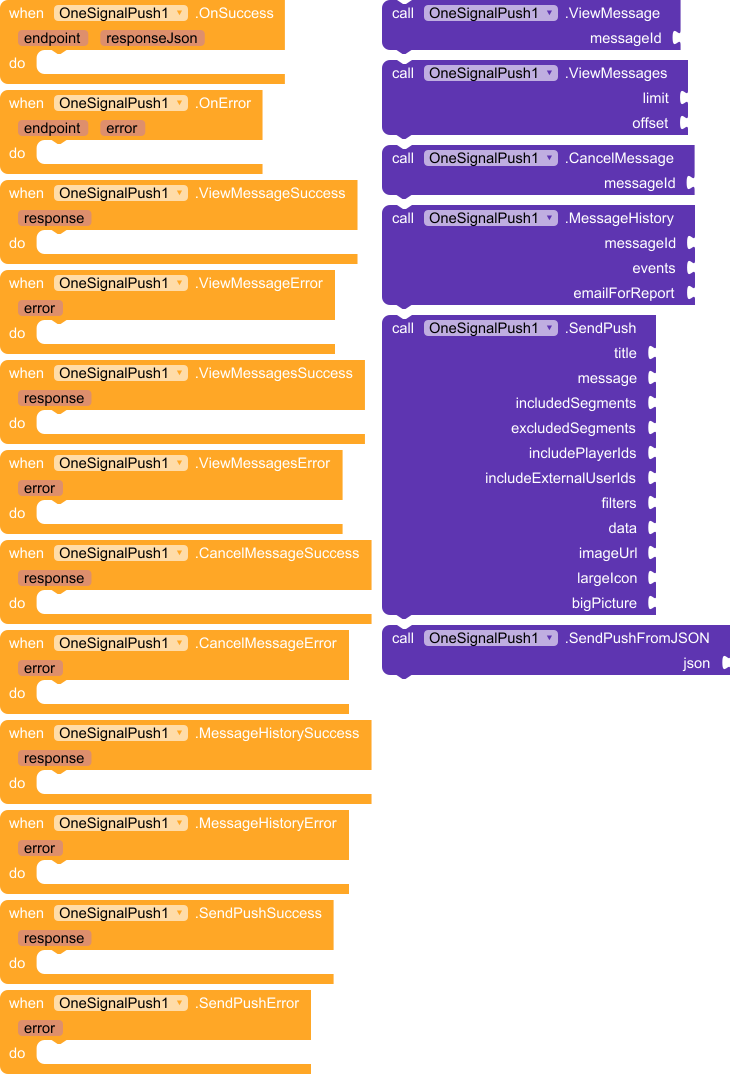
OneSignalPush
Send OneSignal push notifications. Requires the main OneSignal component to be initialized.
Events:
OneSignalPush has total 12 events.
1. OnSuccess
A generic success event for API calls.
| Parameter | Type |
|---|---|
| endpoint | text |
| responseJson | text |
2. OnError
A generic error event for API calls.
| Parameter | Type |
|---|---|
| endpoint | text |
| error | text |
3. ViewMessageSuccess
Event raised when a message is viewed successfully.
| Parameter | Type |
|---|---|
| response | text |
4. ViewMessageError
Event raised when viewing a message fails.
| Parameter | Type |
|---|---|
| error | text |
5. ViewMessagesSuccess
Event raised when messages are viewed successfully.
| Parameter | Type |
|---|---|
| response | text |
6. ViewMessagesError
Event raised when viewing messages fails.
| Parameter | Type |
|---|---|
| error | text |
7. CancelMessageSuccess
Event raised when a message is canceled successfully.
| Parameter | Type |
|---|---|
| response | text |
8. CancelMessageError
Event raised when canceling a message fails.
| Parameter | Type |
|---|---|
| error | text |
9. MessageHistorySuccess
Event raised when message history is retrieved successfully.
| Parameter | Type |
|---|---|
| response | text |
10. MessageHistoryError
Event raised when retrieving message history fails.
| Parameter | Type |
|---|---|
| error | text |
11. SendPushSuccess
Event raised when a push notification is sent successfully.
| Parameter | Type |
|---|---|
| response | text |
12. SendPushError
Event raised when sending a push notification fails.
| Parameter | Type |
|---|---|
| error | text |
Methods:
OneSignalPush has total 6 methods.
1. ViewMessage
View a single message (push/email/sms) by ID.
| Parameter | Type |
|---|---|
| messageId | text |
2. ViewMessages
View messages with pagination.
| Parameter | Type |
|---|---|
| limit | number |
| offset | number |
3. CancelMessage
Cancel a scheduled message by ID.
| Parameter | Type |
|---|---|
| messageId | text |
4. MessageHistory
Request CSV history (sent/clicked) for a message.
| Parameter | Type |
|---|---|
| messageId | text |
| events | text |
| emailForReport | text |
5. SendPush
Send a push notification with advanced options. Use empty strings for unused parameters.
| Parameter | Type |
|---|---|
| title | text |
| message | text |
| includedSegments | text |
| excludedSegments | text |
| includePlayerIds | text |
| includeExternalUserIds | text |
| filters | text |
| data | text |
| imageUrl | text |
| largeIcon | text |
| bigPicture | text |
6. SendPushFromJSON
Send a push notification using a raw JSON object. Allows full API access.
| Parameter | Type |
|---|---|
| json | text |
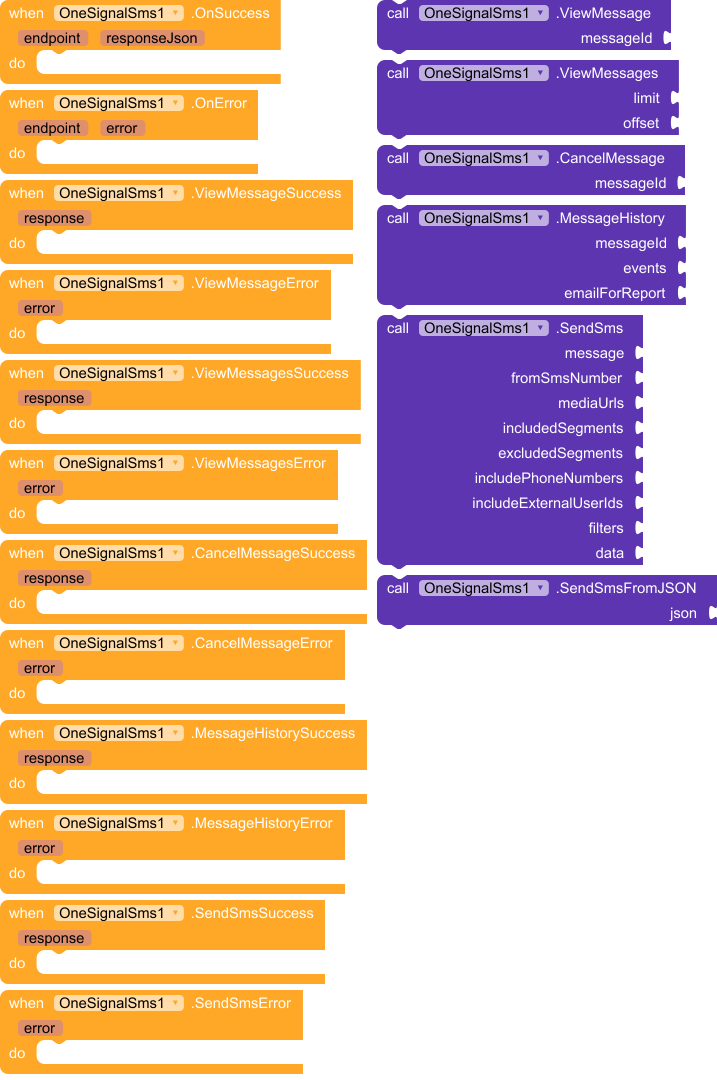
OneSignalSms
Send SMS/MMS via OneSignal. Requires the main OneSignal component to be initialized.
Events:
OneSignalSms has total 12 events.
1. OnSuccess
A generic success event for API calls.
| Parameter | Type |
|---|---|
| endpoint | text |
| responseJson | text |
2. OnError
A generic error event for API calls.
| Parameter | Type |
|---|---|
| endpoint | text |
| error | text |
3. ViewMessageSuccess
Event raised when a message is viewed successfully.
| Parameter | Type |
|---|---|
| response | text |
4. ViewMessageError
Event raised when viewing a message fails.
| Parameter | Type |
|---|---|
| error | text |
5. ViewMessagesSuccess
Event raised when messages are viewed successfully.
| Parameter | Type |
|---|---|
| response | text |
6. ViewMessagesError
Event raised when viewing messages fails.
| Parameter | Type |
|---|---|
| error | text |
7. CancelMessageSuccess
Event raised when a message is canceled successfully.
| Parameter | Type |
|---|---|
| response | text |
8. CancelMessageError
Event raised when canceling a message fails.
| Parameter | Type |
|---|---|
| error | text |
9. MessageHistorySuccess
Event raised when message history is retrieved successfully.
| Parameter | Type |
|---|---|
| response | text |
10. MessageHistoryError
Event raised when retrieving message history fails.
| Parameter | Type |
|---|---|
| error | text |
11. SendSmsSuccess
Event raised when an SMS is sent successfully.
| Parameter | Type |
|---|---|
| response | text |
12. SendSmsError
Event raised when sending an SMS fails.
| Parameter | Type |
|---|---|
| error | text |
Methods:
OneSignalSms has total 6 methods.
1. ViewMessage
View a single message (push/email/sms) by ID.
| Parameter | Type |
|---|---|
| messageId | text |
2. ViewMessages
View messages with pagination.
| Parameter | Type |
|---|---|
| limit | number |
| offset | number |
3. CancelMessage
Cancel a scheduled message by ID.
| Parameter | Type |
|---|---|
| messageId | text |
4. MessageHistory
Request CSV history (sent/clicked) for a message.
| Parameter | Type |
|---|---|
| messageId | text |
| events | text |
| emailForReport | text |
5. SendSms
Send an SMS/MMS with advanced options. Use empty strings or empty JSON arrays for unused parameters.
| Parameter | Type |
|---|---|
| message | text |
| fromSmsNumber | text |
| mediaUrls | text |
| includedSegments | text |
| excludedSegments | text |
| includePhoneNumbers | text |
| includeExternalUserIds | text |
| filters | text |
| data | text |
6. SendSmsFromJSON
Send an SMS/MMS using a raw JSON object. Allows full API access.
| Parameter | Type |
|---|---|
| json | text |
Get the Extension now 
The extension is available for just 2.99$ from the link below! (Offer valid for this week only!)