EXTENSION DESCRIPTION
This extension allows your Kodular / App Inventor app to connect and control MikroTik Routers (RouterOS v6 & v7) using the RouterOS API.
With this extension you can:
- Connect to your MikroTik router using SSL or Plain API
- Send commands synchronously or asynchronously
- Receive router responses as human-readable text or JSON
- Build advanced apps such as network monitoring dashboards, hotspot management, PPPoE manager, or router automation tools
 Connection & Configuration
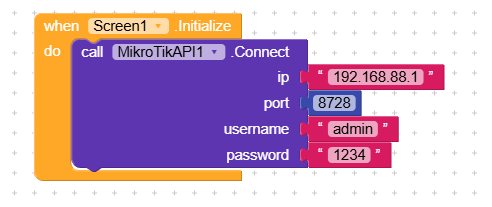
This block connects to the MikroTik router and performs authentication.
Parameters:
ip– String, router IP address (e.g.,"192.168.88.1")port– Number, API port (8728for plain,8729for SSL)username– String, MikroTik usernamepassword– String, MikroTik password
The connection will follow the selected ConnectionMode (AUTO / SSL_ONLY / PLAIN_ONLY).
Disconnect
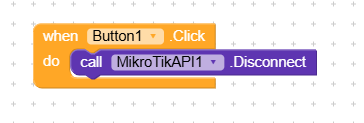
Disconnects from the router and closes the socket.
No parameters.
IsConnected

Returns a Boolean:
true→ router is connectedfalse→ connection lost / not connected
 Timeout Settings
ConnectTimeout
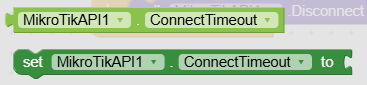
Sets the timeout for the connection phase.
Parameters:
timeoutMs– Number in milliseconds (default:8000)
If set to 0 or negative, it falls back to 8000.
ConnectTimeout (getter)
Returns the current connection timeout.
ReadTimeout
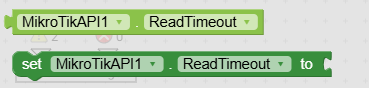
Sets the timeout for reading router responses.
Parameters:
timeoutMs– Number in milliseconds (default:8000)
ReadTimeout (getter)
Returns the current read timeout.
 Connection Mode (SSL / Plain)
ConnectionMode
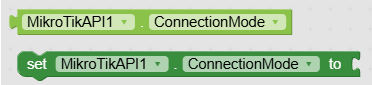
Sets the connection mode for the API.
| Value | Mode |
|---|---|
0 |
AUTO (try SSL then fallback to plain) |
1 |
SSL_ONLY |
2 |
PLAIN_ONLY |
AUTO is recommended for most cases.
ConnectionMode (getter)

Returns:
0→ AUTO1→ SSL_ONLY2→ PLAIN_ONLY
 Synchronous Commands
Synchronous commands wait for the router response and return the result directly.
Recommended for normal usage when you need to get values immediately.
ResponseSendCommand

Sends a RouterOS command and returns a formatted text output.
Parameters:
command– String (RouterOS command)
/ip/hotspot/user/print
For multi-line commands:
/ip/hotspot/user/print
?name=user1
Returns: text formatted like this:
[1]
.id: *1
name: user1
profile: default
uptime: 00:10:21
ResponseJsonSendCommand

Sends a RouterOS command and returns the output in JSON array format.
Example Response:
[
  {"name":"user1","profile":"default","uptime":"00:10:21"},
  {"name":"user2","profile":"VIP","uptime":"02:11:03"}
]
If the router returns !trap, the block returns "" and triggers OnError.
 Asynchronous Commands
Async commands run in a separate thread (non-blocking).
The result is received via an event callback.
SendCommandAsync

Sends a RouterOS command asynchronously.
The result will be returned via:
OnResponseAsync(command, response)
SendJsonCommandAsync

Sends a command asynchronously and returns the result as JSON via:
OnJsonResponseAsync(command, jsonResponse)
 Events
OnConnected

Triggered when the connection and authentication to the router is successful.
OnError
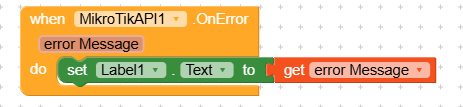
Triggered when an error occurs (connection, login, send, read, router trap).
Returns:
errorMessage– String containing the error
OnResponseAsync
Triggered when SendCommandAsync returns a response.
Parameters:
command– String sent to the routerresponse– Formatted text result
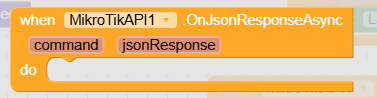
OnJsonResponseAsync
(image)
Triggered when SendJsonCommandAsync returns a JSON output.
Parameters:
commandjsonResponse
 Simple Usage Example
Connect on screen startup
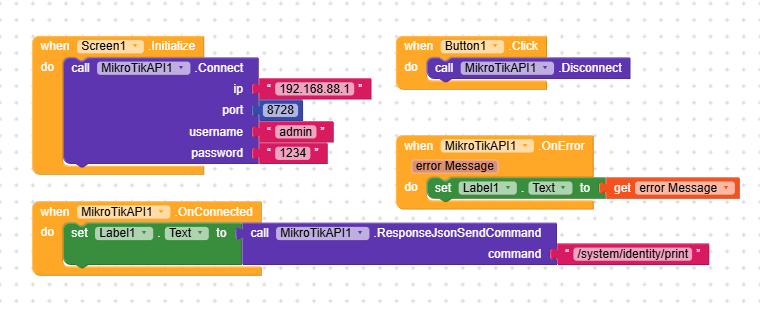
 What’s included with this extension?
| Item | Included |
|---|---|
MikroTikAPI .aix |
 |
| Documentation (README) | |
| Lifetime updates |  Free Free |
| Unlimited app usage | No restrictions |
 Price and License
Price: $5 (one-time payment — lifetime license)
You are allowed to:
Use in unlimited projects
Connect to unlimited routers
Publish apps made using this extension
You are not allowed to:
✘ Resell the .aix file as a standalone product without permission
PM or comment below to buy
 Payment Methods
You can purchase this extension using any of the following payment methods:
PayPal
Crypto (USDT, BTC, BNB, etc.)
QRIS (for buyers from Indonesia)