Notification UI - Fetch From OneSignal | NotifViewer Pro aka Bgnotif 
Description
NotifViewer Pro is a Kodular/App Inventor extension that fetches and displays your OneSignal notification history directly inside your app. It creates a beautiful, customizable notification-style UI panel showing title, message, and timestamp – with persistent dismissal (cleared notifications stay hidden forever) and title-based filtering.
Perfect for apps that want an in-app “Notification Center” for users to view past pushes without leaving the app, I keep price very minimal.
Paid Version [$2 USD or INR 200/- ]: Full features with license protection
 Released On: December 29, 2025
Support me if you love this extension:
PayPal
Explanation
NotifViewer Pro solves the common problem: users miss or clear OneSignal notifications and can’t see them again. This extension:
- Fetches your sent notification history from OneSignal API
- Displays them in a scrollable, card-based UI inside any container
- User can dismissed notifications permanently.
- Allows title word filtering to show only relevant notifications
- Fully customizable appearance
Ideal for news apps, e-commerce, communities, games, or any app using OneSignal – give users a dedicated notification history screen!
Features
 Features:
- Fetch Notification History from OneSignal (up to 100+ notifications)
- Persistent Dismissal: Individual close button + “Clear All” – cleared ones never reappear
- Title Word Filtering: Show only notifications containing specific words (case-insensitive)
- Customizable UI Cards: Corner radius, colors, text sizes, show/hide close icon & clear button
- Maximum Limit: Configurable (1-200) newest notifications
- Sorted by Date: Newest first with formatted timestamp
Demo Video
T̶r̶y̶ t̶h̶i̶s̶ e̶x̶t̶e̶n̶s̶i̶o̶n̶ w̶i̶t̶h̶ t̶e̶m̶e̶r̶o̶r̶y̶ U̶s̶e̶r̶n̶a̶m̶e̶ a̶n̶d̶ ̶̶p̶a̶s̶s̶w̶o̶r̶d̶̶̶ b̶o̶t̶h̶ a̶r̶e̶ ̶t̶e̶s̶t̶̶
Designer Properties
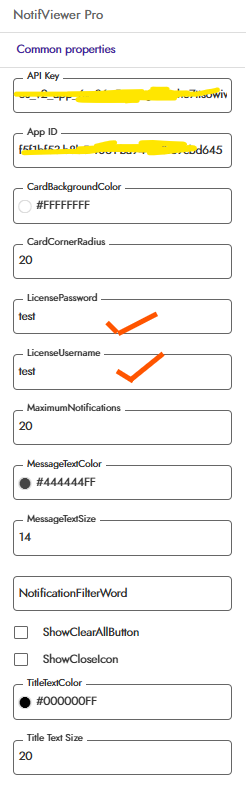
Blocks Image
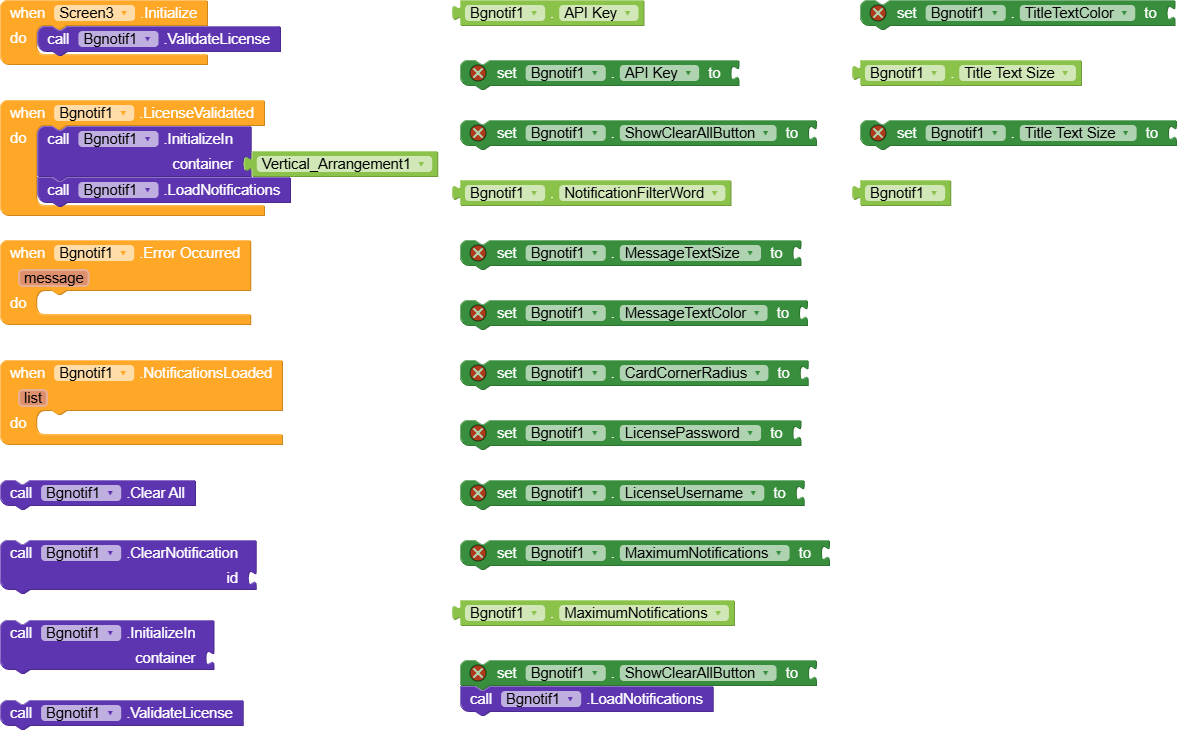
Blocks Overview
 Setup Blocks:
- InitializeIn (container): Attach UI panel
- LoadNotifications: Fetch & refresh from OneSignal
- ValidateLicense: Activate pro features (call on Initialize)
 Core Blocks:
- ClearNotification (id): Manually clear one
- ClearAll: Clear all visible
 Events:
- NotificationsLoaded (list of [id, title, content, timestamp])
- ErrorOccurred (message)
- LicenseValidated (when activated)
How to Use (Block Steps)
Pro Version Setup:
1. Import the .aix file in Kodular Extensions
2. Add Bgnotif Extension component to screen
3. Set in Designer or Blocks:
Set Bgnotif1.LicenseUsername to "your-username"
Set Bgnotif1.LicensePassword to "your-password"
4. On Screen Initialize:
Call Bgnotif1.ValidateLicense
5. When LicenseValidated:
Set Bgnotif1.ApiKey to "your-rest-api-key"
Set Bgnotif1.AppId to "your-app-id"
Call Bgnotif1.InitializeIn container: VerticalArrangement1
Call Bgnotif1.LoadNotifications
6. Optional: Set NotificationFilterWord for filtering
Use Cases
- In-App Notification Center for any OneSignal-powered app
- Admin/Dashboard Apps to view sent notification history
- User Engagement – let users revisit important messages
- Offline Access to past notifications
- Filtered Views (e.g., show only “sale” or “update” notifications)
Why Choose Bgnotif Pro?
Real-World Scenarios
News/App Update App:
“Users cleared important update notifications? Now they can view all past announcements in-app anytime.”
E-commerce Store App:
“Show order confirmations, flash sale alerts, and shipping updates even after users clear system notifications.”
Community/Chat App:
“Members can revisit important broadcasts, events, or moderator messages that were dismissed.”
Game Developer:
“Players never miss limited-time events, rewards, or patch notes – all visible in a history panel.”
Installation
- Import the .aix file via Kodular Extensions
- Drag Bgnotif component to screen
- Set license & OneSignal credentials
- Call ValidateLicense on startup
- InitializeIn a container & LoadNotifications
Lifetime Access on purchase!
AIX File (Extension  )
)
Bgnotif.aix (26.8 KB)
Support development: [PayPal me]

Contact for License
NotifViewer Pro aka Bgnotif v1
Price: Only $2 USD or INR 200/-
- Contact me on Telegram: @ek_rahgir
Feedback & Support
Try this extension with test credential and share your feedback below!
Need help? Ask in comments or DM me.
Special Note Buyers get personal setup help + tips for integrating into your main app!
Changelog
- v1: Initial release – full history viewer, persistent dismissal, title filtering, customizable UI, license system
Give your users a true Notification Center today with NotifViewer Pro aka Bgnotif!