
Password Manager Extension | πŸ”’ SHA-256 + Salt |⚑ Fast | πŸ”’ Build safer apps. Protect user trust. Use PasswordManager

πŸ” Password Manager Extension

An extension for MIT App Inventor 2.

A powerful Java-side password system for your Kodular apps!


:bullseye: What is it?

Password Manager is a professional-grade Kodular extension that helps you securely manage passwords inside your app β€” no extra component required!

Keep your users’ credentials safe with industry-standard one-way hashing.
No AES, no reversible encryption β€” just strong, secure, and irreversible protection.


:sparkles: Features at a Glance

  • :white_check_mark: Strong Security by Default
    Uses PBKDF2WithHmacSHA256 with salt + iterations (200k by default).
  • :white_check_mark: Brute-force Protection
    Exponential lockout on repeated wrong attempts (FailedAttempt + PasswordLocked).
  • :white_check_mark: Password Strength Validation
    Ensures users pick strong, non-trivial passwords.
  • :white_check_mark: Event-Driven Design
    Easy to integrate into Kodular/AI2 blocks using simple success/error events.
  • :white_check_mark: No Plaintext Storage
    Only hashes + salts are stored β€” never the real password.
  • :white_check_mark: Optional Hints
    Users can store non-sensitive hints to help them remember their password.

This extension is perfect for:

  • Building apps that need a secure login system
  • Protecting sensitive data inside your apps
  • Creating personal password managers
  • Any app where security and privacy matter

:hammer_and_wrench: How to Use

1. Setting a Master Password

PasswordManager1.SetPassword(TextBox1.Text)
  • Fires PasswordSet if success.
  • Fires PasswordTooWeak if the password is not strong enough.

2. Logging In

PasswordManager1.VerifyPassword(LoginBox.Text)
  • Fires PasswordVerified if correct.
  • Fires OldPasswordIncorrect if wrong.
  • Fires FailedAttempt (with attempt count + lockout seconds).
  • Fires PasswordLocked if user is locked out and must wait.

3. Changing Password

PasswordManager1.ChangePassword(OldBox.Text, NewBox.Text)
  • Fires PasswordChanged if success.
  • Fires OldPasswordIncorrect if old password is wrong.
  • Fires PasswordTooWeak if new password is weak.

4. Reset / Clear Password

PasswordManager1.ClearPassword()
  • Fires PasswordCleared after wiping stored password.

5. Optional Hint

PasswordManager1.SetPasswordHint("My childhood pet")
Label1.Text = PasswordManager1.GetPasswordHint()

:mobile_phone_with_arrow: Events Cheat-Sheet

  • PasswordSet β†’ Fired after password created.
  • PasswordTooWeak β†’ Fired if password does not meet strength rules.
  • PasswordVerified β†’ Fired when login success.
  • OldPasswordIncorrect β†’ Fired when wrong password entered.
  • PasswordChanged β†’ Fired when password updated.
  • PasswordCleared β†’ Fired after reset.
  • FailedAttempt(failedCount, lockoutSeconds) β†’ Fired each wrong try.
  • PasswordLocked(secondsRemaining) β†’ Fired if user is still locked.
  • PasswordError(message) β†’ Fired if something unexpected goes wrong.

:brain: Password Strength Rules

Password must:

  • Be at least 6 characters :white_check_mark:
  • Include a digit (0–9) :1234:
  • Include an uppercase letter (A–Z) :input_latin_uppercase:
  • Include a special character (!, @, #, etc.) :red_exclamation_mark:

:package: Extension Details

  • Extension Name: PasswordManager
  • Version: v1.0
  • Created by: Mahir Labib
  • Compatible with: Kodular, AI2, etc.
  • Storage: One-way hashing, SharedPreferences (internal & secure)
  • Size: Lightweight (< 100KB)
  • Dependencies: None
  • Built using: FAST v2.6.0
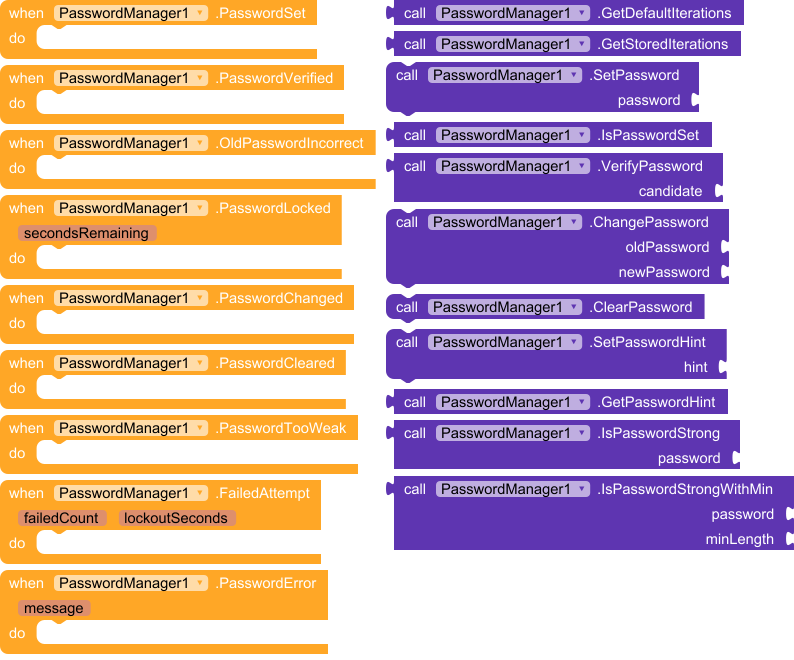
All Blocks


:test_tube: Download

com.mahir.passwordmanager.aix (11.8 KB)


:light_bulb: Example Use-Cases

  • A notes app where users must unlock their notes with a password.
  • A gallery app to protect private photos.
  • A password vault built inside Kodular.
  • Any app where you want a secure login screen.

:rocket: Final Thoughts

The PasswordManager extension brings real-world security practices into Kodular & AI2 apps. By combining hashing, salting, key stretching, and brute-force lockout, it helps developers protect users against the most common threats.

:locked: Build safer apps. Protect user trust. Use PasswordManager.


:left_speech_bubble: Feedback Welcome!

If you like it, comment :heart:
If you want new features like fingerprint support, multi-user, or backup/restore, just request below!

#passwordmanager

5 Likes

Why not to use this

Usually storing password hashes instead of encrypted passwords (or even worse, plaintext passwords) is a fundamental security practice. The core reason lies in the irreversibility of hashing, which provides a crucial layer of protection in case of a data breach.

Here’s a breakdown of why hashing is preferred:
Hashing is a One-Way Process (Irreversible)

  • What it is: A hash function takes an input (your password) and transforms it into a fixed-length string of characters (the hash value). This process is designed to be one-way. You can easily generate a hash from a password, but it’s computationally extremely difficult, practically impossible, to reverse the process and get the original password back from the hash.
  • Security benefit: If a database storing hashed passwords is breached, the attackers only get the hashes, not the actual passwords. Since they can’t reverse the hash, they don’t immediately know your password. This significantly reduces the risk of your password being compromised and used on other services (especially if you reuse passwords).

Encryption is a Two-Way Process (Reversible)

  • What it is: Encryption takes plaintext data and transforms it into ciphertext using an algorithm and a key. The key allows the ciphertext to be decrypted back into the original plaintext.
  • Security drawback for passwords: If an attacker gains access to encrypted passwords AND the decryption key, they can easily decrypt all the passwords and gain full access. Storing the key securely alongside the encrypted passwords is a major challenge, and if the system is compromised, both could be exposed.

The goal of password storage is not to be able to retrieve the original password, but only to verify that the user knows it. Hashing achieves this by providing a one-way, irreversible transformation that protects user credentials even if the database storing the hashes is compromised. Encryption, while vital for data in transit, is not suitable for storing passwords because of its inherent reversibility.

There are extensions available, which can create a hash value, for example the tools extension App Inventor Extensions: Tools | Pura Vida Apps

TinyDB uses also SharedPreferences

Taifun

2 Likes

Thank you for the valuable feedback! You’re absolutely right β€” for best practice in credential storage, hashing is the ideal approach due to its irreversibility and security.

My extension uses AES encryption mainly because it supports use cases where the password needs to be retrieved (such as offline app locks or private notes). However, I’m planning to release an ** hash-based version** soon for users who want irreversible and safer storage.

Appreciate your input β€” stay tuned for the secure-hash edition!

:new_button: New Update! (July 1, 2025)

:white_check_mark: Now uses SHA-256 with random salt for password storage

:white_check_mark: Replaced AES encryption with secure, irreversible hashing

:white_check_mark: Improved overall security β€” no way to retrieve passwords, even by attacker

Thanks @Taifun for informing me. :clap:

1 Like

Are you storing an encrypted password or a hash value now?

What is the difference between VerifyPaasword and IsPasswordCorrect?

What does GetCurrentPassword return? The hash value?

Taifun

1 Like

hash value

In the secure hash-based version, the GetCurrentPassword() method has been removed β€” because hashed passwords are irreversible and cannot be retrieved.

  • :locked_with_key: In the older AES version, it returned the decrypted password
  • :shield: In this updated version, no such method exists β€” for security reasons

Functionally, both methods do the same thing β€” they check if the user input matches the stored password.

  • VerifyPassword() also triggers success/failure events like PasswordVerified or OldPasswordIncorrect
  • IsPasswordCorrect() is a quiet alias that just returns true/false without triggering events

Use VerifyPassword if you want event-driven feedback, and IsPasswordCorrect if you’re checking silently in logic.

Hi @Taifun,
Now my extension is full of secure :key:.
Do you appreciate my work?

Request

If yes, would you please remove your post (WHY not to use this extension) :sob:

Is there an example aia?

@nathaniel_burchill
Thank you for your comment on my post :slight_smile:
I will soon add an example of it :wink:

Thank you so much

@nathaniel_burchill

I am quite busy nowadays.
Would you please kindly read my post(updated) above again? I am sure you will understand it clearly now.

Thanks :heart:

That’s alright thank you.