Adam1
October 16, 2025, 8:44am
1
I Have a 6 Screen app
After each screen it loses the current screen then opens the next one - to avoid stacking
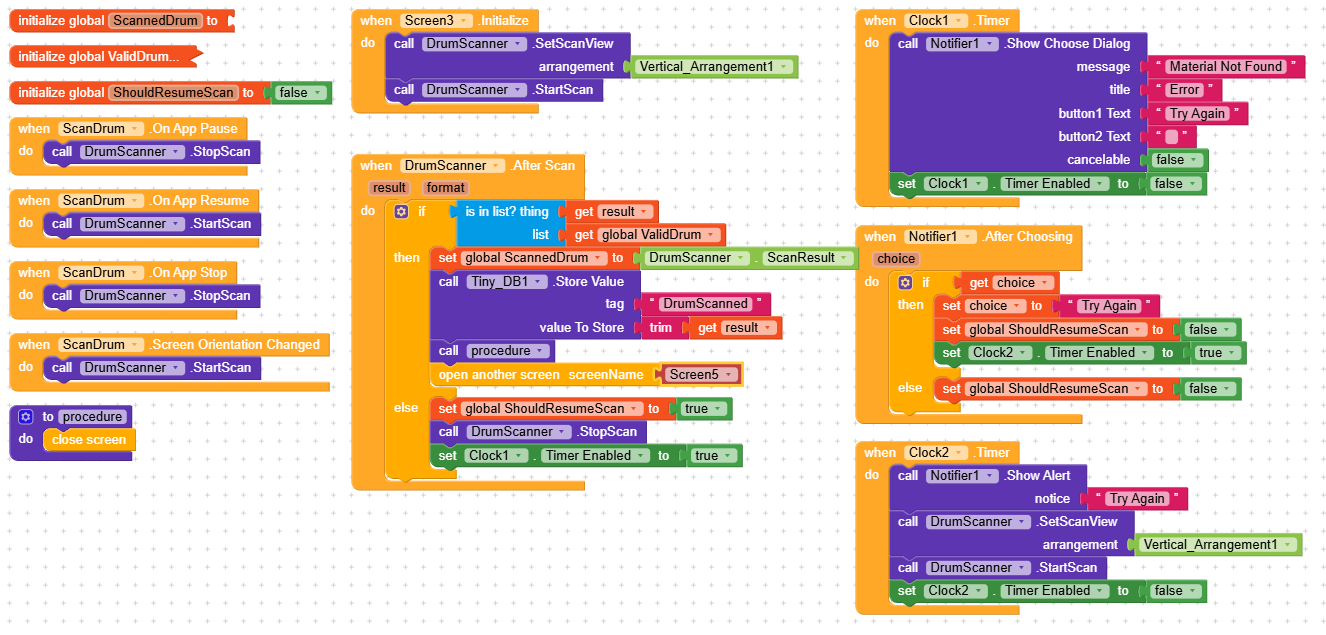
The blocks look like the below:
Call procedure
Procedure = Close screen
This works well, up until I get to screen 4. Anything after screen 4 when the back button is pressed screen 4 re opens.
I have tried everything but I can not get the screen to stop reloading
This is a problem for me because on my last screen I have an exit app button which is taking me back to screen 4
RaYzZz
October 16, 2025, 8:47am
2
Hi Adam,
Welcome to the Kodular community!
That means there’s something wrong in the blocks,Screen4.BackPressed?
1 Like
Adam1
October 16, 2025, 9:19am
3
Hi RaYzZz
Thank you for your reply
I have no blocks for back button pressed - as i am happy with the way it exits the app
But i have tried:
What seems to be happening is screen 4 is stacking - even though i have the procedure to close the screen
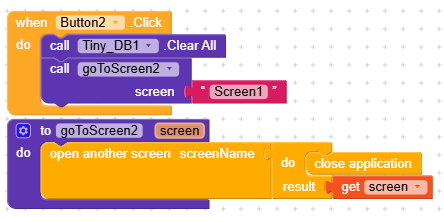
as with my exit button on the last screen - it works as it should,(open screen 1, call procedure to close screen and call procedure to close app) but then screen 4 re-loads again
I can not work it out happy to share my blocks if needed
RaYzZz
October 16, 2025, 9:20am
4
Did you follow this guide?
I see many issues done by users because they switched screens not correct.
This below is now just one of many other solutions:
[blocks]
If you dont open/close screens correct your app will get possible runtime errors.
Possible errors: (example)
Unable to add window -- token android.os.BinderProxy@45d459c0 is not valid; is your activity running?
Iam sure you don’t want that.
Then please do it in the future and switch screens correct.
General Tips and Tricks for App Inventor/Makeroid
…
Adam1
October 16, 2025, 9:40am
5
I have tried almost everything i can think of
Adding a clock timer between closing and opening screens
I have added a notifier to my procedure to check the procedure is working properly - and it is
I have this same procedure for opening / closing all of the screens but this one seems to reload an need closing again
RaYzZz
October 16, 2025, 10:23am
6
I did some testing and can confirm that the screens are not closing properly.
Adam1
October 16, 2025, 10:45am
7
Thanks RaYzZz
i replaced my procedure with close application and it works, but i don’t want the application to close at this point
RaYzZz
October 16, 2025, 10:57am
8
Use the procedure for switching screens to move from one screen to another,
Did you follow this guide?
and close application to exit the app, no?
Adam1
October 16, 2025, 11:17am
9
Yes i tried this
close application to exit app - still rebuild screen 4.
I am then required to press back again to exit application
RaYzZz
October 16, 2025, 11:25am
10
Very strange, I just did a test, and the app closes correctly.
Are you sure your After Scan working good.
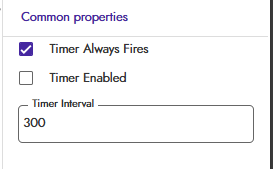
Did you set clock time to false mode in designer
I think he leaves it enabled
Adam1
October 16, 2025, 11:58am
13
This is my ‘Exit App’ Button currently (on screen 6 sorry - not screen 1)
I ask it to open screen 1 and close app so that when app is reopened it opens on screen 1
If I remove opening another screen and just close application it works - but when i open the app it closes instantly and needs to be opened a second time
Clock timers are set up like this
RaYzZz
October 16, 2025, 12:08pm
14
Every time you close the app (destroy the process), it always reopens on screen1.
Adam1
October 16, 2025, 12:12pm
15
Yes, But my issue here is screen 4 is acting like a ‘Milestone’ screen
Once i get to screen 4 or go past screen 4 - any action like close app or back button will re load screen 4, even though it has closed
I have tested adding the close app procedure to screen 3, and it executes perfectly
Taifun
October 16, 2025, 12:16pm
16
Use the recommended method of switching screens in all screens
I see many issues done by users because they switched screens not correct.
This below is now just one of many other solutions:
[blocks]
If you dont open/close screens correct your app will get possible runtime errors.
Possible errors: (example)
Unable to add window -- token android.os.BinderProxy@45d459c0 is not valid; is your activity running?
Iam sure you don’t want that.
Then please do it in the future and switch screens correct.
General Tips and Tricks for App Inventor/Makeroid
…
Do not use close application as you are doing it and do not first close old screen, then open new screen, just follow the recommendation
Taifun
Adam1
October 16, 2025, 12:32pm
17
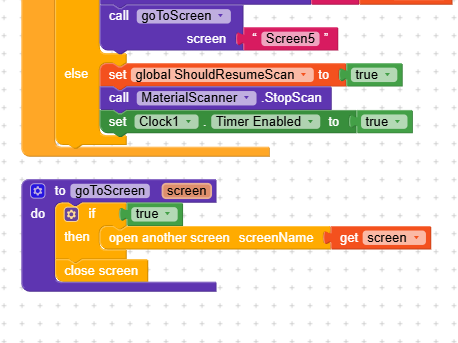
Like this?
I have changed all screens to follow them blocks for closing/opening next screen
but i still have the issue of screen 4 re-loading when pressing back button or exit app button on screen 6
you are talking about
screen 4 but here you have showed your screen3. how could we help you?
Adam1
October 16, 2025, 1:18pm
19
apologies screen 3 is the issue
there is no back button pressed event