i am trying to insert data to google sheet and everything works fine until the 10th column J
data not showing in the sheet while all column from A to I, works fine receiving inserted data from my app, my app has no errors, even tried to change to another column K data still not showing in the sheet, checked with the script itself and everything works in the debug without errors, i made sure the parameters are correct,..var j = e.parameter.J; and sh.appendRow([a, b, c, d, valE, f, g, h, valI, j,]); thats what i have checked, i have no much knowledge please advice me.
Hi dear,
it would be very useful to also show the blocks you are using.
In any case, I recommend Tim’s script used in this guide,
which covers practically all the main actions that can be performed.
appendRow
var data = JSON.parse('[' + e.parameter.DATA + ']');
var lr = sh.getLastRow();
sh.insertRowAfter(lr);
rowNum = lr + 1;
sh.getRange(rowNum,1,1,data[0].length).setValues(data);
return ContentService.createTextOutput('Values: ' + e.parameter.DATA + ' appended');
appendCol
var data = JSON.parse(e.parameter.DATA);
var lc = sh.getLastColumn();
sh.insertColumnAfter(lc);
colNum = lc + 1;
sh.getRange(1,colNum,data.length,1).setValues(data);
return ContentService.createTextOutput('Values: ' + e.parameter.DATA + ' appended');
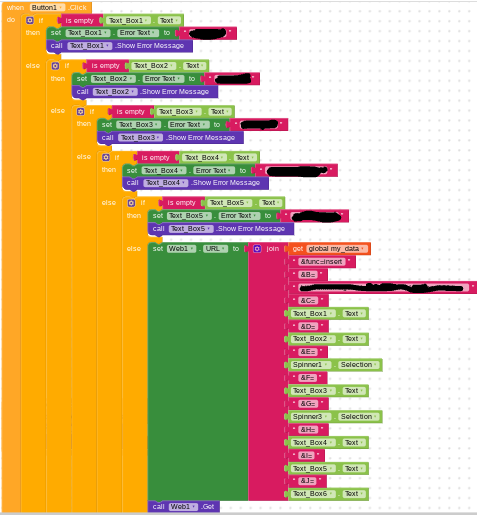
- Why aren’t you writing anything in column A? (in web.URL I don’t see the column specified)
- Which script are you using?
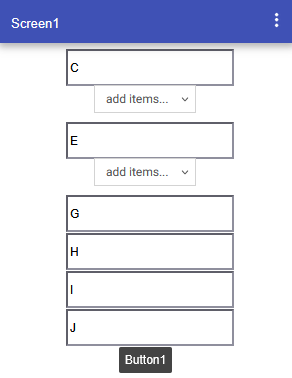
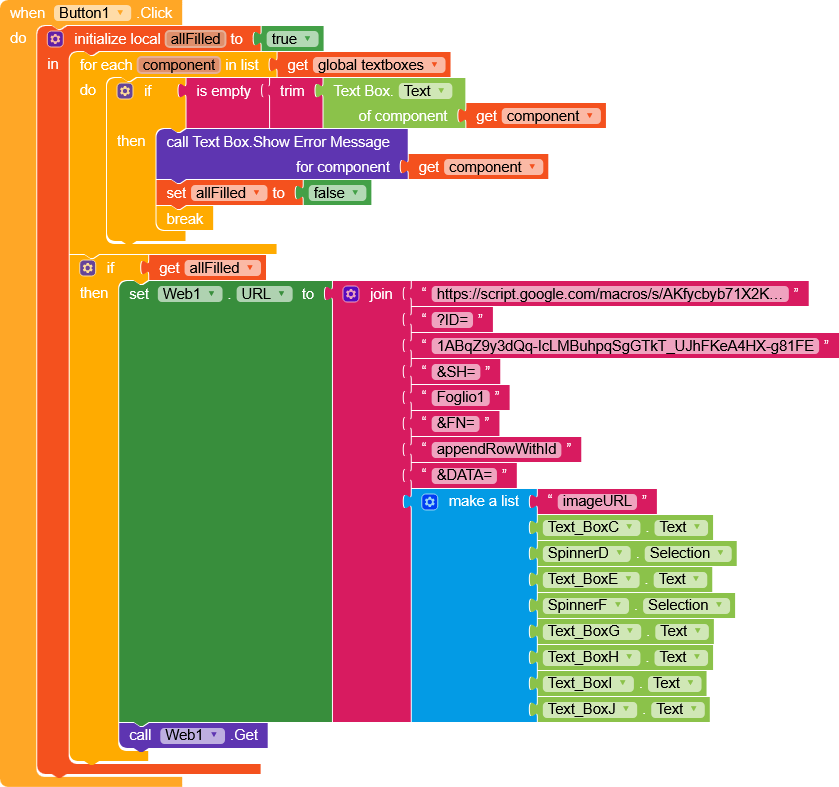
Anyway, using Tim’s script you could do it like this,
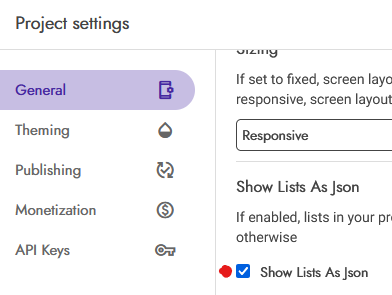
ShowListAsJson = true
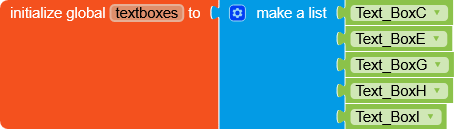
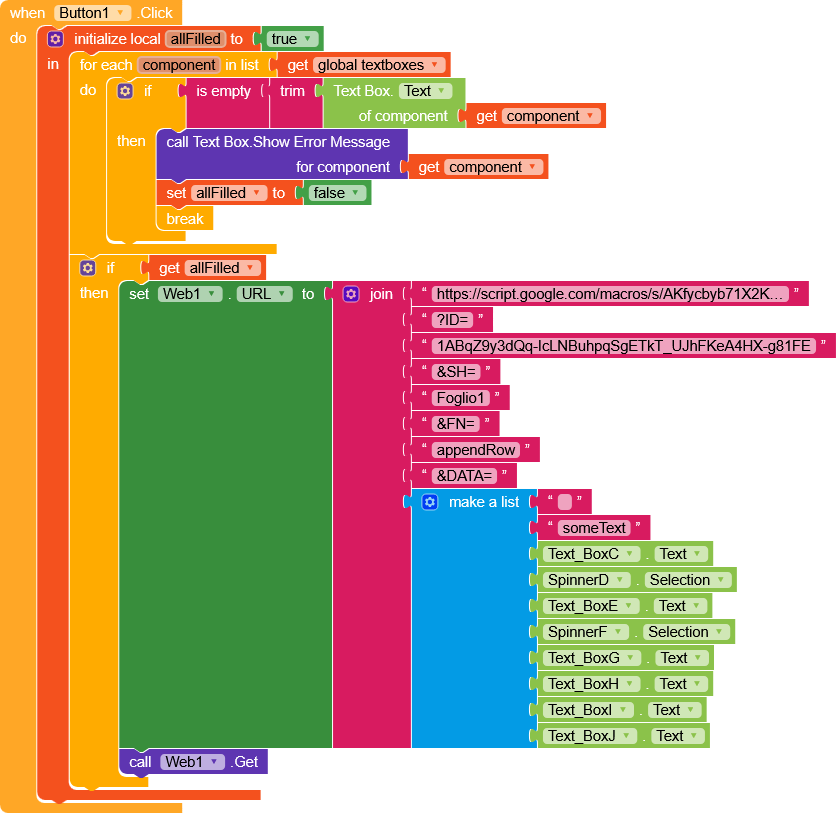
Replace script, spreadSheetId and sheetName (Foglio1)
where each element of the list is a column (I left the first one empty and it is column A)
and the result is this

1 Like
this is my script :
function doGet(e) {
  return ceksheet(e);
}

function doPost(e) {
  return ceksheet(e);
}

function ceksheet(e) {
  // 1. Check if 'e' exists (prevents error if run from editor)
  if (!e || !e.parameter) {
    return ContentService.createTextOutput("Error: No parameters received.").setMimeType(ContentService.MimeType.TEXT);
  }

  var ss = SpreadsheetApp.getActive();
  var sh = ss.getSheetByName(e.parameter.SH);

  // 2. Check if Sheet exists
  if (!sh) {
    return ContentService.createTextOutput("Error: Sheet '" + e.parameter.SH + "' not found.").setMimeType(ContentService.MimeType.TEXT);
  }

  //-------- INSERT --------
  if (e.parameter.func == "insert") {
    var a = e.parameter.A;
    var b = e.parameter.B;
    var c = e.parameter.C;
    var d = e.parameter.D;
    var valE = e.parameter.E; // Renamed to avoid conflict with event 'e'
    var f = e.parameter.F;
    var g = e.parameter.G;
    var h = e.parameter.H;
    var valI = e.parameter.I; // Renamed to avoid conflict with loop 'i'
    var j = e.parameter.J;

    var exists = false;
    var lr = sh.getLastRow();
    if (lr > 0) {
      var dataColumnA = sh.getRange(1, 1, lr, 1).getValues(); // More efficient check
      for (var row = 0; row < dataColumnA.length; row++) {
        if (dataColumnA[row][0] == a) {
          exists = true;
          break;
        }
      }
    }

    if (exists) {
      return ContentService.createTextOutput("Data error: " + a + " already exists.").setMimeType(ContentService.MimeType.TEXT);
    } else {
      sh.appendRow([a, b, c, d, valE, f, g, h, valI, j,]);
      return ContentService.createTextOutput("Successful!").setMimeType(ContentService.MimeType.TEXT);
    }
  }

  //------------------ UPDATE DATA ------------------
  if (e.parameter.func == "UPDATE") {
    var a = e.parameter.A;
    var b = e.parameter.B;
    var c = e.parameter.C;
    var d = e.parameter.D;
    var valE = e.parameter.E; // Renamed to avoid conflict with event 'e'
    var f = e.parameter.F;
    var g = e.parameter.G;
    var h = e.parameter.H;
    var valI = e.parameter.I; // Renamed to avoid conflict with loop 'i'
    var j = e.parameter.J;

    var lr = sh.getLastRow();
    var dataColumnA = sh.getRange(1, 1, lr, 1).getValues();
    for (var row = 0; row < dataColumnA.length; row++) {
      if (dataColumnA[row][0] == a) {
        var sheetRow = row + 1;
        sh.getRange(sheetRow, 2).setValue(b);
        sh.getRange(sheetRow, 3).setValue(c);
        sh.getRange(sheetRow, 4).setValue(d);
        sh.getRange(sheetRow, 5).setValue(e);
        sh.getRange(sheetRow, 6).setValue(f);
        sh.getRange(sheetRow, 7).setValue(g);
        sh.getRange(sheetRow, 8).setValue(h);
        sh.getRange(sheetRow, 9).setValue(i);
        sh.getRange(sheetRow, 10).setValue(j);
        return ContentService.createTextOutput("Data UPDATED").setMimeType(ContentService.MimeType.TEXT);
      }
    }
    return ContentService.createTextOutput("Update Failed: ID not found").setMimeType(ContentService.MimeType.TEXT);
  }

  //----------------------- DELETE ---------------
  if (e.parameter.func == "DELETE") {
    var a = e.parameter.A; // Using uppercase A for consistency
    var lr = sh.getLastRow();
    var dataColumnA = sh.getRange(1, 1, lr, 1).getValues();
    for (var row = 0; row < dataColumnA.length; row++) {
      if (dataColumnA[row][0] == a) {
        sh.deleteRow(row + 1);
        return ContentService.createTextOutput("Data DELETED").setMimeType(ContentService.MimeType.TEXT);
      }
    }
    return ContentService.createTextOutput("Delete Failed: ID not found").setMimeType(ContentService.MimeType.TEXT);
  }

  //------------------ SEARCH ------------------
  if (e.parameter.func == "search") {
    var a = e.parameter.A; // Consistent casing
    var lr = sh.getLastRow();
    var data = sh.getDataRange().getValues();

    for (var row = 0; row < data.length; row++) {
      if (data[row][0] == a) {
        var my_data = data[row][1] + "|" + data[row][2] + "|" + data[row][3];
        return ContentService.createTextOutput("Found|" + my_data).setMimeType(ContentService.MimeType.TEXT);
      }
    }
    return ContentService.createTextOutput("Not Found").setMimeType(ContentService.MimeType.TEXT);
  }

  //----------------- GET ALL -----------------
  if (e.parameter.func == "GET_DATA") {
    var rg = sh.getDataRange().getValues();
    var output = "";
    // Start from 1 to skip header row
    for (var row = 1; row < rg.length; ++row) {
      output += row + ". " + rg[row].join(' - ') + '|\n';
    }
    return ContentService.createTextOutput(output).setMimeType(ContentService.MimeType.TEXT);
  }

  return ContentService.createTextOutput("Error: Invalid function parameter.").setMimeType(ContentService.MimeType.TEXT);
}
i use column A with cell Sequence auto numbers and it works great when a raw added..
and B to insert an image link for each row.
this is my the project settings looks to me its different than yours:
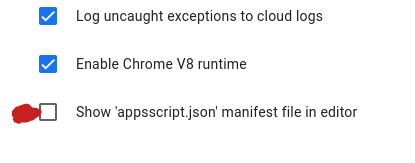
i well try the script and your blocks and see, thank you very much, can i use the first empty to put an image link &B= ?
I see that your script is very customized and specific, but I still recommend using Tim’s script if it’s not an issue.
Is it really necessary?
If so, we can implement it directly in the script by adding an else if with a new function appendRowWithId.
else if (fn == 'appendRowWithId') {
  var data = JSON.parse('[' + e.parameter.DATA + ']');
  var lr = sh.getLastRow();
  sh.insertRowAfter(lr);
  rowNum = lr + 1;
  data[0].unshift(rowNum - 1);
  sh.getRange(rowNum, 1, 1, data[0].length).setValues(data);
  return ContentService.createTextOutput('Values: ' + e.parameter.DATA + ' appended');
}
This way we’ll send the data starting from column B, and column A will be auto-filled with the row number.

These are the settings for the AppScript script, I meant the Kodular settings 
1 Like
using the Tim’s script the Debug tells me this:
var ss = SpreadsheetApp.openById(e.parameter.ID); unidentified
is ok, should i keep using it anyway?
but i find there is problem with valE and valI and it is not properly called in the setvalue code. But youare telling till A to I is writing properly. hmmmm
sh.getRange(sheetRow, 2).setValue(b);
sh.getRange(sheetRow, 3).setValue(c);
sh.getRange(sheetRow, 4).setValue(d);
sh.getRange(sheetRow, 5).setValue(valE); //  see here, why do you use setValue(e)
sh.getRange(sheetRow, 6).setValue(f);
sh.getRange(sheetRow, 7).setValue(g);
sh.getRange(sheetRow, 8).setValue(h);
sh.getRange(sheetRow, 9).setValue(valI); // see here , why do you use setValue(i)
sh.getRange(sheetRow, 10).setValue(j);
check the web url, You should have the final url like this,
https://script.google.com/macros/s/AKfycbXXXXXXXXXXXXXXX/exec
?func=insert
&SH=DataSheet
&A=1001
&B=Ravi
&C=Chennai
&D=TamilNadu
&E=600001
&F=Male
&G=28
&H=India
&I=Active
&J=Remarks_here
and sheet ID need to be used here, because already you are using in the var ss
var ss = SpreadsheetApp.getActive();
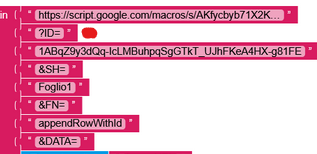
It means you’re not passing
ID in the URL.
To debug, you need to use a URL passing the AppScript URL, ID, SH, FN, and DATA.
i have tested this code and found working fine.
function doGet(e) {
  return ceksheet(e);
}

function doPost(e) {
  return ceksheet(e);
}

function ceksheet(e) {

  // Safety check
  if (!e || !e.parameter) {
    return ContentService.createTextOutput("Error: No parameters received")
      .setMimeType(ContentService.MimeType.TEXT);
  }

  var ss = SpreadsheetApp.getActive();
  var sh = ss.getSheetByName(e.parameter.SH);

  if (!sh) {
    return ContentService.createTextOutput("Error: Sheet not found")
      .setMimeType(ContentService.MimeType.TEXT);
  }

  var func = e.parameter.func;

  // ================= INSERT =================
  if (func === "insert") {

    var a = e.parameter.A || "";
    var b = e.parameter.B || "";
    var c = e.parameter.C || "";
    var d = e.parameter.D || "";
    var valE = e.parameter.E || "";
    var f = e.parameter.F || "";
    var g = e.parameter.G || "";
    var h = e.parameter.H || "";
    var valI = e.parameter.I || "";
    var j = e.parameter.J || "";

    // Check duplicate in column A
    var lr = sh.getLastRow();
    if (lr > 0) {
      var colA = sh.getRange(1, 1, lr, 1).getValues();
      for (var r = 0; r < colA.length; r++) {
        if (colA[r][0] == a) {
          return ContentService.createTextOutput("Data error: Already exists")
            .setMimeType(ContentService.MimeType.TEXT);
        }
      }
    }

    // FORCE write till column J (important fix)
    var row = lr + 1;
    sh.getRange(row, 1, 1, 10).setValues([[
      a, b, c, d, valE, f, g, h, valI, j
    ]]);

    return ContentService.createTextOutput("Successful!")
      .setMimeType(ContentService.MimeType.TEXT);
  }

  // ================= UPDATE =================
  if (func === "UPDATE") {

    var a = e.parameter.A || "";
    var b = e.parameter.B || "";
    var c = e.parameter.C || "";
    var d = e.parameter.D || "";
    var valE = e.parameter.E || "";
    var f = e.parameter.F || "";
    var g = e.parameter.G || "";
    var h = e.parameter.H || "";
    var valI = e.parameter.I || "";
    var j = e.parameter.J || "";

    var lr = sh.getLastRow();
    var colA = sh.getRange(1, 1, lr, 1).getValues();

    for (var r = 0; r < colA.length; r++) {
      if (colA[r][0] == a) {
        var row = r + 1;
        sh.getRange(row, 1, 1, 10).setValues([[
          a, b, c, d, valE, f, g, h, valI, j
        ]]);
        return ContentService.createTextOutput("Data UPDATED")
          .setMimeType(ContentService.MimeType.TEXT);
      }
    }

    return ContentService.createTextOutput("Update Failed: ID not found")
      .setMimeType(ContentService.MimeType.TEXT);
  }

  // ================= DELETE =================
  if (func === "DELETE") {

    var a = e.parameter.A || "";
    var lr = sh.getLastRow();
    var colA = sh.getRange(1, 1, lr, 1).getValues();

    for (var r = 0; r < colA.length; r++) {
      if (colA[r][0] == a) {
        sh.deleteRow(r + 1);
        return ContentService.createTextOutput("Data DELETED")
          .setMimeType(ContentService.MimeType.TEXT);
      }
    }

    return ContentService.createTextOutput("Delete Failed: ID not found")
      .setMimeType(ContentService.MimeType.TEXT);
  }

  // ================= SEARCH =================
  if (func === "search") {

    var a = e.parameter.A || "";
    var data = sh.getDataRange().getValues();

    for (var r = 0; r < data.length; r++) {
      if (data[r][0] == a) {
        return ContentService.createTextOutput(
          "Found|" + data[r].join("|")
        ).setMimeType(ContentService.MimeType.TEXT);
      }
    }

    return ContentService.createTextOutput("Not Found")
      .setMimeType(ContentService.MimeType.TEXT);
  }

  // ================= GET ALL =================
  if (func === "GET_DATA") {

    var data = sh.getDataRange().getValues();
    var out = "";

    for (var r = 1; r < data.length; r++) {
      out += r + ". " + data[r].join(" - ") + "|\n";
    }

    return ContentService.createTextOutput(out)
      .setMimeType(ContentService.MimeType.TEXT);
  }

  return ContentService.createTextOutput("Invalid function")
    .setMimeType(ContentService.MimeType.TEXT);
}
and this is my final url,
https://script.google.com/macros/s/AKfycbxmaOPV94lfZ7FtSePMn3-fLfUkzexd9u4ucr_WGUSQNcBx7DJV-oUerNE1J69dj72KBg/exec?func=insert
&SH=DataSheet
&A=1001
&B=Ravi
&C=Chennai
&D=TamilNadu
&E=600001
&F=Male
&G=28
&H=India
&I=Active
&J=Remarks_here
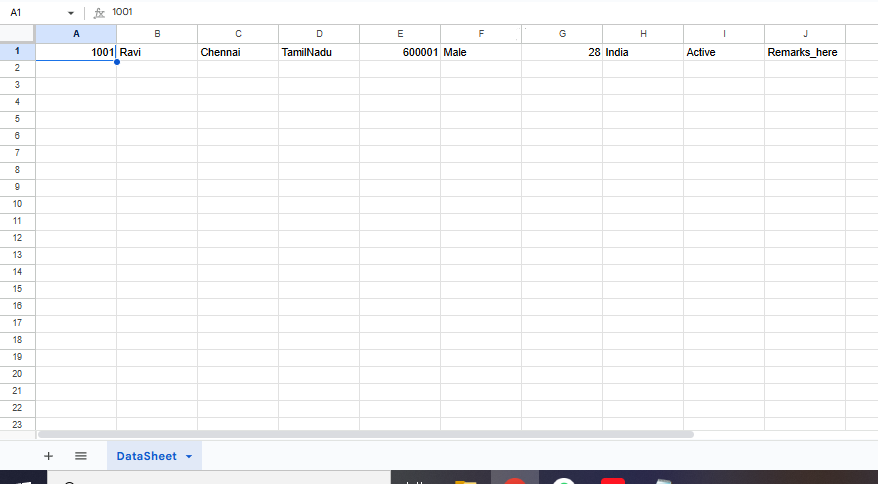
i well fix the script as you showed me, but still its not the problem, because i want to insert not to update..thanks
It mean if data exists in the first row, again it wont write there and will throw this eror.
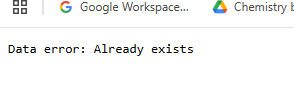
Pls clarify me again, because i may be weak in understanding. Every time you want to insert the data next to the last filled row? or anyother things like
If the col A data matches then it will throw Data exits else it will append to the last filled row
there is no error, i just want to create data in column J as you did it seems worked with you 
Then try the above script code sent to you, deploy again then use the new script url in kodular platform. You will find it will work like charm.
Summary
make sure col J is not filled the texts with white text volour
1 Like
i like magic  you changed the script, and it worked very well, thank you very much…say you have fixed, not just test it
Then try the above script code sent to you, deploy again then use the new script url in kodular platform. You will find it will work like charm.
it charmed me 
1 Like
This topic was automatically closed 30 days after the last reply. New replies are no longer allowed.