🔍 AdvancedSearch
An extension for MIT App Inventor 2.Advanced search extension with multiple filters and fast searching.
Intro:
Speed up your apps with powerful and flexible search capabilities!
The Advanced Search extension helps you quickly search lists, filter JSON, highlight results, and even perform background (async) searches without freezing your UI.
Whether you’re making a contact list, book app, product filter, or massive search engine inside your app — this extension is built to scale 
 Features
- Super-fast searching even in large lists
- Search in plain lists, dictionaries, or JSON
- Full support for case sensitivity, starts with / ends with
- Background (async) search — no UI lag!
- Highlight matching parts of results
- Optional sorting by relevance or length
 Blocks & Usage
SearchList
SearchList(list, query, caseSensitive, partialMatch, startsWith, endsWith, sortResults)
Performs a custom search in a list of strings.
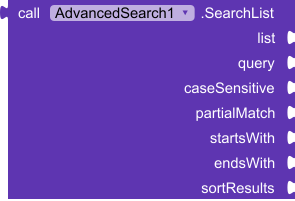
Example:
SearchList(["Apple", "Banana", "Apricot"], "ap", false, true, true, false, true)
→ Returns: ["Apple", "Apricot"]
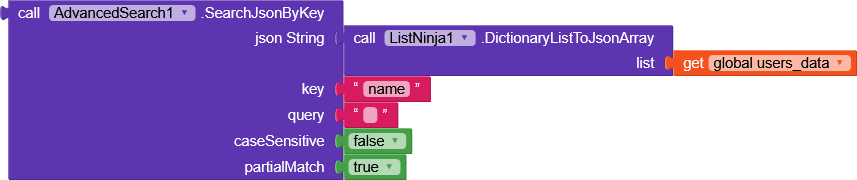
SearchListByKey(list of dictionaries, key, query, caseSensitive, partialMatch)
Search inside a specific key of a dictionary list.
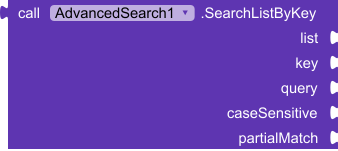
Example:
List = [{name: "Alex"}, {name: "Alice"}, {name: "Bob"}]
SearchListByKey(List, "name", "Al", false, true)
→ Returns: ["Alex", "Alice"]
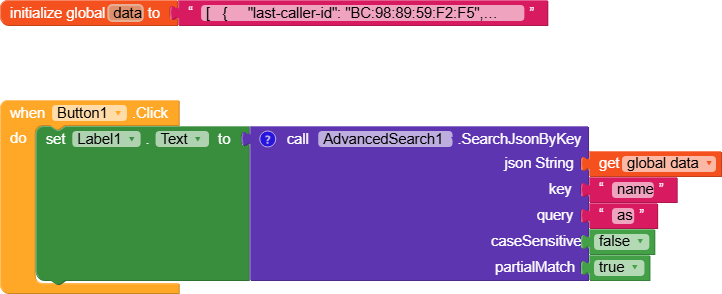
SearchJsonByKey(jsonString, key, query, caseSensitive, partialMatch)
Search a key in JSON Array strings.
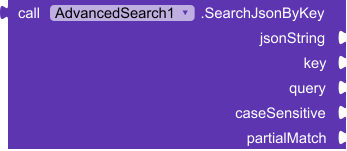
Example:
[
  {"title": "Hello World"},
  {"title": "World News"},
  {"title": "Hello Kodular"}
]
SearchJsonByKey(json, "title", "world", false, true)
→ Returns: ["Hello World", "World News"]
HighlightMatch(text, query, prefix, suffix, caseSensitive)
Highlights the part oftextthat matches the query.
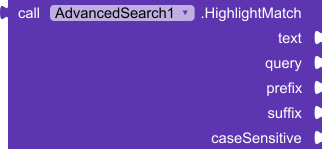
Example:
HighlightMatch("Welcome to Kodular", "kodular", "<b>", "</b>", false)
→ "Welcome to <b>Kodular</b>"
Perfect for showing matched keywords in search results!
SortList(list, byLength)
Sorts the list alphabetically or by string length.

Example:
SortList(["Banana", "Kiwi", "Apple"], false)
→ ["Apple", "Banana", "Kiwi"]

SortList(["Banana", "Kiwi", "Apple"], true)
→ ["Kiwi", "Apple", "Banana"]
SearchListAsync(list, query, caseSensitive, partialMatch)
Performs background search (non-blocking).
Use with theSearchCompletedevent.

Example:
Call SearchListAsync with:
List = BigList
Query = "data"
CaseSensitive = false
PartialMatch = true
SearchCompleted (Event)
SearchCompleted(resultList)
Called whenSearchListAsyncfinishes.
Use this to update your UI.

When SearchCompleted do
→ Set ListView.Elements to resultList
 Ideal Use Cases
- Contact search
- Product filtering
- Dictionary/Glossary apps
- JSON search engines
- Chat history filter
- Live search with async update
 Specifications
 Package: com.glich.advancedsearch
 Size: 9.52 KB
 Minimum API Level: 7
 Updated On: 2025-07-24T18:00:00Z
 Built & documented using: FAST-CLI
Download :
com.glich.advancedsearch.aix (9.5 KB)
Ready to supercharge your app?
Drop this extension in, and let your users search smarter and faster.
If you want even more—like fuzzy search, live debounce, or multi-key filters—just comment and I’ll bring updates soon! If you ,Like it Leave  and comment it.
Thanks ,
Mahir