App icon change Dynamically

Hi everyone,

I currently have a default app icon set through the app’s settings. However, for any festival or occasion, I would like to change my app icon remotely after the app is installed on a user’s device. I want to achieve this by sending a JPG or PNG image link-
(eg: https://www.example.com/testimage.png or https://www.example.com/testimage.jpg)
through Firebase
.

If the remote image is not available, the app should revert to the default app icon stored in the app’s assets.

Is there any way to do this? Please help me with this."

I asked chatgpt for you below what he said

Good question — and this is an interesting idea :backhand_index_pointing_down:

:light_bulb: Short Answer

No, Kodular (and any App Inventor–based platform) does not currently allow changing the actual app icon dynamically after installation — Android restricts it for security and consistency reasons.


:brick: Why You Can’t Do It Directly

The app icon shown on the home screen and launcher is declared in the AndroidManifest.xml and bundled into the APK or AAB file.

Once installed, Android does not allow changing the launcher icon resource unless:

You use multiple launcher activities with different icons and enable/disable them programmatically (using Java or Kotlin code, not Kodular blocks).

Or you reinstall / update the app with a new icon.


:gear: Workarounds (Possible Alternatives)

  1. Dynamic icon inside the app (not launcher icon)

You can display a custom icon or logo inside your app screen that changes remotely:

Store the icon URL in Firebase (as you mentioned).

Use Image component → Image.Picture from the URL.

If Firebase image URL is empty/unavailable, show your default icon from assets.

:small_blue_diamond: Example Kodular logic:

When Screen1.Initialize
→ Get value “app_icon_url” from Firebase
When Firebase GotValue
If value ≠ “” then
Set Image1.Picture to value
else
Set Image1.Picture to “default_icon.png”

:white_check_mark: Works perfectly — you can change this image anytime from Firebase.


  1. Actual launcher icon change (only via Java Extension)

If you develop a custom AIX extension in Java, you can technically:

Create multiple launcher aliases in AndroidManifest.xml.

Use PackageManager.setComponentEnabledSetting() to enable one and disable another dynamically.
But Kodular doesn’t expose Manifest editing directly — so it requires an extension or a custom-built app (outside Kodular).

:warning: This also won’t fetch icons from a URL — the alternate icons still need to be included in the app package.


:white_check_mark: Conclusion

Goal Possible in Kodular? Method

Change actual launcher icon dynamically :cross_mark: No Needs native Android code
Change displayed icon inside app UI via Firebase URL :white_check_mark: Yes Use Image + Firebase.

Kuch Bhi Chal Nikal GIF by Aniket Mishra

Bro, Chat GPT don’t know what’s exact block available in :kodular:odular, so don’t ask tricky question with them, Always give you irrelevant suggestion :frowning:

I need genuine suggestion/solution if any advance user here.

Here’s an answer from 2024 on AppInventor, and it seems that it’s not possible.

But you can fork the open source ai2, add new features to AppInventor, run it locally, and build the apps you want.

:grin:


Changing an icon inside the app is very simple since it’s basically just an image, if you’re interested, let us know.

see this thread

and read again the Short answer

In case a badge could help, try

Taifun

Hmm, Thanks for thread.

Yeah! may be next time :rofl: :grin:

I read all, It’s seems though but not imossible, let me see what i can do. Thank you bdw for helping with such threads/posts.

:joy::joy: securebugs if you see me asking chatGpt means I run out of suggestions.

Agreed I do same for translation or what i was unable to get point.

Thanks everyone for the feedback – I read all your comments, did deep research, and finally understood why Kodular or Any other Block’s App platforms cannot change the main app icon directly.


Why they CANNOT Change the Main App Icon (Real Reason)

  1. App icon is set in AndroidManifest.xml → Android reads it only once at install time.
  2. To change icon at runtime, you need → This lets you have multiple launcher icons and switch them.
  3. They does NOT allow editing AndroidManifest.xml → No way to add → true icon change = impossible.

Even if you upload appicon.png, it becomes a drawable — NOT a launcher icon.


But Don’t Lose Hope!

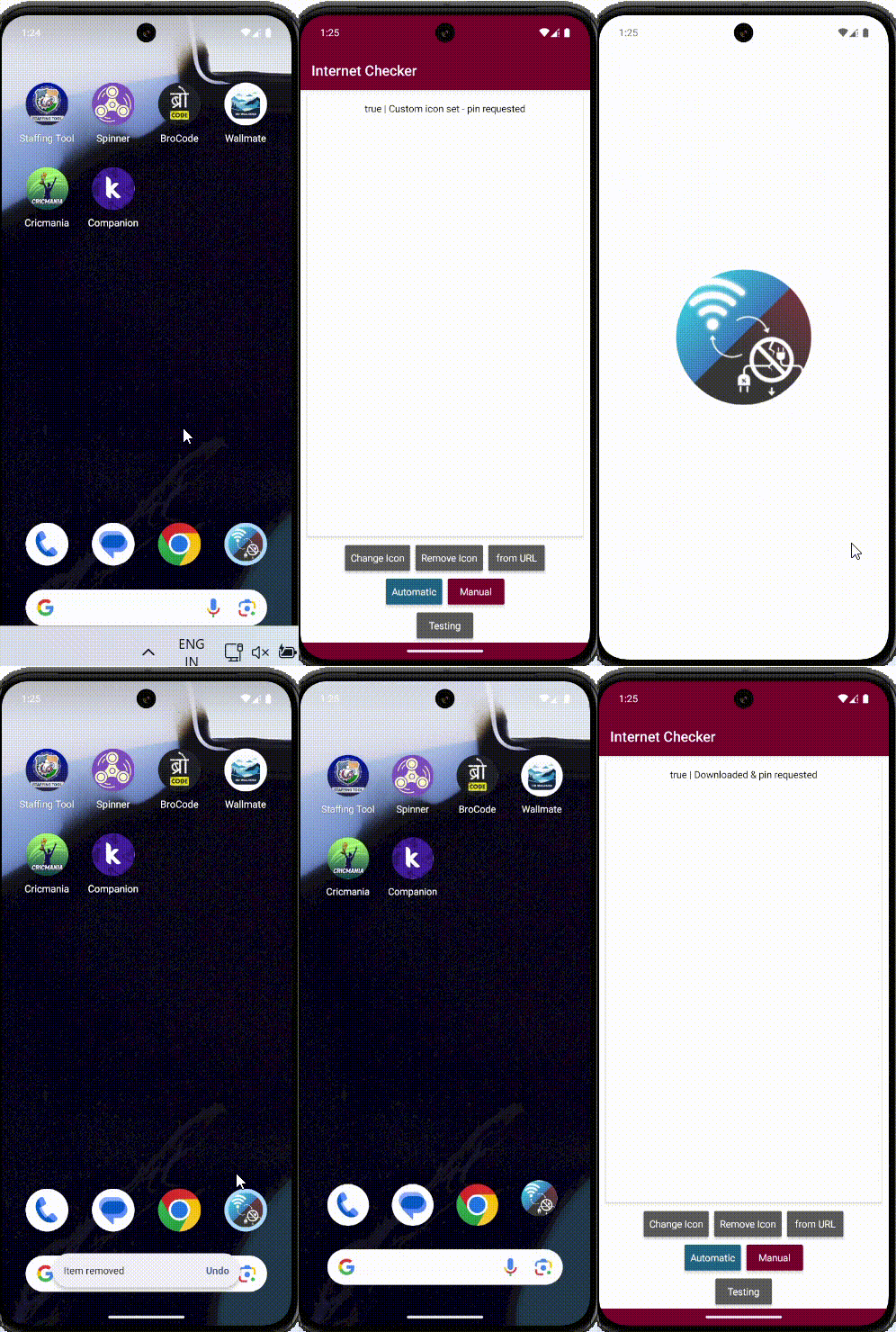
I created a powerful extension that gives you a realistic dynamic app iconas close as possible to the real thing — without editing manifest!


appyIcon – Dynamic App Icon Extension

Features:

  • Set icon from assets (appicon.png)
  • Set icon from any URL (.jpg, .jpeg, .png)
  • One-time pin → icon updates forever
  • Remove custom icon → disables shortcut + reverts
  • No duplicates – clean & smooth

How It Works (Simple Flow)

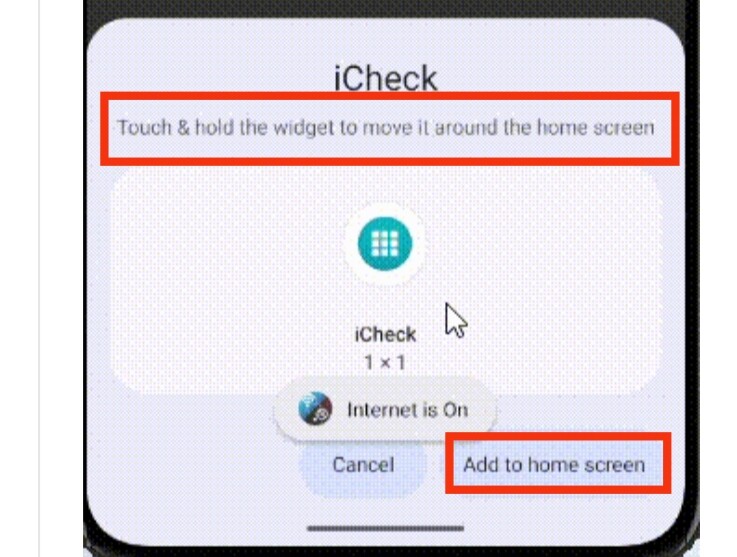
  1. First time: Click “Set Custom Icon”“Add to Home” popup → Tap OK
  2. After that: Icon changes instantly on every click
  3. Remove: One click → back to original

Demo GIF

The image shows a smartphone home screen with various app icons including Staffing Tool, Spinner, BroCode, Wallmate, Cricmania, and Companion, along with navigation and status bars. (Captioned by AI)


If anybody need this extension Let me know! just pay ($2) It will very helpful. :heart:

I’m glad you solved it :partying_face:.

If you can, create a separate topic in Extensions so it’ll be easier for other users to find.

2 Likes

I think this aix not working as your expectations, it creates shortcut not changed the real app icon, did I see correct?

1 Like

Not exactly, but something :grin:

A dog with a unique coat pattern resembling tiger stripes stands on a concrete floor near bicycles and other objects. (Captioned by AI)

Yes bro, I know it creating shortcut, That why i send above gif :grin:

This not change app icon, this create short cut with custom icon :melting_face:

1 Like

Yes i know :grin: It seems You not read my last replies.

1 Like