Is there any way or extension to prevent the application from freezing on startup and while processing bluetooth.connect? Bluetooth Classic
Hi Gaston,
The app freezes because you run a connect in Screen.Initialize?
You could try adding a clock that performs the operations shortly after the
iInitialization, but I’d first like to understand better what happens when you do Bluetooth.Connect.
Does the app freeze at that moment? For how long?
If you run it manually with a button, does it freeze the same way?
It would really help if you provided a screenshot of your relevant blocks, so we can see what you are trying to do, and where the problem may be.
To get an image of your blocks, right click in the Blocks Editor and select “Download Blocks as Image”. You might want to use an image editor to crop etc. if required. Then post it here in the community.
Taifun
@taifun There’s nothing relevant, it’s just that during the connection process everything freezes (textbox, button, Animations, etc) clock1.TimerInterval = 5000
If a connection is not established, the block may last up to 10 seconds.
@RayzZz
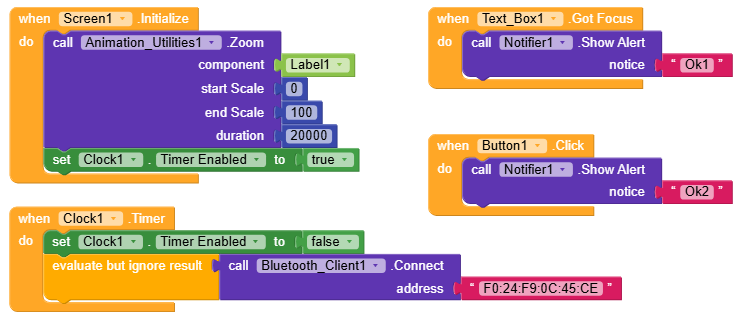
Which builder are you using? It doesn’t look like Kodular.
If it isn’t, I’d ask you to post in the corresponding community.
That’s true, but it doesn’t matter, it happens on both platforms, I already tested it.
I’m now replacing the images with Kodular blocks.
@RaYzZz Done! The animation, which lasts 20 seconds, freezes, as does everything else, and resumes after the connection process is complete.

So can you confirm that with these blocks the .Zoom animation is smooth for the first 5 seconds and right after that it freezes?
A piece of advice, don’t ignore the return value of .connect, put it inside an if.
Are you close to that device while trying to connect?
What happens without using that animation?
Btw usually to connect you use an if statement like this
If Connect …
Then connected
Else not connected
Taifun
That’s right, the animation starts, everything is normal until the clock starts and launches the connection, then after about 10 seconds, everything returns to normal.
I understand the logical structure I must apply; here I show basic connection blocks. Whether it connects or not is irrelevant to the issue; it will only take more or less time, but the freezing occurs in the same way, and that is the point.
Whether it’s 3 seconds or 15, temporary freezing is always present, and that’s precisely what I want to avoid.
Have you tried using an extension?
Maybe it handles the connection better without causing freezes.
(I know it’s not a real solution, but if it’s not an issue it can save a lot of time  )
)
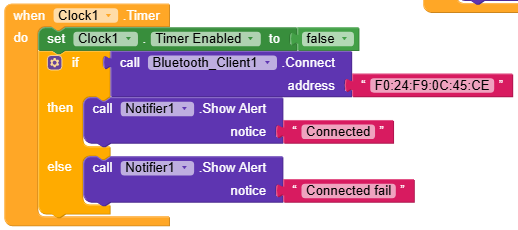
I really don’t want to try pointless extensions, that’s why I initially asked if any AIX would prevent that inevitable freezing.
I’m currently writing a basic extension to see if I can fix it.
We know very well that it isn’t the solution, but it’s a matter of logic. You should at least inform the user that the connection failed with an alert or a message, and maybe try reconnecting .
Pardon me, I had forgotten 
Have you tried at least one of them?
You are still using a ckock
Try a button click event without any animation
Taifun
1 Like
That extension seems to meet my needs, I’ll try it and let you know.
Perfect! Nothing freezes at any point, whether it’s connected or not.
Luckily, the extension had its source and I was able to make a minor correction because it was giving a minor error.
Thank you so much for your contribution! @RaYzZz
Connection Fail:
ConnectionSuccess:
Very good! I’m really glad 
Thanks also to  Daniel for the very useful extension.
Happy Koding!