Hi everyone  ,
,
I recently got into the world of SQLite to help a user turn a Google Sheet table into an SQL database.
Since we found a solution, I wanted to share it with you.
Let’s get started!
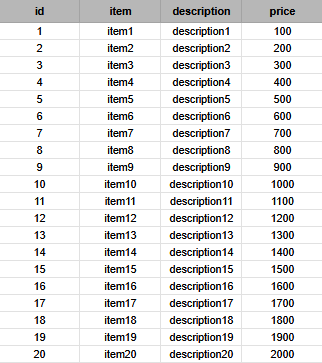
This will be our reference table.
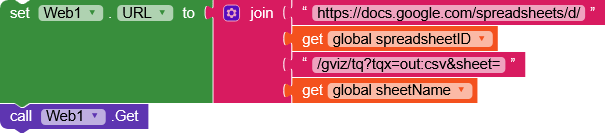
First, we get the table in CSV format using the classic URL:
https://docs.google.com/spreadsheets/d/SPREADSHEET_ID/gviz/tq?tqx=out:csv&sheet=SHEET_NAME
Then, in the Web.GotText we transform the csv response into a list with the appropriate block.

We create two variables.
listwill contain the entire list of elements.headerswill contain only the headers.
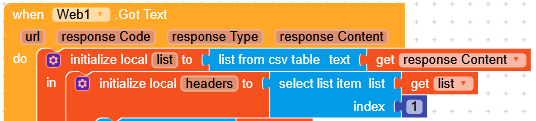
Right after obtaining the headers, we can remove them from the main list.

Now, let’s create the table gsTable.
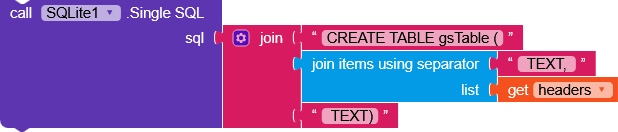
Since this is a very simple database, each column will be of type TEXT, so I joined each header with TEXT, to obtain something like:
CREATE TABLE gsTable (id TEXT, item TEXT, description TEXT, price TEXT)
Next, we insert each row of the table
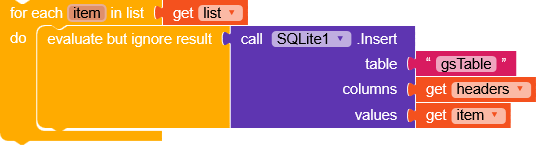
by running a for each item in list, and for each element we do an INSERT with:
-
table = gsTable
-
columns =
headers
Example for the first element:columns = (id, item, description, price) -
values = element of the
list
Example for the first element:values = (1, item1, description1, price1)
As you can see, I’m ignoring the insertion result with
evaluate but ignore result.
In theory, it should never return an error, but you could add a condition just in case.
In the attached .aia project, I also implemented a function that comes from this guide:
which itself originates from this one:
This function converts the CSV response into either a dictionary or a list depending on the type of data requested:
- Multiple “rows” = a dictionary with the first column as the key.
- Single “column” = a list of elements.
In addition, this function is linked to queryToCSV,

which converts the response received from SQLite into the correct CSV format to pass to
CSVResponseConverter.An SQL query will return a list of elements (headers data) , and we simply join them with a
\n.
So, to execute a query we will no longer use

but


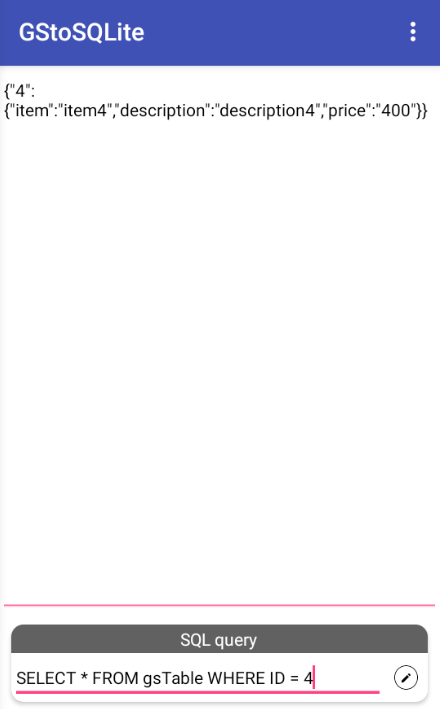

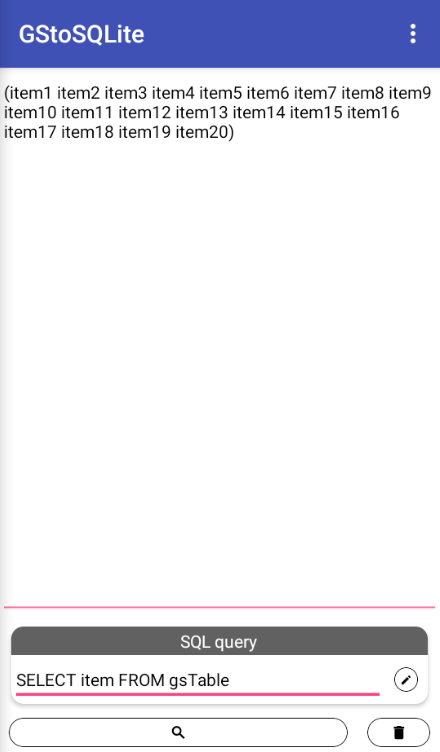
Finished !
Happy  oding!!!
AIA project
GStoSQL.aia (41.2 KB)
I strongly recommend checking out this guide by TimAi2, which contains a lot of useful information that can be easily integrated into this project.