Hi everyone,
Today I wanted to share this function I’ve used multiple times in my projects. It converts a CSV table into a dictionary (typically used for converting from Google Sheets CSVs).
Very simply, this function saves the headers into a list, loops through all the rows, and for each row’s value, it creates a dictionary.
The key of this dictionary is the value from column A, and the other key-value pairs correspond to key = header and value = the corresponding cell's value. It’s easier to see than to explain.
Google sheet table
(but it can also be a CSV table from any source)
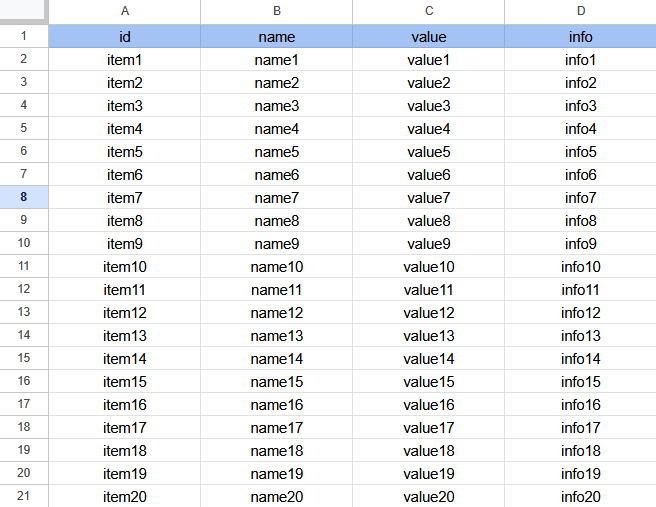
And in CSV format, it looks like this:
"id","name","value","info"
"item1","name1","value1","info1"
"item2","name2","value2","info2"
"item3","name3","value3","info3"
"item4","name4","value4","info4"
"item5","name5","value5","info5"
"item6","name6","value6","info6"
"item7","name7","value7","info7"
"item8","name8","value8","info8"
"item9","name9","value9","info9"
"item10","name10","value10","info10"
"item11","name11","value11","info11"
"item12","name12","value12","info12"
"item13","name13","value13","info13"
"item14","name14","value14","info14"
"item15","name15","value15","info15"
"item16","name16","value16","info16"
"item17","name17","value17","info17"
"item18","name18","value18","info18"
"item19","name19","value19","info19"
"item20","name20","value20","info20"
We separate the first row from the rest of the table
local headers variable

"id","name","value","info"
local list variable

"item1","name1","value1","info1"
"item2","name2","value2","info2"
"item3","name3","value3","info3"
"item4","name4","value4","info4"
"item5","name5","value5","info5"
"item6","name6","value6","info6"
"item7","name7","value7","info7"
"item8","name8","value8","info8"
"item9","name9","value9","info9"
"item10","name10","value10","info10"
"item11","name11","value11","info11"
"item12","name12","value12","info12"
"item13","name13","value13","info13"
"item14","name14","value14","info14"
"item15","name15","value15","info15"
"item16","name16","value16","info16"
"item17","name17","value17","info17"
"item18","name18","value18","info18"
"item19","name19","value19","info19"
"item20","name20","value20","info20"
Example for row 1
for each item in row 1 (item1, name1, value1, info1)
  for each item in headers (id, name, value, info)
    make a dictionary
      with key = header (example for the first cycle "id")
         value = select item in the row list at index of the header (example for the first cycle "item1")
For the first cycle of headers and rows, we’ll get a dictionary like this:
{
"id":"item1",
"name":"name1",
"value":"value1",
"info":"info1"
}
And for the second:
{
"id":"item2",
"name":"name2",
"value":"value2",
"info":"info2"
}
Then, we create a dictionary where the key is the value from the first column (for example, “item1” from the first cycle). The value associated with this key is the entire dictionary we just created with all the row’s values. So, we’ll end up with something like this:
{
   "item1":{
      "id":"item1",
      "name":"name1",
      "value":"value1",
      "info":"info1"
   }
}
Once we’ve cycled through all the rows, we’ll have a master dictionary! (itemDictionary)
This dictionary contains all our data, and you can easily access any specific set of values by using the key from the first column (like “item1” or “item2”).
It’s a super handy way to organize and retrieve your data.
I want “info” value of “item9”
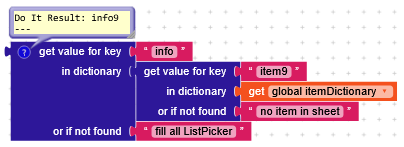
or even better
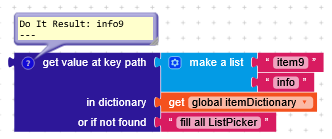
Function with blocks
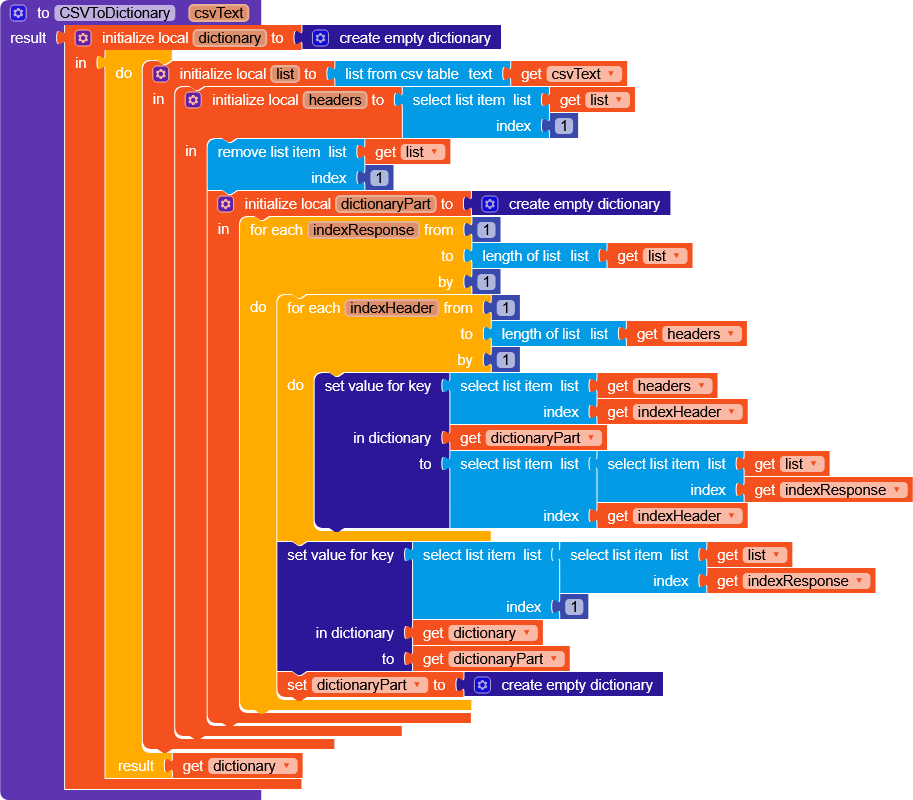
Example project
CSVtoDictionary.aia (6.3 KB)
