Hi everyone  ,
,
Today I want to share with you a method to implement Lazy loading / Infinite Scroll.

First of all, I’d like to thank @Bharathirajan_k who asked this question in the community,
and @Ibrahim_Jamar 
fueling my desire for knowledge 
And big thanks to
@The_K_Studio for Async Image Loader and @zainulhassan for Image Scale Type and Recycler List
In this example I used Supabase with this structure,
But any other database that allows downloading data in defined ranges can be used
Google Sheets is a valid alternative that can be used as well, we’ll see how later.
Variables

This dictionary will contain the settings for our list
itemsPerRequest: the number of items that will be requested each time we reach the enditemRows: how many rows to display on the screenitemColumns: how many columns of items on the screen
I’d like to point out that itemRows and itemColumns are not strictly necessary and exist only for convenience, cleanliness, and organization, but we’ll see why later.

This variable will contain all the data downloaded from the database

This variable is used to block requests, but we’ll look at how it works later
Screen.initialize
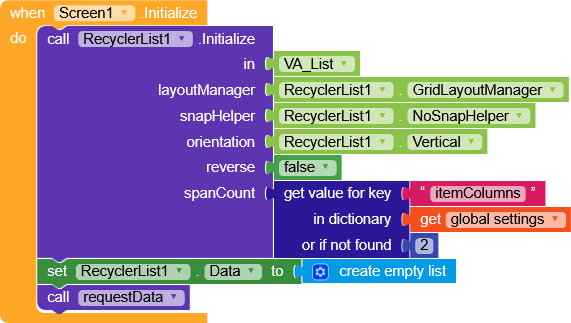
Here we initialize the RecyclerList,
note that
spanCount is a settings parameter (so it could also be set directly here)Then we perform the first
requestData to populate the list.
requestData
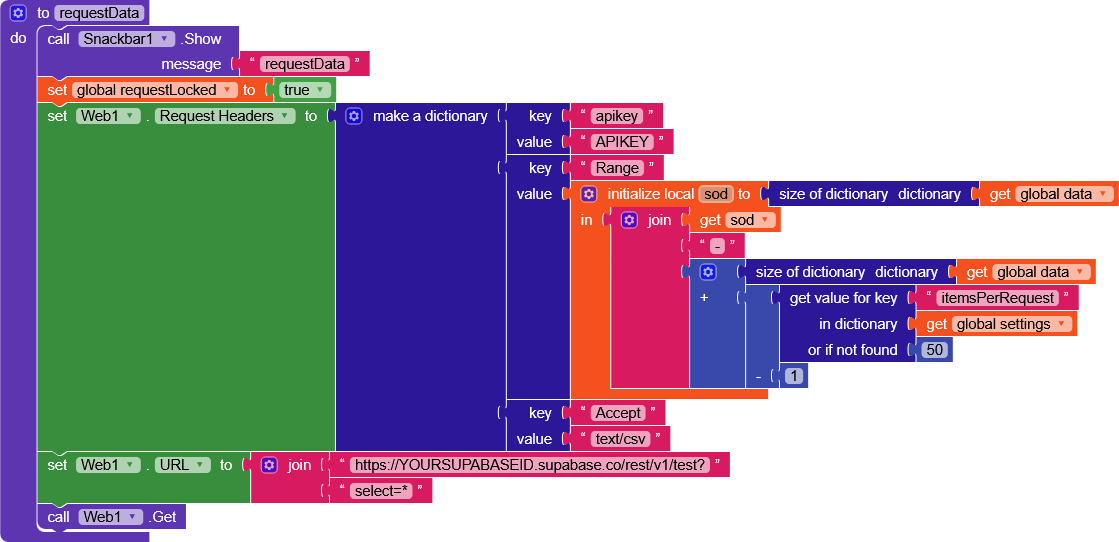
I added a snackbar to see in real time when it’s called (to be removed)
- We set
requestLockedto true in order to block any other requests (inRecyclerList.OnScrolledeverything will be clearer) - We set the headers of our request, with Supabase we need to pass
apikey,Range, andAccept - I’ll focus on
Range, which is the fundamental part:
the value of this key must be the range of data we want to request. The first one will be from element 0 to 49, “0-49” (Supabase starts from 0), so I used the size of the dictionarysod(first request data = 0) “-”itemsPerRequest(50) - 1 - We set the URL with that of our Supabase database, selecting all elements
select=*
https://SUPABASEID.supabase.co/rest/v1/TABLENAME?select=*
(remember to modify SUPABASEID and APIKEY)
- And we perform the
Get
Web.GotText
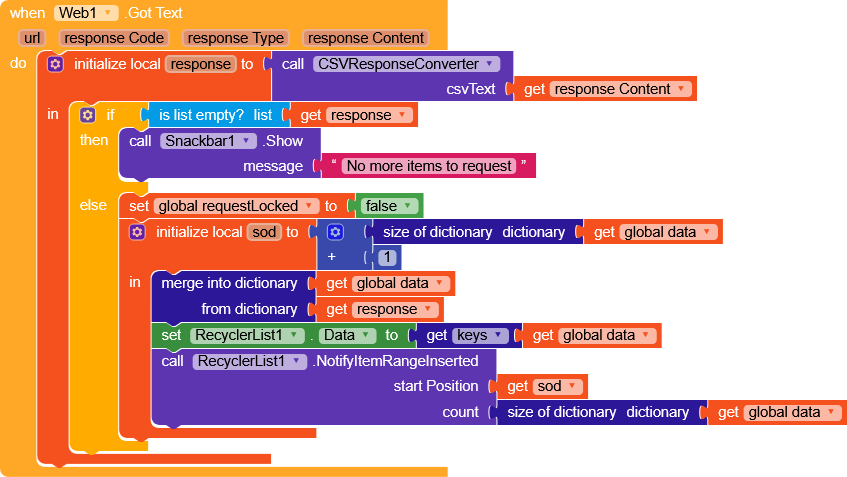
- Since I prefer dictionaries over lists, I implemented a
CSVResponseConverterprocedure that was explained in this topic.
It converts a CSV list into a dictionary with
key = first column
value = pairs of "columnName" : "columnValue".
Nothing prevents you from handling everything using just a list.
-
If the response is an empty list (note that I enabled
ShowListAsJson)- I show a snackbar indicating that there are no more items to download
-
If there is data instead
- we unlock
requestLockedby setting it to false - we create the
sodvariable (important because it will keep track of how many items were in data before doing the next merge) - we add them to the data dictionary with merge
- we update the RecyclerList data
- and we notify that the range
startPosition=sod
count=sizeOfDictionary(data)
has been inserted.
- we unlock
RecyclerList.OnScrolled
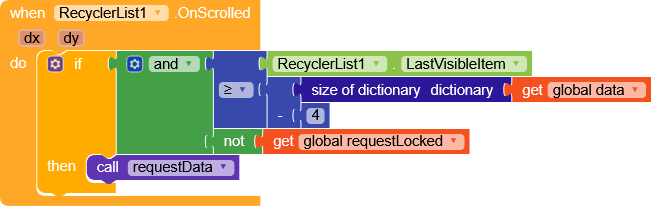
Here RecyclerList will check when to download data.
If the last visible element is greater than our data dictionary size minus 4, and requests are not locked, we request new data.
For example, with the current settings parameters we download 50 items at every request, while scrolling .OnScrolled checks which is the last element we are seeing.
In this case, as soon as the element at position 46 (50 minus 4) becomes visible, it performs a requestData.
Translated: 4 elements before reaching the end of the list, a
requestDatais executed.In my example I set these values based on the database response speed, so they will definitely need to be adjusted according to your needs.
On Google Sheets I set it to 8 since it was slower in returning the data.
OnScrolled is executed many times while scrolling, therefore, requestLocked exists precisely to prevent multiple requestData calls.
In fact, as soon as the data is requested, requestLocked is set to true to act as a block.
Other blocks
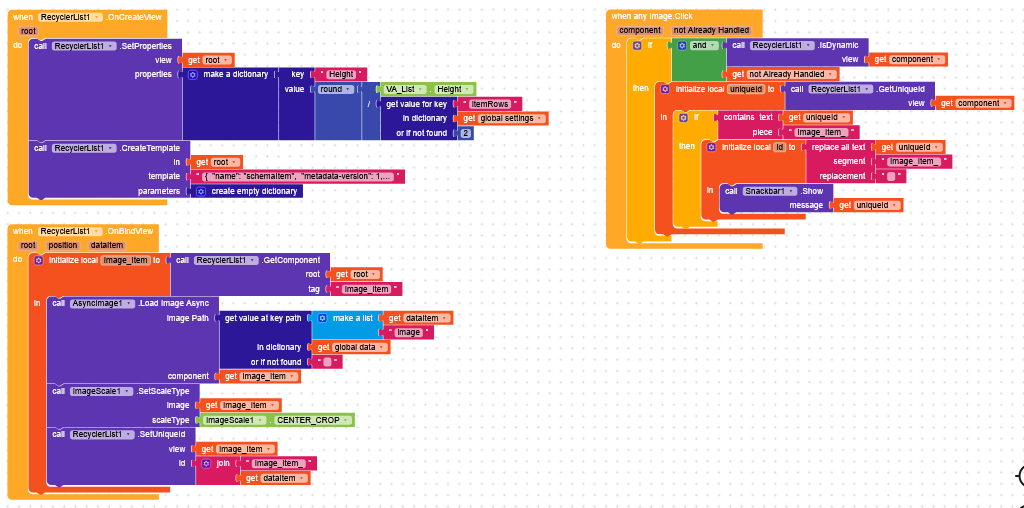
Here we simply handle .OnCreateView, .OnBindView, and the click on each item.
Since these are highly customizable blocks, I won’t explain their functioning in detail, but if needed, feel free to ask me and I’ll be happy to help.
Supabase AIA
SBLazyLoading.aia (146.4 KB)
Google Sheet
Since the data is processed through requestData and Web.GotText, we can very easily implement other databases without too much effort.
Google sheet data
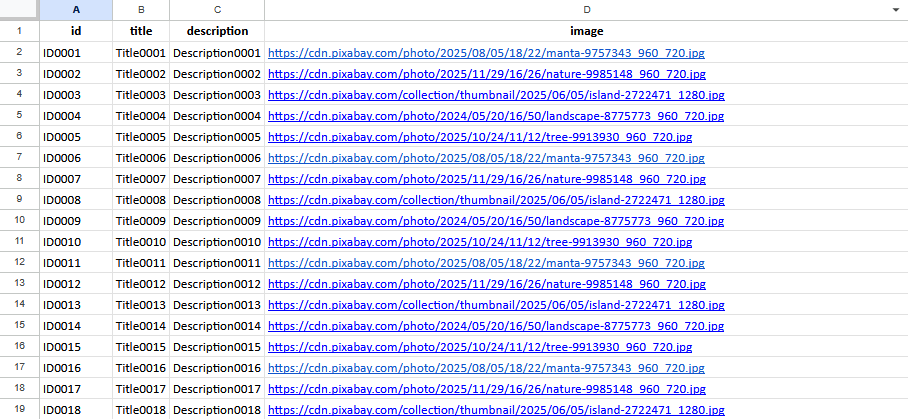
requestData
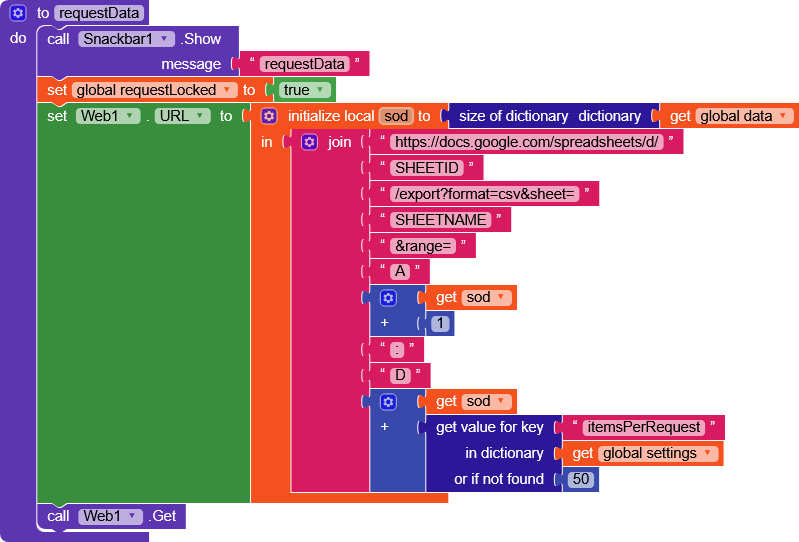
Here we will use the Google Sheets export function to obtain the range, below is an example for A1:D50
https://docs.google.com/spreadsheets/d/SHEETID/export?format=csv&sheet=SHEETNAME&range=A1:D50
(remember to modify SHEETID, SHEETNAME and the columns range)
Web.GotText
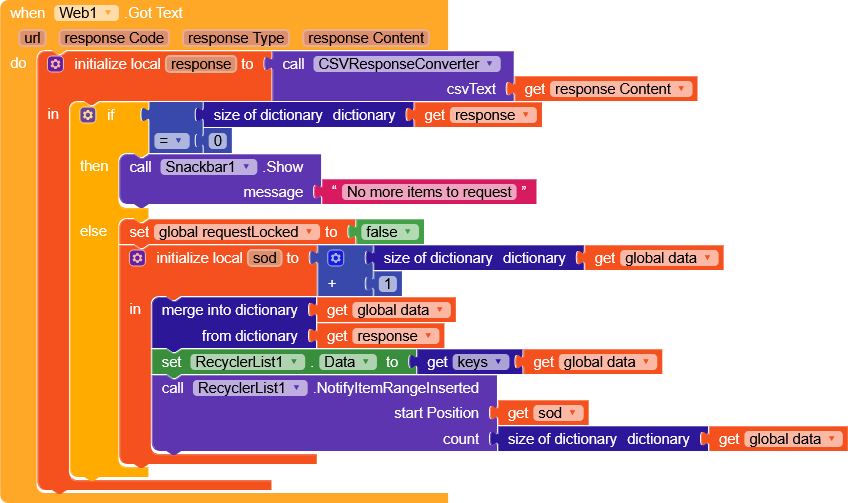
Almost identical to Supabase, except for the response where we check if size of the dictionary = 0.
Google Sheet AIA
GSLazyLoading.aia (146.1 KB)
Airtable
Here is an example of implementation with Airtable.
Airtable data
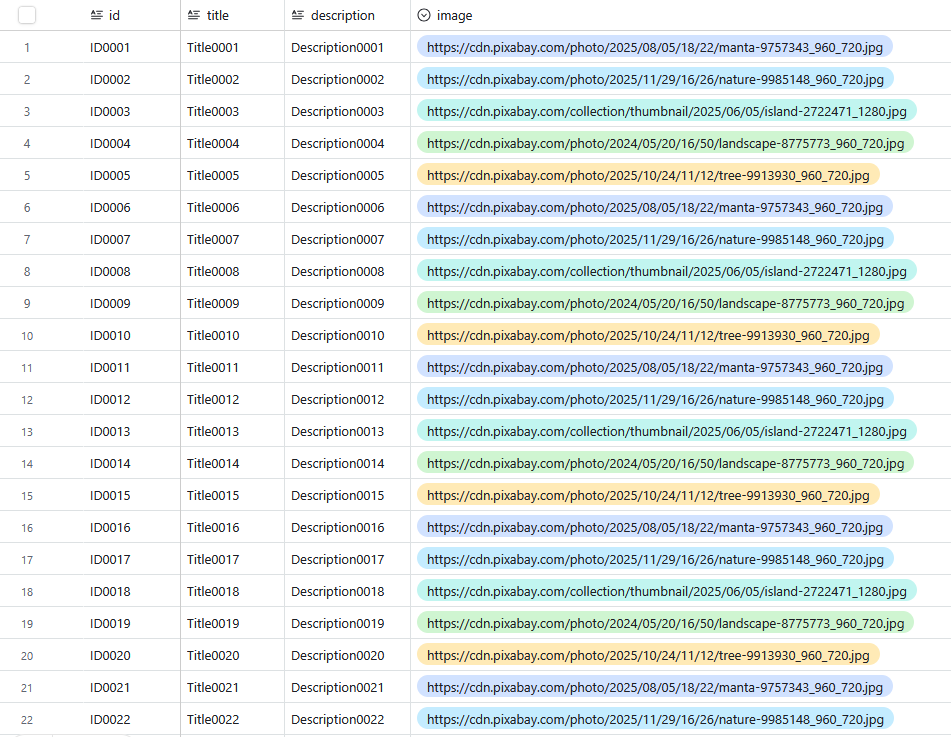
Airtable handles pagination in a slightly different way, it uses an offset to keep track of the last requested element.
Because of this, I added an offset variable and included a check in Web.URL
requestData
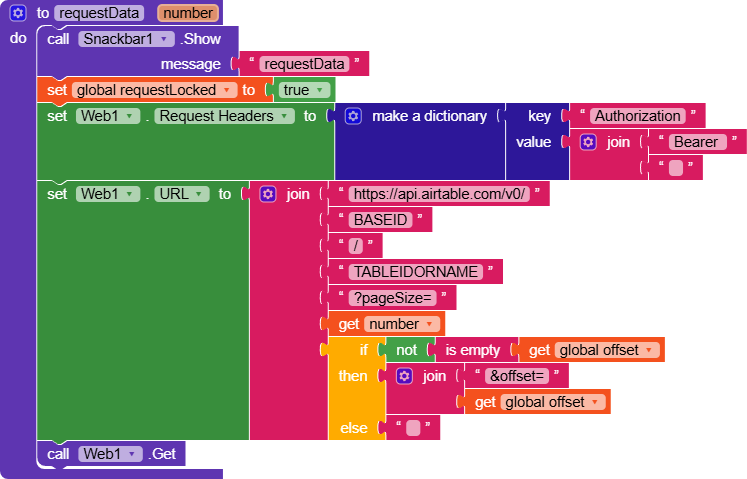
Remember to add Token in the headers and replace BASEID/TABLEIDORNAME
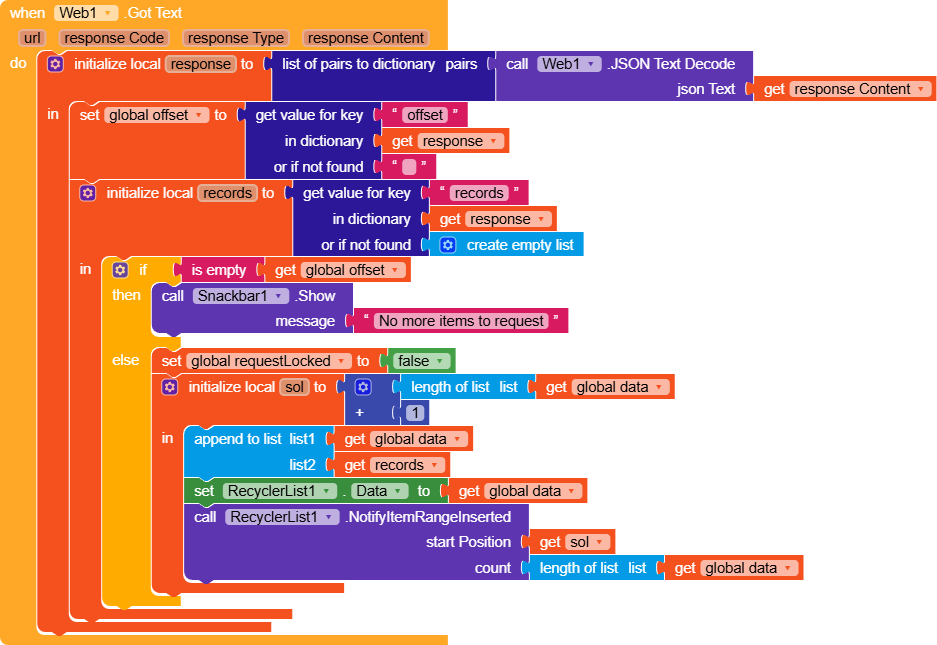
The response received is a dictionary containing two keys,
- offset
- records
records is a list of dictionaries where each dictionary is composed of three keys- createdTime
- id
id is the key assigned by Airtable to that item - fields
fields contains the fields of our table in the format- key = column name
- value = the cell value
Sample response
{
	"offset": "itrk3K1IdXs9Cg5gO/recEkweZPVWtlZdpK",
	"records": [
		{
			"createdTime": "2026-01-04T22:58:18.000Z",
			"fields": {
				"description": "Description0001",
				"id": "ID0001",
				"image": "https://cdn.pixabay.com/photo/2025/08/05/18/22/manta-9757343_960_720.jpg",
				"title": "Title0001"
			},
			"id": "rec0KZBAL68xA0Ezj"
		},
		{
			"createdTime": "2026-01-04T22:58:18.000Z",
			"fields": {
				"description": "Description0101",
				"id": "ID0101",
				"image": "https://cdn.pixabay.com/photo/2025/08/05/18/22/manta-9757343_960_720.jpg",
				"title": "Title0101"
			},
			"id": "rec0hx00YA1kIzRO8"
		},
		{
			"createdTime": "2026-01-04T22:58:18.000Z",
			"fields": {
				"description": "Description0026",
				"id": "ID0026",
				"image": "https://cdn.pixabay.com/photo/2025/08/05/18/22/manta-9757343_960_720.jpg",
				"title": "Title0026"
			},
			"id": "rec0o05rFiHmAa2MV"
		}
	]
}
Therefore, I managed the data variable as a list rather than a dictionary.
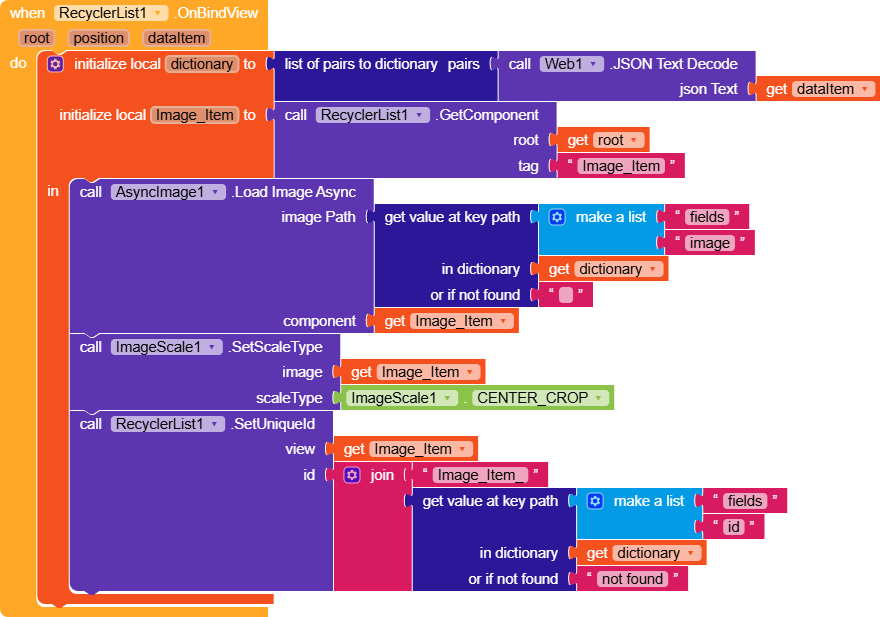
In addition to these changes, I also had to modify the way data is read in .OnBindView, which now converts dataitem to JSON and then retrieves the values from fields using getValueAtKeyPath.
Done
Airtable AIA
ATLazyLoading.aia (144.7 KB)


 oding!