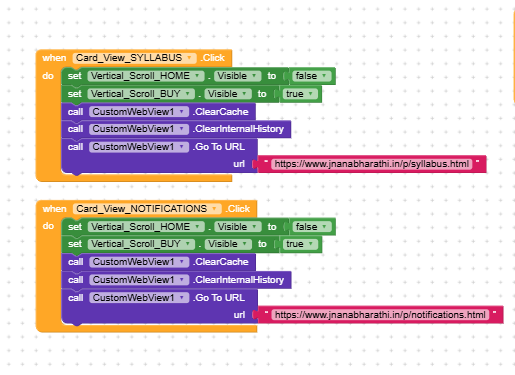
Those blocks are very complicated. i Dont understand. I just need simple blocks to
- User clicks Syllabus - opens Syllabus URL.
- User presses Back - Clear History - returns to Home layout.
- User clicks Notifications - opens Notifications URL.
Those blocks are very complicated. i Dont understand. I just need simple blocks to
First of all, think about it, every time you press back, you clear the history.
You should clear it in two cases:
To make everything simpler, I’d suggest clearing the history as soon as you click on the CardView Notification
Can I help you understand them better, or do you want to keep it light for now?
The problem just shifts somewhere else, because what you’re seeing is simply the CWV still having the previous page loaded and to fix this in the simplest way, I’d suggest doing a blank Go To URL before loading the next page.
A very good way to learn App Inventor or Kodular…
I remember have a similar unrelated issue like this a few years ago. My solution was to use a second webview. CustomWebviewer is well organised for this with its id system.