A non-visible component that lets you integrate Firebase Authentication (email/password) into your App Inventor, Kodular, or other AI2-based apps without writing Java code.
Features
Sign Up / Sign In with Email & Password
Change Password (requires current ID token)
Change Email (requires current ID token)
Refresh ID Token
Send Email Verification
Check Email Verification Status
Delete Account
Reset Password (send password reset email)
Exposes both Local ID and ID Token to your blocks
All operations use Firebase’s REST Web API; no Google Play Services dependency.
Designer Properties
Property Name
Type
Description
ApiKey
Text
Your Firebase project Web API Key (from Firebase Console → Project Settings).
SignedInLocalId
Readonly
The user’s local UID returned by Firebase after sign in.
SignedInIdToken
Readonly
The user’s current ID Token returned by Firebase after sign in.
Blocks
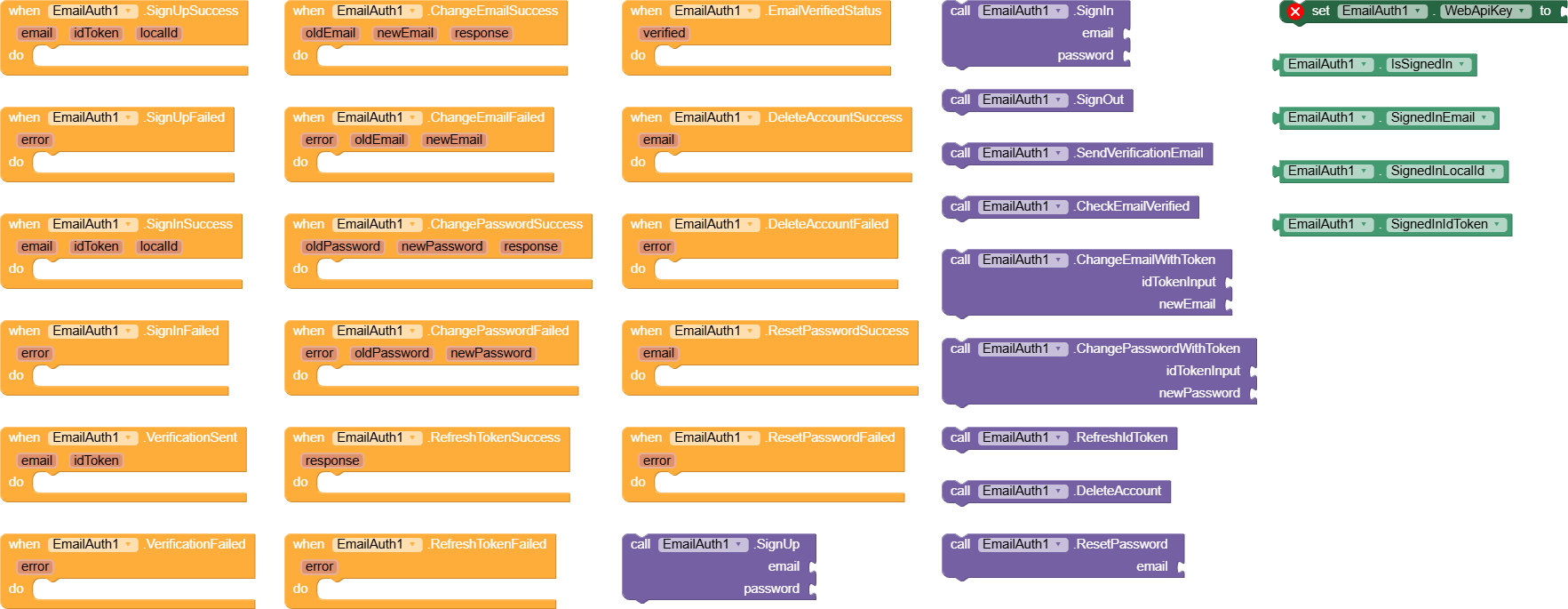
Authentication
Block
Inputs
Output / Event
SignUp(email, password)
Email, Password
Fires SignUpSuccess(email, idToken, localId) or SignUpFailed(errorJson)
SignIn(email, password)
Email, Password
Fires SignInSuccess(email, idToken, localId) or SignInFailed(errorJson)
SendVerificationEmail(idToken)
idToken (from sign in)
Fires VerificationSent(email, idToken) or VerificationFailed(errorJson)
CheckEmailVerificationStatus(idToken)
idToken
Fires EmailVerifiedStatus(verified)
Account Management
Block
Inputs
Output / Event
ChangeEmail(idToken, newEmail)
idToken, newEmail
Fires ChangeEmailSuccess(oldEmail, newEmail, response) or ChangeEmailFailed(errorJson, oldEmail, newEmail)
ChangePassword(idToken, newPassword)
idToken, newPassword
Fires ChangePasswordSuccess(oldPassword, newPassword, response) or ChangePasswordFailed(errorJson, oldPassword, newPassword)
RefreshToken(refreshToken)
Refresh token
Fires RefreshTokenSuccess(responseJson) or RefreshTokenFailed(errorJson)
DeleteAccount(idToken)
idToken
Fires DeleteAccountSuccess(email) or DeleteAccountFailed(errorJson)
SendPasswordResetEmail(email)
Email
Fires ResetPasswordSuccess(email) or ResetPasswordFailed(errorJson)
This extension does not work with phone authentication. Its all about email Auth with every features with minimum effort. its just require API key from firebase to work, google-service.json is not required
Of course, what’s about verified it manually, like creating OTP system, send it to that email, and if user enters correct information, mean that email is a working, I have ever used this functionality
That will not work because if you close the app go to the email, when turning back, u suppose to verify blocks after user verify it in external web, may add verification webview inside you app and catching it’s response, but it needs setup
Else verify it manually, we do verify options, reason it to confirm that the user enter a working email address to avoid abuse, or drama logins, so just set your OTP, but before send it store it inside your app, then send it
Eg 175867, call TinyDB store value 175867. The compare with user inputs, if matches then that email address is working
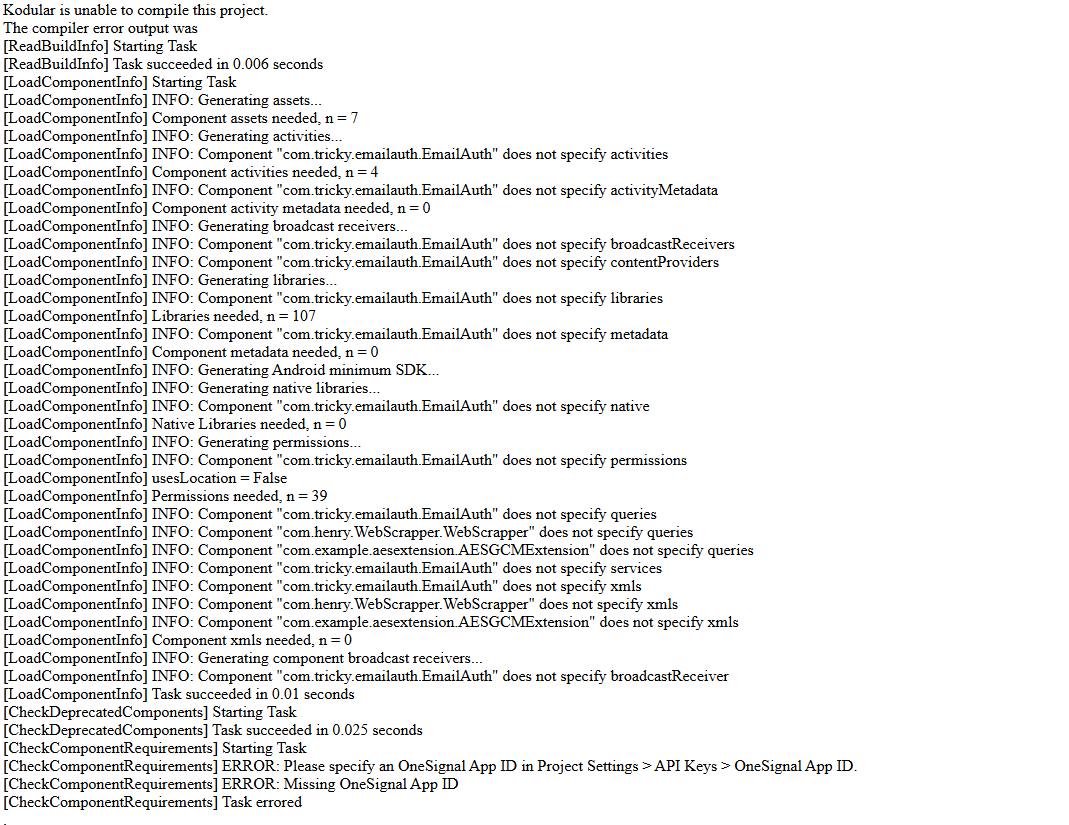
I am using an authentication extension, but when I build it, this error appears.There is no problem in testing with companion. I tried, but it didn’t work. Please help me.
The extension I use: Firebase Email Auth Extension
 Features
 Sign Up / Sign In with Email & Password
 Change Password (requires current ID token)
 Change Email (requires current ID token)
 Refresh ID Token
 Send Email Verification
 Check Email Verification Status
 Delete Account
 Reset Password (send password reset email)
 Exposes both Local ID and ID Token to your blocks
 Blocks
 Events
All
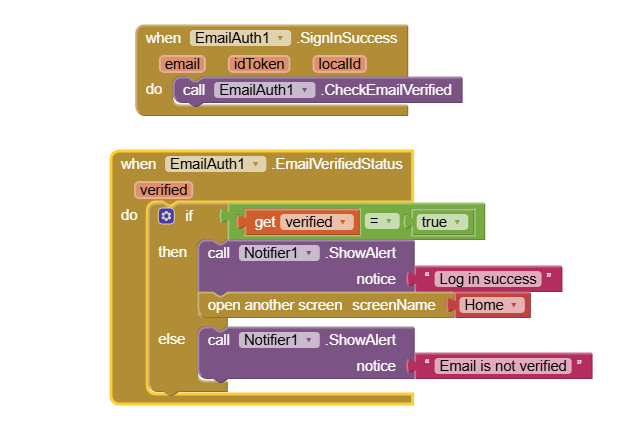
 Usage Example