🧩 OneSignalExtension
An extension for MIT App Inventor 2.Complete OneSignal REST API Extension
 Specifications
 Package: com.jamar.onesignalextension
 Size: 62.63 KB
 Minimum API Level: 14
 Updated On: 2025-12-31T18:30:00Z
 Built & documented using: FAST v5.4.0
Events:
OneSignalExtension has total 25 events.
1. OnNotificationSent
Triggered when notification is sent successfully
| Parameter | Type |
|---|---|
| response | text |
2. OnNotificationViewed
Triggered when notification details are viewed
| Parameter | Type |
|---|---|
| response | text |
3. OnNotificationCanceled
Triggered when notification is canceled
| Parameter | Type |
|---|---|
| response | text |
4. OnNotificationHistoryReceived
Triggered when notification history is received
| Parameter | Type |
|---|---|
| response | text |
5. OnNotificationsListReceived
Triggered when notifications list is received
| Parameter | Type |
|---|---|
| response | text |
6. OnDeviceAdded
Triggered when device is added successfully
| Parameter | Type |
|---|---|
| response | text |
7. OnDeviceEdited
Triggered when device is edited successfully
| Parameter | Type |
|---|---|
| response | text |
8. OnDeviceViewed
Triggered when device details are viewed
| Parameter | Type |
|---|---|
| response | text |
9. OnDevicesListReceived
Triggered when devices list is received
| Parameter | Type |
|---|---|
| response | text |
10. OnDevicesBySegmentReceived
Triggered when devices by segment are received
| Parameter | Type |
|---|---|
| response | text |
11. OnDevicesCountReceived
Triggered when devices count is received
| Parameter | Type |
|---|---|
| response | text |
12. OnDevicesCountBySegmentReceived
Triggered when devices count by segment is received
| Parameter | Type |
|---|---|
| response | text |
13. OnDevicesCSVExport
Triggered when devices CSV export is completed
| Parameter | Type |
|---|---|
| response | text |
14. OnSegmentsReceived
Triggered when segments list is received
| Parameter | Type |
|---|---|
| response | text |
15. OnSegmentCreated
Triggered when segment is created
| Parameter | Type |
|---|---|
| response | text |
16. OnSegmentDeleted
Triggered when segment is deleted
| Parameter | Type |
|---|---|
| response | text |
17. OnAppViewed
Triggered when app details are viewed
| Parameter | Type |
|---|---|
| response | text |
18. OnAppCreated
Triggered when app is created
| Parameter | Type |
|---|---|
| response | text |
19. OnAppUpdated
Triggered when app is updated
| Parameter | Type |
|---|---|
| response | text |
20. OnOutcomesReceived
Triggered when outcomes data is received
| Parameter | Type |
|---|---|
| response | text |
21. OnDeliveryStatsReceived
Triggered when delivery statistics are received
| Parameter | Type |
|---|---|
| response | text |
22. OnOpenTracked
Triggered when notification open is tracked
| Parameter | Type |
|---|---|
| response | text |
23. OnInAppMessageSent
Triggered when in-app message is sent
| Parameter | Type |
|---|---|
| response | text |
24. OnError
Triggered when an error occurs
| Parameter | Type |
|---|---|
| operation | text |
| errorMessage | text |
25. OnApiComplete
Triggered when API call completes
| Parameter | Type |
|---|---|
| operation | text |
| response | text |
Methods:
OneSignalExtension has total 32 methods.
1. Initialize
Initialize OneSignal with App ID and API Key
| Parameter | Type |
|---|---|
| appId | text |
| restApiKey | text |
2. SendNotificationToDevices
Send push notification to specific devices
| Parameter | Type |
|---|---|
| playerIds | text |
| title | text |
| message | text |
| data | text |
3. SendNotificationToSegments
Send push notification to segments
| Parameter | Type |
|---|---|
| segments | text |
| title | text |
| message | text |
| data | text |
4. SendNotificationToAll
Send push notification to all users
| Parameter | Type |
|---|---|
| title | text |
| message | text |
| data | text |
5. SendAdvancedNotification
Send notification with advanced options
| Parameter | Type |
|---|---|
| payloadJson | text |
6. ViewNotification
View notification details
| Parameter | Type |
|---|---|
| notificationId | text |
7. Cancelnotification
Cancel scheduled notificaton
| Parameter | Type |
|---|---|
| notificationId | text |
8. GetNotificationHistory
Get notification history
| Parameter | Type |
|---|---|
| notificationId | text |
| events | text |
| text |
9. GetNotifications
Get notifications list with pagination
| Parameter | Type |
|---|---|
| limit | number |
| offset | number |
10. AddDevice
Add a new device/player
| Parameter | Type |
|---|---|
| deviceType | text |
| identifier | text |
| data | text |
11. EditDevice
Edit an existing device/player
| Parameter | Type |
|---|---|
| playerId | text |
| data | text |
12. ViewDevice
View device/player details
| Parameter | Type |
|---|---|
| playerId | text |
13. GetDevices
Get devices list with pagination
| Parameter | Type |
|---|---|
| limit | number |
| offset | number |
14. GetDevicesBySegment
Get devices by segment
| Parameter | Type |
|---|---|
| segment | text |
15. GetDevicesCount
Get devices count
16. GetDevicesCountBySegment
Get devices count by segment
| Parameter | Type |
|---|---|
| segment | text |
17. ExportDevicesCSV
CSV export of all devices
18. GetSegments
Get all segments
19. CreateSegment
Create a new segment
| Parameter | Type |
|---|---|
| name | text |
| filters | text |
20. DeleteSegment
Delete a segment
| Parameter | Type |
|---|---|
| segmentId | text |
21. ViewApp
View app details
22. CreateApp
Create a new app
| Parameter | Type |
|---|---|
| name | text |
| apnsEnv | text |
| gcmKey | text |
23. UpdateApp
Update app settings
| Parameter | Type |
|---|---|
| settings | text |
24. GetOutcomes
Get outcomes data
| Parameter | Type |
|---|---|
| outcomeNames | text |
| outcomeNames2 | text |
| outcomeTimeRange | text |
| outcomePlatforms | text |
| outcomeAttribution | text |
25. GetDeliveryStats
Get delivery statistics
26. TrackNotificationOpen
Track notification open
| Parameter | Type |
|---|---|
| notificationId | text |
| playerId | text |
27. SendInAppMessage
Send in-app message
| Parameter | Type |
|---|---|
| playerIds | text |
| message | text |
28. CreateNotificationPayload
Create notification payload JSON
- Return type:
text
| Parameter | Type |
|---|---|
| includedSegments | text |
| includedPlayerIds | text |
| title | text |
| message | text |
| data | text |
| url | text |
| iosBadgeCount | text |
| iosSound | text |
| androidSound | text |
| smallIcon | text |
| largeIcon | text |
| bigPicture | text |
| sendAfter | text |
29. CreateDeviceData
Create device data JSON
- Return type:
text
| Parameter | Type |
|---|---|
| identifier | text |
| language | text |
| timezone | number |
| gameVersion | text |
| deviceModel | text |
| deviceOS | text |
| adId | text |
| sdk | text |
| sessionCount | number |
| tags | text |
| amountSpent | number |
| createdAt | number |
| playtime | number |
| badgeCount | number |
| lastActive | number |
| notificationTypes | number |
30. ExtractPlayerId
Extract player ID from response
- Return type:
text
| Parameter | Type |
|---|---|
| response | text |
31. ExtractNotificationId
Extract notification ID from response
- Return type:
text
| Parameter | Type |
|---|---|
| response | text |
32. IsSuccess
Check if operation was successful
- Return type:
boolean
| Parameter | Type |
|---|---|
| response | text |
Setters:
OneSignalExtension has total 3 setter properties.
1. AppId
Set OneSignal App ID
- Input type:
text
2. RestApiKey
Set OneSignal REST API Key
- Input type:
text
3. UserAuthKey
Set OneSignal User Auth Key
- Input type:
text
Blocks
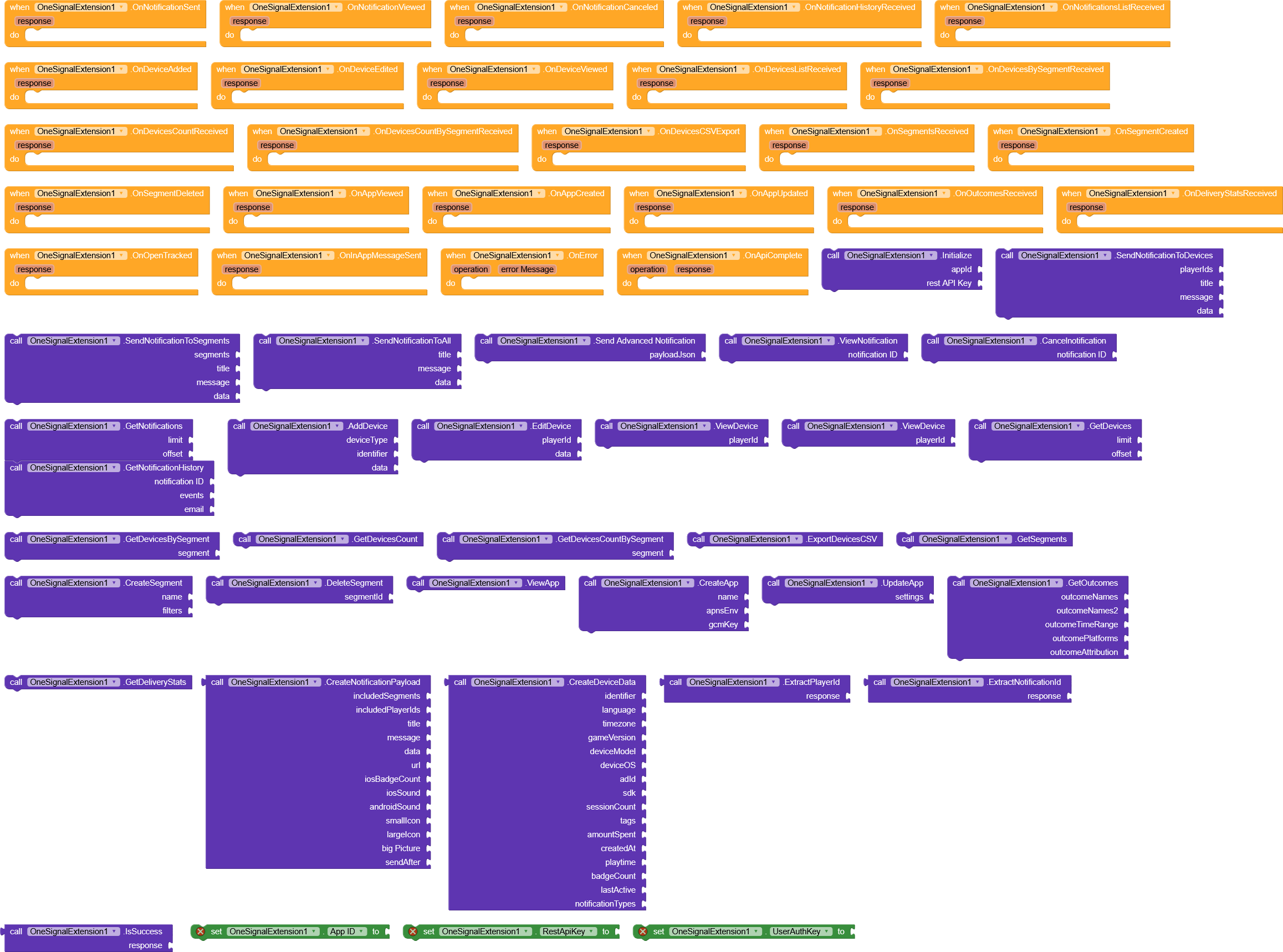
 Use Case
The OneSignalExtension is ideal for developers building apps on MIT App Inventor 2 or Kodular who want to implement push notifications, in-app messages, and user/device management without writing complex server-side code. Typical use cases include,
- Sending targeted notifications to specific devices or user segments.
- Tracking notification opens and delivery statistics.
- Managing devices, segments, and app data programmatically.
- Creating automated campaigns using the REST API.
- Exporting device data for analytics or integration with other services.
 Why Choose This AIX
- Complete REST API Integration – Covers 70% OneSignal REST API functionalities including notifications, devices, segments, and apps.
- Easy to Use – Provides 32 methods and 25 events, simplifying complex API calls into simple blocks.
- Flexible – Supports sending notifications to single devices, segments, or all users.
- Data Extraction – Includes helper methods like
ExtractPlayerIdandExtractNotificationId. - Cross-Platform Support – Works seamlessly with MIT App Inventor 2 and Kodular.
- No Server Needed – Everything is handled directly from the app using the REST API.
- Reliable CLI-built AIX – Built with FAST CLI, ensuring consistent structure and compatibility.
 Acknowledgment
Special thanks to @Jewel for the amazing FAST CLI AIX builder, which made this extension development smooth and reliable. Thanks also to @RaYzZz and @Still-learning for providing guidance and assisting with troubleshooting folder structure issues
 Note
Note
No examples are included for now, so if you encounter any issues, feel free to ask in this thread .
.
For data and values, you can see here.
Download v2
com.jamar.onesignalextension.aix (40.8 KB)
OneSignal AIX — Version 3 (v3) Changelog
 Release Overview
Version 3 is a major milestone release that completes OneSignal REST API integration, introducing full support for Templates, Users, Custom Events, and Live Activities.
🔔 Notification Templates (NEW – Full Support)
Added Functions
CreateTemplate– Create reusable notification templatesUpdateTemplate– Update existing templatesGetTemplates– Fetch all templatesGetTemplate– Retrieve a template by IDDeleteTemplate– Delete a template permanentlySendNotificationWithTemplate– Send notifications using templatesCreateTemplateJson– Utility for generating valid template JSON
Added Events
OnTemplateCreatedOnTemplateUpdatedOnTemplatesReceivedOnTemplateReceivedOnTemplateDeletedOnNotificationWithTemplateSent
Notes
- Supports dynamic variables
- Reduces payload duplication
- Fully aligned with OneSignal Template API
👤 Users & Identity Management (COMPLETED)
Added Functions
CreateUserGetUserByExternalIdUpdateUserDeleteUserGetUserSubscriptionStatusGetUserIdentityAddUserAliasRemoveUserAliasGetUserDevices
Added Events
OnUserCreatedOnUserReceivedOnUserUpdatedOnUserDeletedOnUserSubscriptionStatusReceivedOnUserIdentityReceivedOnUserAliasAddedOnUserAliasRemovedOnUserDevicesReceived
Notes
- Implements modern OneSignal Users API
- Supports multi-device users
- External User ID is now first-class
📊 Custom Events (COMPLETED)
Capabilities
- Send custom user events
- Attach event properties
- Trigger OneSignal journeys and automation
- Track advanced user behavior
Notes
- Enables event-driven notifications
- Improves analytics and segmentation
🟢 Live Activities (COMPLETED)
Capabilities
- Start Live Activities
- Update Live Activity state
- End Live Activities
- Real-time notification updates
Notes
- Ideal for delivery tracking, live scores, progress updates
- Compatible with OneSignal Live Activity workflows
⚙️ Internal Improvements
- Improved background thread handling
- Centralized
OnErrorreporting - Safer JSON parsing
- Better REST request stability
- Optimized for Kodular runtime
⚠️ Important Notes / Breaking Changes
- Fully migrated to OneSignal Users API
- Legacy player-only workflows are deprecated
- External User ID is required for most operations
- REST API Key must be configured correctly
Final Summary
v3 completes the OneSignal API implementation, making this extension suitable for production-grade notification systems with templates, users, events, and live updates.
New added blocks and aix file
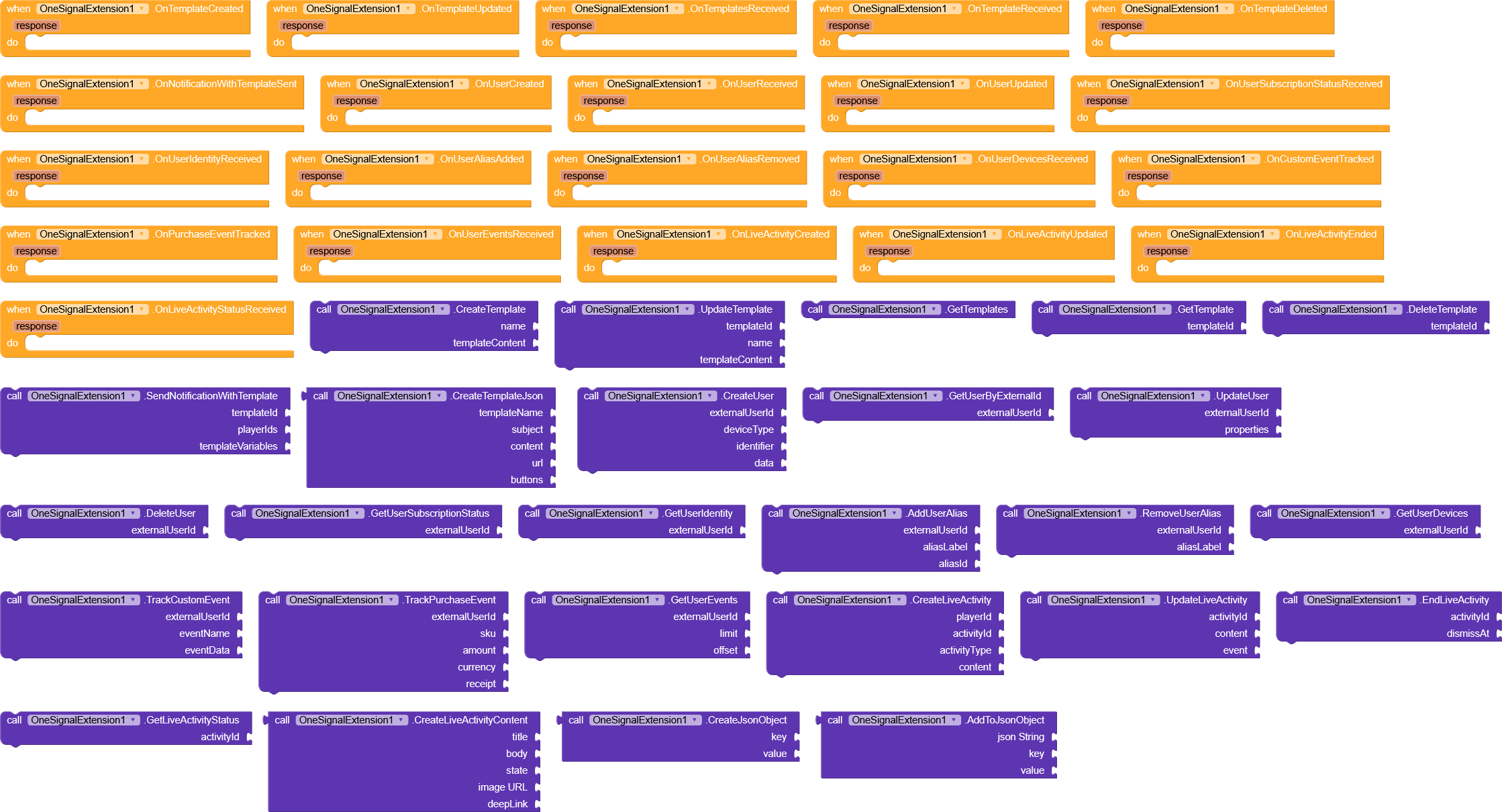
Download v3
com.jamar.onesignalextension.onesignalextension.aix (62.6 KB)

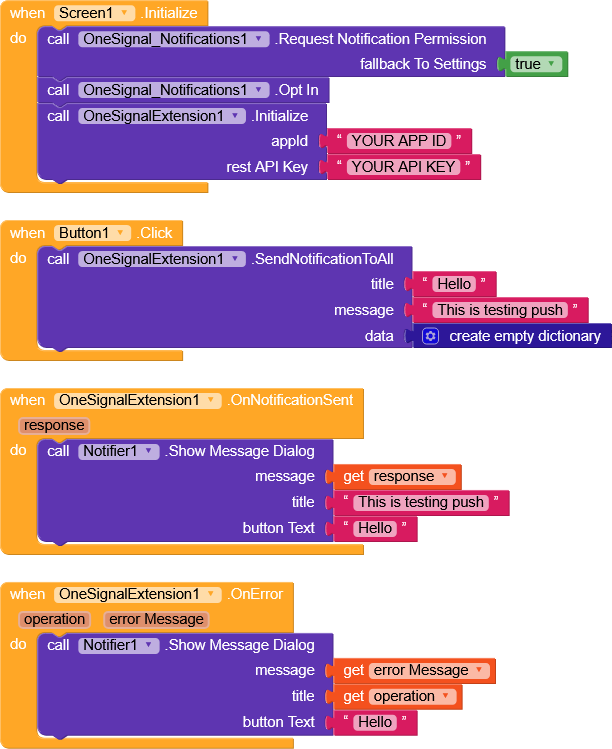


 Amazing keep it up Mr Man, BTW happy new year to you Ibrahim and all koders.
 These are email, password, login