🧩 AirtablePro
An extension for KodularAirtable Pro – Full featured extension
 Specifications
 Package: com.jsr.airtablepro
 Size: 46.53 KB
 Minimum API Level: 14
 Updated On: 2025-12-10T18:30:00Z
 Built & documented using: FAST v5.2.0-premium
Extension V1 : com.jsr.airtablepro_v2.0.aix (46.5 KB)
Special Thanks to @JEWEL for his wounderful platform for building extension
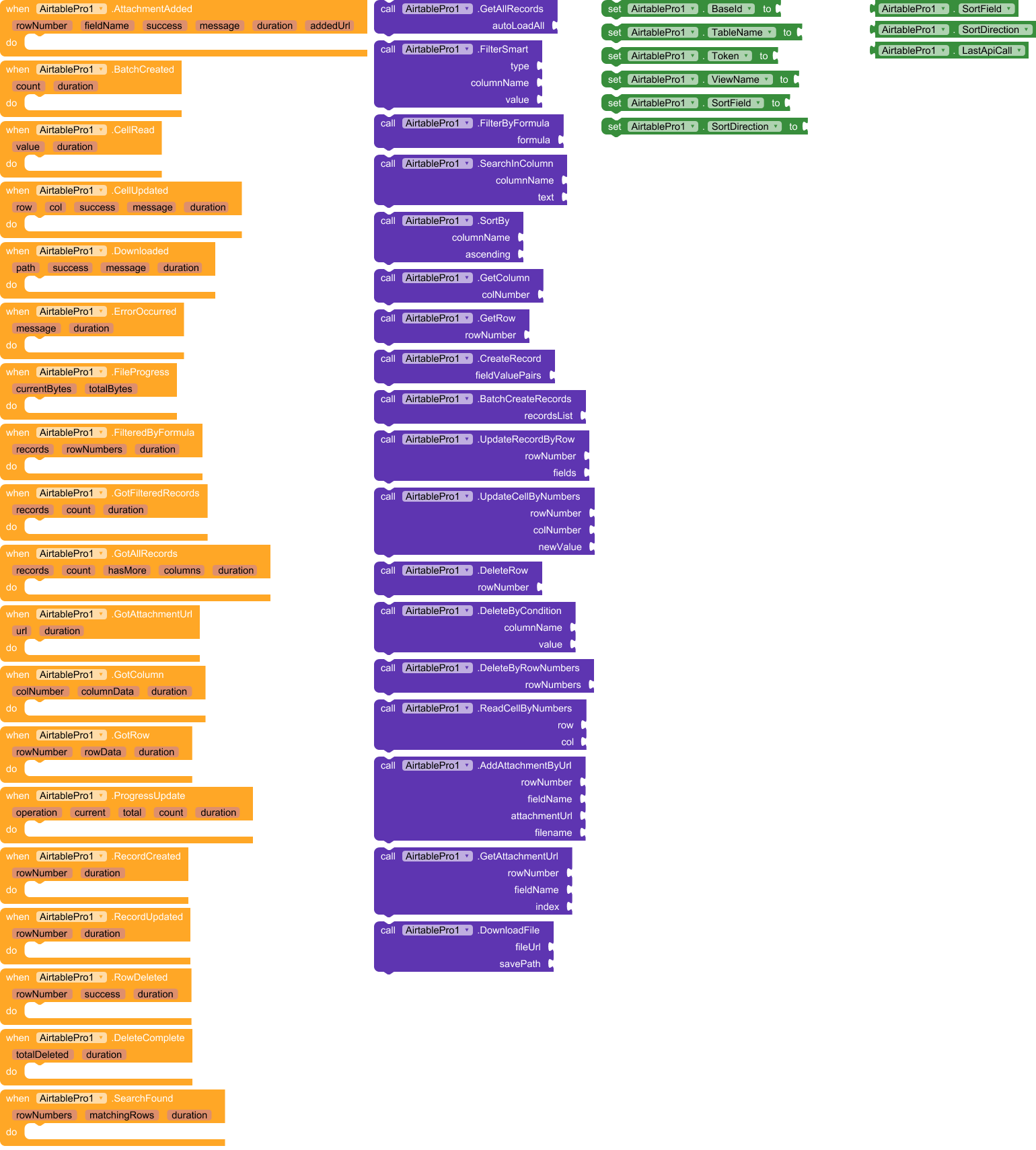
Events:
Say goodbye to complex API integrations and hello to seamless Airtable connectivity! AirtablePro is a powerful, user-friendly extension that lets you create, read, update, delete, search, filter, sort, and manage your Airtable data directly from your app — all with simple drag-and-drop blocks. Whether you’re building a to-do list, inventory tracker, CRM, or data dashboard, AirtablePro gives you full control over your Airtable base with real-time feedback, progress tracking, error handling, and precise cell-level operations
Absolutely! Below is a comprehensive user guide for your AirtablePro extension, tailored for Kodular and MIT App Inventor users.
This guide explains exactly how to use each function — including which blocks to use, how to structure lists, and what data types to provide.
 AirtablePro User Guide
For Kodular & MIT App Inventor
 Prerequisites
- Create an Airtable account and a Base (database).
- Get your Base ID (from URL:
https://airtable.com/appXXXXXXXXXXXXXX/...) - Generate a Personal Access Token (PAT) from Airtable Account Settings
- Add the
AirtableProextension to your project
 Set Up Your Component (Designer View)
| Property | How to Set | Example |
|---|---|---|
BaseId |
Text block | "appXXXXXXXXXXXXXX" |
TableName |
Text block | "Tasks" |
Token |
Text block | "patXXXXXXXXXXXXXXXXXXXX" |
ViewName |
(Optional) Text block | "Grid view" |
Tip: Store these in variables so you can change them easily.
 Core Functions & Block Setup
1. GetAllRecords(autoLoadAll)
Purpose: Fetch all records from your table.
| Parameter | Block Type | Example |
|---|---|---|
autoLoadAll |
Boolean | true (to get all pages) or false (first 100 only) |
How to use:
- Use a
call AirtablePro.GetAllRecordsblock - Handle result in
GotAllRecordsevent:records: List of rows (each row is a list)columns: List of column names
Note: Row 1 = ID + all field values. Column 1 = Record ID (you can ignore it).
2. FilterByFormula(formula)
Purpose: Filter using Airtable formula logic.
| Parameter | Block Type | Example |
|---|---|---|
formula |
Text | "{Status}='Done'" or "FIND('John', {Name})>0" |
How to use:
- Use
call AirtablePro.FilterByFormulawith a text block - Handle result in
FilteredByFormulaevent
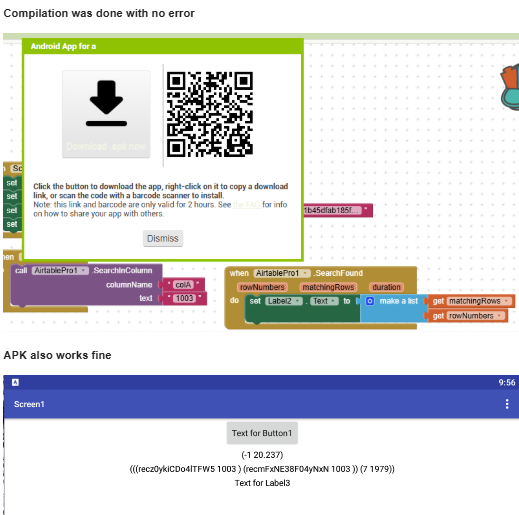
3. SearchInColumn(columnName, text)
Purpose: Find rows where a column contains text.
| Parameter | Block Type | Example |
|---|---|---|
columnName |
Text | "Name" |
text |
Text | "John" |
How to use:
- Use
call AirtablePro.SearchInColumn("Name", "John") - Handles case-insensitive search automatically
- Result in
SearchFoundevent → returns row numbers and matching rows
4. CreateRecord(fieldValuePairs)
Purpose: Add a new record.
| Parameter | Block Type | How to Build |
|---|---|---|
fieldValuePairs |
List of Lists | Use make a list → inside, add make a list for each field |
Example:
make a list
  └── make a list
        ├── "Name"
        └── "John"
  └── make a list
        ├── "Age"
        └── "30"
RecordCreated(rowNumber, duration)
5. UpdateRecordByRow(rowNumber, fields)
Purpose: Update an entire row.
| Parameter | Block Type | Example |
|---|---|---|
rowNumber |
Number | 5 |
fields |
List of Lists | Same format as CreateRecord |
Example:
UpdateRecordByRow
  ├── 5
  └── make a list
        ├── make a list → ["Status", "Done"]
        └── make a list → ["Priority", "High"]
Validation: Field names must match your Airtable column names exactly
6. UpdateCellByNumbers(row, col, newValue)
Purpose: Update a single cell.
| Parameter | Block Type | Example |
|---|---|---|
row |
Number | 3 |
col |
Number | 2 (1 = first data column, not Record ID) |
newValue |
Text | "Completed" |
7. ReadCellByNumbers(row, col)
Purpose: Read a single cell value.
| Parameter | Block Type | Example |
|---|---|---|
row |
Number | 4 |
col |
Number | 1 |
Result:
CellRead(value, duration)→valueis text
8. DeleteRow(rowNumber)
Purpose: Delete a row.
| Parameter | Block Type | Example |
|---|---|---|
rowNumber |
Number | 7 |
9. BatchCreateRecords(recordsList)
Purpose: Create up to 10 records at once (faster).
| Parameter | Block Type | Structure |
|---|---|---|
recordsList |
List of Records | Each record = make a list of field pairs |
Example:
make a list
  └── make a list
        ├── make a list → ["Name", "Alice"]
        └── make a list → ["Age", "25"]
  └── make a list
        ├── make a list → ["Name", "Bob"]
        └── make a list → ["Age", "30"]
BatchCreated(count, duration)
10. GetRow(rowNumber) & GetColumn(colNumber)
GetRow(3)→ returns clean row data (no Record ID)GetColumn(2)→ returns entire column as a list
| Parameter | Block Type |
|---|---|
rowNumber / colNumber |
Number |
GotRowandGotColumn
11. SortBy(columnName, ascending)
Purpose: Sort records.
| Parameter | Block Type | Example |
|---|---|---|
columnName |
Text | "Due Date" |
ascending |
Boolean | false (for descending) |
GotAllRecordswith sorted data
 Events: How to Handle Results
All events include duration (in seconds). Always use:
when AirtablePro.GotAllRecords
  ├── records → set to a global variable
  ├── columns → use to build column headers
  └── duration → show "Loaded in 2.3 sec"
Key Events:
| Event | Returns |
|---|---|
GotAllRecords |
Full table data |
FilteredByFormula |
Filtered records + row numbers |
RecordCreated |
New row number |
CellRead |
Cell value |
ProgressUpdate |
For large operations: (operation, currentPage, totalPages, recordsSoFar, duration) |
ErrorOccurred |
Always check this! Shows API errors |
 Pro Tips for Users
Building Lists Correctly
- Use
make a listblock (notjoin) - For field-value pairs, nest lists:
make a list
  └── make a list → [field, value]
Handling Large Tables
- Use
autoLoadAll = falsefor quick previews - Use
ProgressUpdateto show loading status
Debugging
- Check
LastApiCallproperty → copy URL into browser to test - Always handle
ErrorOccurred— Airtable returns clear error messages
Column Numbers
- 1 = first data column (Record ID is hidden in clean functions)
- Use
GotAllRecords→columnsto see column order
 Example: Create a New Task
when Button.CreateTask click
  call AirtablePro.CreateRecord
    └── make a list
          ├── make a list → ["Task", "Buy groceries"]
          └── make a list → ["Status", "Pending"]

when AirtablePro.RecordCreated
  └── show "New task at row " + rowNumber
 Common Mistakes to Avoid
| Mistake | Fix |
|---|---|
| Using wrong column name | Check GotAllRecords → columns |
Forgetting to set Token |
Set in Designer or via block |
Using " instead of ' in formulas |
Airtable formulas use 'single quotes' |
| Assuming row 1 = first data row | Row numbers are 1-based and include all records |
 Final Advice
Start small: Use
GetAllRecords→ display in aListView
ErrorOccurred— it shows exactly what went wrong!
FilterByFormula usage table
- Name given inside { and } are the field names. In the below table the table field (table headers) names used are Name, Age, Status, Email etc.,
Clean, Copy-Paste Ready Table
| Purpose | Formula String (paste exactly) |
|---|---|
| Name = “John” | {Name} = 'John' |
| Age > 25 | {Age} > 25 |
| Status is “Done” OR “Pending” | OR({Status}='Done', {Status}='Pending') |
| Name contains “alex” (case insensitive) | FIND('alex', LOWER({Name})) > 0 |
| Email ends with @gmail.com | RIGHT({Email}, 10) = '@gmail.com' |
| Date is today | IS_SAME({Date}, TODAY()) |
| Date is in last 7 days | DATETIME_DIFF(TODAY(), {Date}, 'days') <= 7 |
| Cell is blank | {Priority} = BLANK() |
| Cell is NOT blank | {Priority} != BLANK() |
| Multiple conditions | AND({Age} >= 18, {Country} = 'India', {Active} = 1) |
| Name starts with “A” | LEFT({Name}, 1) = 'A' |
