🧩 FirebaseDatabaseExtended
An extension for MIT App Inventor 2.Firebase Realtime Database Extension using REST API. Developed by Jamar using Fast.
 Overview
FirebaseDatabaseExtended is a lightweight yet powerful extension designed to simplify and standardize Firebase Realtime Database interactions in MIT App Inventor–based environments.
It addresses inconsistencies observed in the default Firebase component and introduces structured JSON handling, controlled data merging, synchronous and asynchronous access methods, and improved error reporting.
This extension is particularly suited for developers who require,
- Deterministic key–value storage (non-list-based)
- JSON-to-dictionary mapping
- Append/merge operations without overwriting existing data
- Explicit success and error callbacks
 Specifications
- Package:
com.firebaseextended.oi.firebasedatabaseextended - Extension Size: 20.04 KB
- Minimum Android API Level: 14
- Last Updated: 2026-01-26
- Built & Documented Using:
FAST – Fast and Simple Extensions Toolchain Version 5.4.0
 Events
FirebaseDatabaseExtended exposes a total of 5 events:
1. OnStoreSuccess
Triggered when data is successfully stored in Firebase.
| Parameter | Type |
|---|---|
| path | text |
2. OnAppendSuccess
Triggered when data is successfully appended or merged at a Firebase path.
| Parameter | Type |
|---|---|
| path | text |
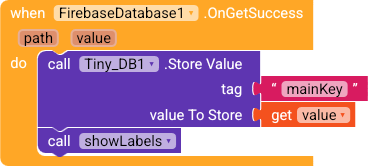
3. OnGetSuccess
Triggered when data is successfully retrieved from Firebase.
| Parameter | Type |
|---|---|
| path | text |
| value | text |
4. OnError
Triggered when an error occurs during any Firebase operation.
| Parameter | Type |
|---|---|
| functionName | text |
| errorMessage | text |
5. OnConnectionTestComplete
Triggered after a Firebase connectivity test completes.
| Parameter | Type |
|---|---|
| success | boolean |
| message | text |
 Methods
FirebaseDatabaseExtended provides 12 methods:
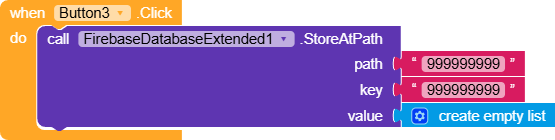
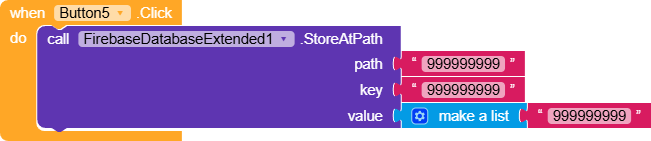
1. StoreAtPath
Stores a single key–value pair at a specified Firebase path.
Existing data at that path is overwritten.
| Parameter | Type |
|---|---|
| path | text |
| key | text |
| value | any |
2. StoreValueFromJSON
Parses a JSON string and stores all key–value pairs at the specified path.
Example JSON:
{"name":"John","age":25}
| Parameter | Type |
|---|---|
| path | text |
| jsonText | text |
3. AppendAtPath
Adds or updates a single key–value pair without overwriting other data at the same path.
| Parameter | Type |
|---|---|
| path | text |
| key | text |
| value | any |
4. AppendFromJSON
Parses a JSON string and merges all key–value pairs with existing data.
| Parameter | Type |
|---|---|
| path | text |
| jsonText | text |
5. GetValue
Retrieves a specific value by key from a Firebase path.
Returns an empty string if the key does not exist.
| Parameter | Type |
|---|---|
| path | text |
| key | text |
6. GetAllValues
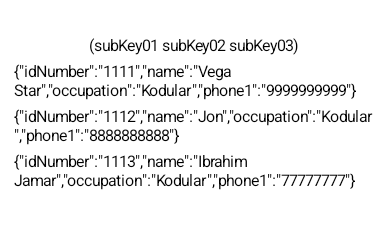
Retrieves all key–value pairs at a Firebase path as a JSON string.
| Parameter | Type |
|---|---|
| path | text |
7. DeleteAtPath
Deletes all data at the specified Firebase path.
| Parameter | Type |
|---|---|
| path | text |
8. TestConnection
Tests the current Firebase configuration and connectivity.
9. ValidateJSON
Checks whether the provided text is a valid JSON string.
- Return type:
boolean
| Parameter | Type |
|---|---|
| jsonText | text |
10. CreateJSON
Generates a JSON string from multiple key–value pairs.
Example:
CreateJSON("name", "John", "age", 25)
- Return type:
text
| Parameter | Type |
|---|---|
| keyValuePairs | any |
11. GetValueSync
Synchronously retrieves a value from Firebase.
 Blocks execution until a response is received; use cautiously to avoid UI freezes.
- Return type:
text
| Parameter | Type |
|---|---|
| path | text |
| key | text |
12. GetAllValuesSync
Synchronously retrieves all values at a Firebase path as a JSON string.
- Return type:
text
| Parameter | Type |
|---|---|
| path | text |
 Designer Properties
FirebaseDatabaseExtended includes 3 designer properties:
1. FirebaseDatabaseUrl
- Type:
string - Default:
https://your-project.firebaseio.com/
2. FirebaseApiKey
- Type:
string
3. ProjectIdBucket
- Type:
string
 Setter Properties
FirebaseDatabaseUrl
The Firebase Realtime Database URL.
Must end with a trailing slash (/).
FirebaseApiKey
Your Firebase Web API Key
(Firebase Console → Project Settings → Web API Key).
ProjectIdBucket
Optional project ID bucket.
Typically not required for standard operations.
 Getter Properties
Each getter returns the currently configured value:
FirebaseDatabaseUrl→textFirebaseApiKey→textProjectIdBucket→text
Blocks

AIX
com.firebaseextended.oi.firebasedatabaseextended.aix (20.0 KB)
 Acknowledgements & Notes
This extension was created to mitigate inconsistent behavior observed in the default Firebase component.
Special thanks to @jewel for the Fast CL
, which significantly simplifies extension development and publishing, thank to @curious_singh for this thread, it boosted something 
Quick sample usage
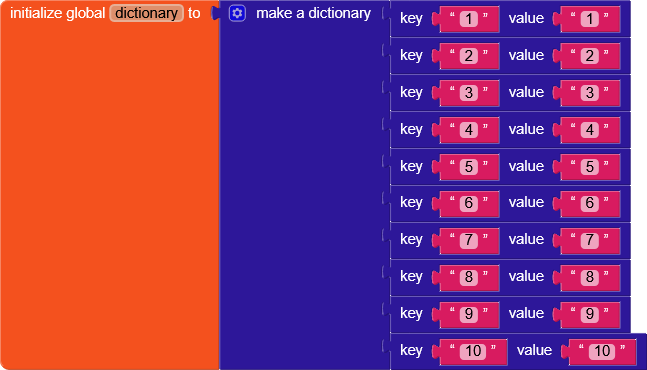

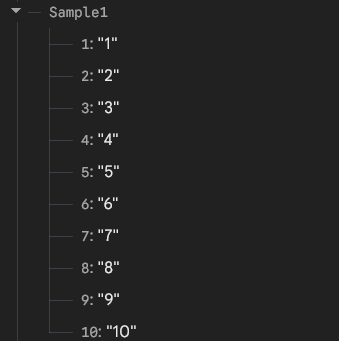
Additional features and improvements are planned and will be released in upcoming updates.
 FirebaseDatabaseExtended v6 – Major Update
📄 DOCS
🧩 FirebaseDatabaseExtended
An extension for MIT App Inventor 2.Complete Firebase Realtime Database Extension using REST API. Now with realtime listeners, offline queue, and advanced utilities. Developed by Jamar.
Specifications
 Package: com.firebaseextended.oi.firebasedatabaseextended
 Size: 49.23 KB
 Minimum API Level: 14
 Updated On: 2026-06-15T22:00:00Z
 Built & documented using: FAST v6.0.0
Events:
FirebaseDatabaseExtended has total 16 events.
1. OnStoreSuccess
Triggered when data is successfully stored.
| Parameter | Type |
|---|---|
| path | text |
2. OnAppendSuccess
Triggered when data is successfully appended.
| Parameter | Type |
|---|---|
| path | text |
3. OnGetSuccess
Triggered when data is successfully retrieved.
| Parameter | Type |
|---|---|
| path | text |
| value | text |
4. OnDeleteSuccess
Triggered when data is successfully deleted.
| Parameter | Type |
|---|---|
| path | text |
5. OnPushSuccess
Triggered when data is successfully pushed with unique key.
| Parameter | Type |
|---|---|
| path | text |
| key | text |
6. OnQuerySuccess
Triggered when a query operation completes successfully.
| Parameter | Type |
|---|---|
| path | text |
| results | text |
7. OnBatchSuccess
Triggered when batch operation completes successfully.
| Parameter | Type |
|---|---|
| operation | text |
| count | number |
8. OnTransactionSuccess
Triggered when a transaction/counter operation completes.
| Parameter | Type |
|---|---|
| path | text |
| newValue | text |
9. OnConnectionChanged
Triggered when connection status changes.
| Parameter | Type |
|---|---|
| isConnected | boolean |
10. OnError
Triggered when any error occurs.
| Parameter | Type |
|---|---|
| functionName | text |
| errorMessage | text |
11. DataChanged
Fired when data at a path changes (realtime listener).
| Parameter | Type |
|---|---|
| path | text |
| value | text |
12. ChildAdded
Fired when a child is added (realtime listener).
| Parameter | Type |
|---|---|
| path | text |
| value | text |
13. ChildRemoved
Fired when a child is removed (realtime listener).
| Parameter | Type |
|---|---|
| path | text |
14. ChildChanged
Fired when a child is changed (realtime listener).
| Parameter | Type |
|---|---|
| path | text |
| value | text |
15. ConnectionStatus
Fired in response to GetConnectionStatus().
| Parameter | Type |
|---|---|
| online | boolean |
16. PingResult
Fired in response to PingDatabase() with latency in ms.
| Parameter | Type |
|---|---|
| latencyMs | number |
Methods:
FirebaseDatabaseExtended has total 77 methods.
1. StoreAtPath
Stores a single key-value pair at the specified path.
| Parameter | Type |
|---|---|
| path | text |
| key | text |
| value | any |
2. StoreValue
Stores a value at root path (convenience method).
| Parameter | Type |
|---|---|
| key | text |
| value | any |
3. StoreValueFromJSON
Parses JSON and stores all key-value pairs at the specified path.
| Parameter | Type |
|---|---|
| path | text |
| jsonText | text |
4. AppendAtPath
Appends/updates a key-value pair without overwriting other data.
| Parameter | Type |
|---|---|
| path | text |
| key | text |
| value | any |
5. AppendValue
Appends a value at root path (convenience method).
| Parameter | Type |
|---|---|
| key | text |
| value | any |
6. AppendFromJSON
Parses JSON and merges key-value pairs with existing data.
| Parameter | Type |
|---|---|
| path | text |
| jsonText | text |
7. MergeValue
Merges a single key-value pair.
| Parameter | Type |
|---|---|
| path | text |
| key | text |
| value | any |
8. MergeFromJSON
Merges multiple key-value pairs from JSON with existing data.
| Parameter | Type |
|---|---|
| path | text |
| jsonText | text |
9. GetValueAtPath
Gets a specific value by key from the specified path.
| Parameter | Type |
|---|---|
| path | text |
| key | text |
10. GetValue
Gets a value from root path (convenience method).
| Parameter | Type |
|---|---|
| key | text |
11. GetAllAtPath
Gets all key-value pairs from the specified path.
| Parameter | Type |
|---|---|
| path | text |
12. GetAllValues
Gets all values from root path (convenience method).
13. DeleteAtPath
Deletes a specific key from the specified path.
| Parameter | Type |
|---|---|
| path | text |
| key | text |
14. DeleteValue
Deletes a value from root path (convenience method).
| Parameter | Type |
|---|---|
| key | text |
15. ClearPath
Clears all data at the specified path.
| Parameter | Type |
|---|---|
| path | text |
16. DeleteMultiplePaths
Deletes multiple paths specified in JSON array.
| Parameter | Type |
|---|---|
| pathsJson | text |
17. PushValue
Pushes a value with auto-generated unique key.
| Parameter | Type |
|---|---|
| path | text |
| value | any |
18. PushFromJSON
Pushes JSON data with auto-generated unique key.
| Parameter | Type |
|---|---|
| path | text |
| jsonText | text |
19. GeneratePushKey
Generates a Firebase-style push ID.
- Return type:
text
20. StoreMultiple
Stores multiple key-value pairs in a batch operation.
| Parameter | Type |
|---|---|
| path | text |
| jsonText | text |
21. UpdateMultiple
Updates multiple key-value pairs in a batch.
| Parameter | Type |
|---|---|
| path | text |
| jsonText | text |
22. GetMultiple
Gets values from multiple paths.
| Parameter | Type |
|---|---|
| pathsJson | text |
23. DeleteMultiple
Deletes multiple keys from a path.
| Parameter | Type |
|---|---|
| path | text |
| keysJson | text |
24. GetList
Gets data as a list from the specified path.
| Parameter | Type |
|---|---|
| path | text |
25. AppendToList
Appends a value to a list at the specified path.
| Parameter | Type |
|---|---|
| path | text |
| value | any |
26. RemoveFromList
Removes an item by key from a list.
| Parameter | Type |
|---|---|
| path | text |
| key | text |
27. RemoveFirstFromList
Removes the first item from a list.
| Parameter | Type |
|---|---|
| path | text |
28. RemoveLastFromList
Removes the last item from a list.
| Parameter | Type |
|---|---|
| path | text |
29. GetListItem
Gets a specific item from a list by key.
| Parameter | Type |
|---|---|
| path | text |
| key | text |
30. SetListItem
Sets/updates a specific item in a list.
| Parameter | Type |
|---|---|
| path | text |
| key | text |
| value | any |
31. ListLength
Gets the number of items in a list.
| Parameter | Type |
|---|---|
| path | text |
32. ListContains
Checks if a list contains a specific value.
| Parameter | Type |
|---|---|
| path | text |
| value | text |
33. FilterList
Filters a list based on a search term.
| Parameter | Type |
|---|---|
| path | text |
| searchTerm | text |
34. SortList
Sorts a list by keys or values.
| Parameter | Type |
|---|---|
| path | text |
| sortBy | text |
35. JsonToDictionary
Converts JSON text to App Inventor Dictionary.
- Return type:
dictionary
| Parameter | Type |
|---|---|
| jsonText | text |
36. DictionaryToJson
Converts App Inventor Dictionary to JSON text.
- Return type:
text
| Parameter | Type |
|---|---|
| dict | dictionary |
37. GetDictValue
Gets a value from a dictionary by key.
- Return type:
text
| Parameter | Type |
|---|---|
| dict | dictionary |
| key | text |
38. SetDictValue
Sets a value in a dictionary.
- Return type:
dictionary
| Parameter | Type |
|---|---|
| dict | dictionary |
| key | text |
| value | any |
39. RemoveDictKey
Removes a key from a dictionary.
- Return type:
dictionary
| Parameter | Type |
|---|---|
| dict | dictionary |
| key | text |
40. DictContainsKey
Checks if a dictionary contains a key.
- Return type:
boolean
| Parameter | Type |
|---|---|
| dict | dictionary |
| key | text |
41. MergeDictionaries
Merges multiple dictionaries.
- Return type:
dictionary
| Parameter | Type |
|---|---|
| dict1 | dictionary |
| dict2 | dictionary |
42. GetNestedDictValue
Gets a nested value from a dictionary using dot notation.
- Return type:
text
| Parameter | Type |
|---|---|
| dict | dictionary |
| path | text |
43. SetNestedDictValue
Sets a nested value in a dictionary using dot notation.
- Return type:
dictionary
| Parameter | Type |
|---|---|
| dict | dictionary |
| path | text |
| value | any |
44. FlattenDictionary
Flattens a nested dictionary to single level with dot notation keys.
- Return type:
dictionary
| Parameter | Type |
|---|---|
| dict | dictionary |
45. QueryByKey
Queries data by specific key.
| Parameter | Type |
|---|---|
| path | text |
| key | text |
46. QueryByValue
Queries data by specific value.
| Parameter | Type |
|---|---|
| path | text |
| value | text |
47. QueryStartsWith
Queries data where keys start with a prefix.
| Parameter | Type |
|---|---|
| path | text |
| prefix | text |
48. QueryEndsWith
Queries data where keys end with a suffix.
| Parameter | Type |
|---|---|
| path | text |
| suffix | text |
49. QueryEquals
Queries data where key equals specific value.
| Parameter | Type |
|---|---|
| path | text |
| key | text |
| value | text |
50. QueryLimit
Queries data with limit on number of results.
| Parameter | Type |
|---|---|
| path | text |
| limit | number |
51. AdvancedQuery
Advanced query with filters. Pass empty strings for unused filters.
| Parameter | Type |
|---|---|
| path | text |
| orderBy | text |
| equalTo | text |
| startAt | text |
| endAt | text |
| limitToFirst | number |
| limitToLast | number |
52. NormalizePath
Normalizes a Firebase path (removes extra slashes).
- Return type:
text
| Parameter | Type |
|---|---|
| path | text |
53. JoinPath
Joins multiple path segments into a single path.
- Return type:
text
| Parameter | Type |
|---|---|
| segments | any |
54. SplitPath
Splits a path into its segments.
- Return type:
list
| Parameter | Type |
|---|---|
| path | text |
55. GetChildKeys
Gets all child keys at a path.
| Parameter | Type |
|---|---|
| path | text |
56. GetChildCount
Gets the number of children at a path.
| Parameter | Type |
|---|---|
| path | text |
57. IncrementValue
Increments a numeric value at the specified path.
| Parameter | Type |
|---|---|
| path | text |
| key | text |
| amount | number |
58. DecrementValue
Decrements a numeric value at the specified path.
| Parameter | Type |
|---|---|
| path | text |
| key | text |
| amount | number |
59. CompareAndSet
Compares current value and sets new value if they match.
| Parameter | Type |
|---|---|
| path | text |
| key | text |
| expectedValue | text |
| newValue | text |
60. StartListener
Start listening to changes at a path. Events: DataChanged, ChildAdded, ChildRemoved, ChildChanged.
| Parameter | Type |
|---|---|
| path | text |
61. StopListener
Stop the listener for a specific path.
| Parameter | Type |
|---|---|
| path | text |
62. StopAllListeners
Stop all active listeners.
63. CacheData
Save data locally (SharedPreferences). Use path as key.
| Parameter | Type |
|---|---|
| path | text |
| value | text |
64. GetCachedData
Retrieve locally cached data. Returns empty string if not found.
- Return type:
text
| Parameter | Type |
|---|---|
| path | text |
65. ClearCache
Clear all cached data.
66. SyncQueuedWrites
Sync all queued writes to the server (automatically retried on failure).
67. ExportDatabase
Export the entire database as a JSON string.
68. ImportDatabase
Import a full JSON database (overwrites all data).
| Parameter | Type |
|---|---|
| jsonData | text |
69. BackupNode
Backup a specific node (store it locally as JSON).
| Parameter | Type |
|---|---|
| path | text |
70. RestoreNode
Restore a node from a previously stored backup (JSON string).
| Parameter | Type |
|---|---|
| path | text |
| jsonBackup | text |
71. GetConnectionStatus
Check if the Firebase server is reachable (simple GET).
72. PingDatabase
Ping the database (returns latency in milliseconds via PingResult event).
73. GoOnline
Sets Firebase to online mode.
74. GoOffline
Sets Firebase to offline mode.
75. Reconnect
Reconnects to Firebase.
76. IsConnected
Checks if connected to Firebase.
- Return type:
boolean
77. CancelPendingRequests
Cancels all pending Firebase requests.
Designer:
FirebaseDatabaseExtended has total 5 designer properties.
1. FirebaseUrl
- Input type:
string - Default value:
https://your-project.firebaseio.com/
2. ApiKey
- Input type:
string
3. AuthToken
- Input type:
string
4. ProjectBucket
- Input type:
string
5. Timeout
- Input type:
integer - Default value:
10000
Setters:
FirebaseDatabaseExtended has total 5 setter properties.
1. FirebaseUrl
Firebase Database URL. Must end with slash. Example: https://your-project.firebaseio.com/
- Input type:
text
2. ApiKey
Firebase API Key (Secret) for authentication.
- Input type:
text
3. AuthToken
Firebase Auth Token (ID Token) – include 'Bearer ’ prefix if using ID token.
- Input type:
text
4. ProjectBucket
Optional project ID bucket.
- Input type:
text
5. Timeout
Timeout in milliseconds for Firebase requests (1000-60000).
- Input type:
number
Getters:
FirebaseDatabaseExtended has total 7 getter properties.
1. FirebaseUrl
Firebase Database URL. Must end with slash. Example: https://your-project.firebaseio.com/
- Return type:
text
2. ApiKey
Firebase API Key (Secret) for authentication.
- Return type:
text
3. AuthToken
Firebase Auth Token (ID Token) – include 'Bearer ’ prefix if using ID token.
- Return type:
text
4. ProjectBucket
Optional project ID bucket.
- Return type:
text
5. Timeout
Timeout in milliseconds for Firebase requests (1000-60000).
- Return type:
number
6. LastError
Returns the last error message.
- Return type:
text
7. LastErrorFunction
Returns the function name where last error occurred.
- Return type:
text
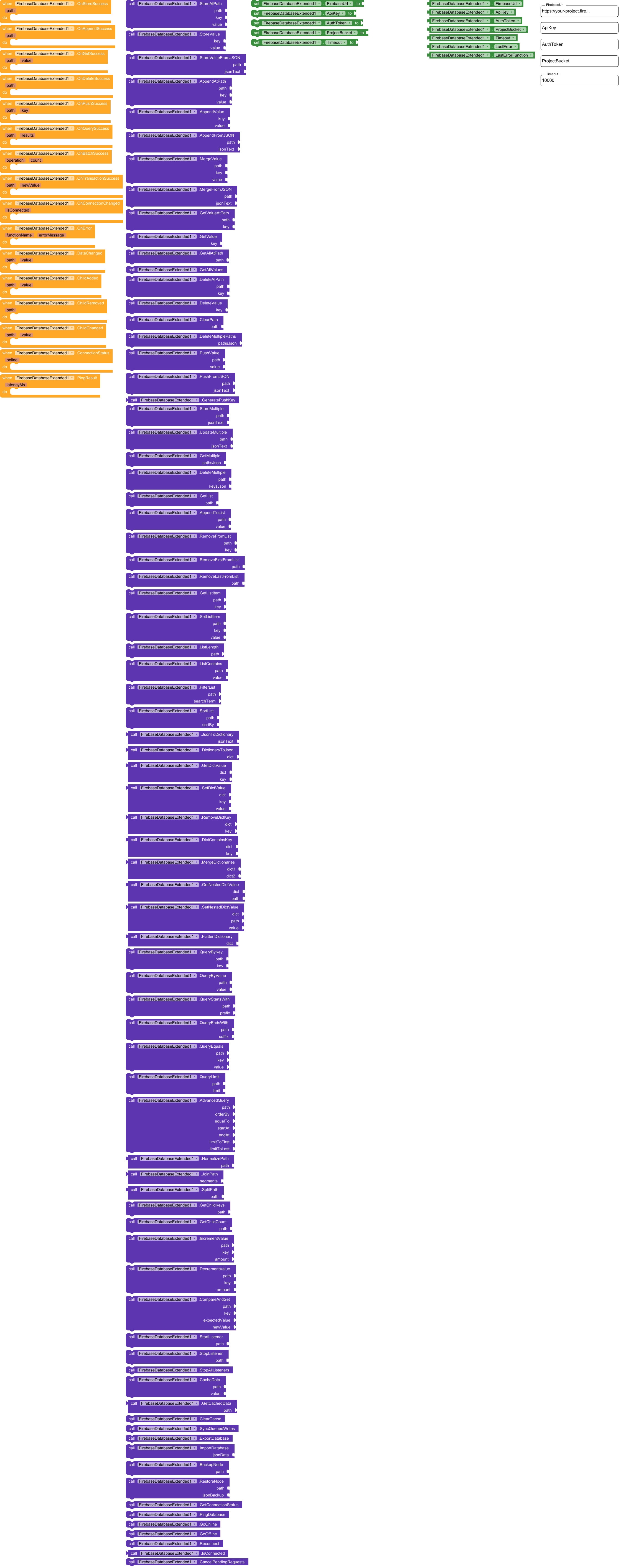
🧩 BLOCKS
Browse all available blocks, events, methods, and properties included in this extension. [extension.txt|attachment](upload://wlAfVY27Tefg7SunZC2lm14BGJI.txt) (14.5 KB)
📝 NOTE
⚠️ Before replacing or updating this extension in your project, try what functionality you need from this AIX with a test project for now.
I have not yet tested every possible use case, so if you encounter bugs or unexpected behavior or you experience any issues, I am available to help fix them.
📦 AIX
Download the latest version of this extension
com.firebaseextended.oi.firebasedatabaseextended.aix (49.2 KB)
.


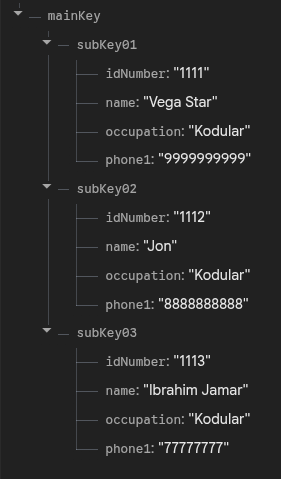
 and show it in the UI: