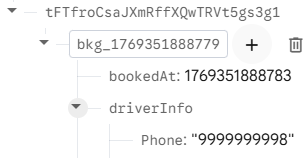
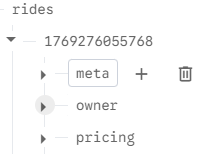
I’m using dictionary to store data in my project. it stores like in the image at first when store value is fired.
when I press enter, it gets converted automatically to nice tree.
But I want it to store in nice tree automatically, why do I need to manually go to data and press enter.
If you use dict, it wont parse each key as separate tag. But while export it as json you will get it as dic
Try this web method of posting data
VIDEO
Source : METRIC RAT AI2 - Firebase with a Web Component
1 Like
RaYzZz
January 25, 2026, 5:48pm
3
Maybe this can help too,
Hi Boby,
In Tim’s guide you really have everything you need, but briefly, to insert data into your Firebase using the Web component (let’s remember that in my opinion the Firebase component is not recommended except for the .DataChanged function)
You set the URL by specifying the tag where you’re going to write in the URL.
https://firebaseproject.firebaseio.com/item1/NewTag.json
And do a PUT with a dictionary containing the key and the value to be saved.
[blocks(25)]
[immagine]
Abo…
Try to see if this guide can help you,
It’s not exactly the same thing you’re asking, but there are some concepts that could be useful to you.
you can do it, but it’s not very efficient because you would end up making 500 requests to the database, and it would make more sense to make a single one with 500 elements.
Firebase Database quotas are very high on the free plan, but if your app were to be used by many people, you could reach the limits.
It’s not exactly what you’re asking for, but it contains some useful information about lists
1 Like
Thanks, I think I do not have any option apart from this. I’ll try and then mark it as a solution once my data is correctly visible in firebase.
Vega_Star
January 26, 2026, 9:20am
5
Don’t worry firebase already contains structured data, what you are seeing is a single line but other apps and the kodular read it as a tree only okay. This single line is not going to effect the app performance at all and you can retrieve dictionary with no problem. Its Firebase… So better ignore it and focus on the build.
no, this is incorrect. Kodular is not able to read the data if stored in this way. I’ve been trying from morning hence I asked in the forum. I also thought initially that it will work but guess what it didn’t.
Yes, using the WEB component. I can see the data is being stored as a nice tree and have no issue reading it back in kodular.
1 Like
system
February 25, 2026, 1:12pm
8
This topic was automatically closed 30 days after the last reply. New replies are no longer allowed.