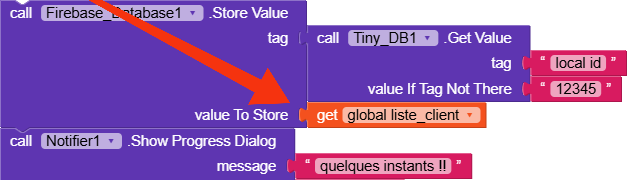
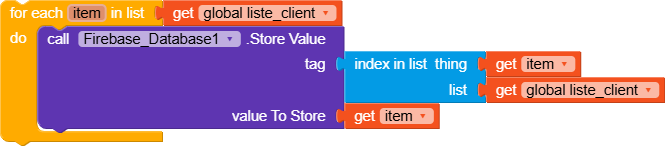
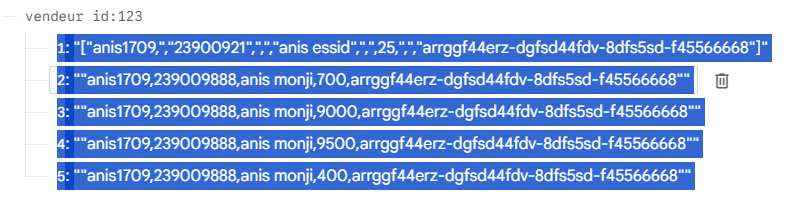
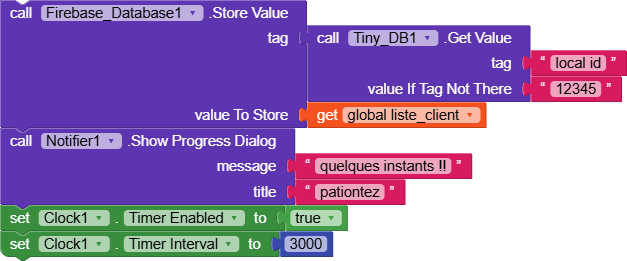
I have a global list global_liste_client in Kodular that I build by adding each client (using add items to list). When I call FirebaseDB.StoreValue with Tag = UID and Value = global_liste_client, the data shown in the Firebase console appears as a single mixed line instead of each client on its own line. Example of what is currently stored in Firebase:
Unfortunately, the native component saves the data as text and not as properly formatted arrays, however, if you then perform a getValue, the value is returned correctly in list format.
To work around this problem, you could use an extension, or as I recommend to everyone, you could use the Web component and this wonderful guide by Tim that explains perfectly how to do it.
I just wanted to point something, firebase database component works different from web component, in your case I noticed that you are storing data from a list, even with web component, if you still post the data in a list it will be stored as list too
I just see that when we are using Firebase database component we supposed to use single component with single functions also @Essid_Mahdi store a list of list that’s why it’s stored like that, example if we have 20 Key and 20 values we supposed to call Firebase database store value 20 times with different tags as our keys
Try to see if this guide can help you,
It’s not exactly the same thing you’re asking, but there are some concepts that could be useful to you.
you can do it, but it’s not very efficient because you would end up making 500 requests to the database, and it would make more sense to make a single one with 500 elements.
Firebase Database quotas are very high on the free plan, but if your app were to be used by many people, you could reach the limits.

 Tim
Tim