Hi Boby,
In Tim’s guide you really have everything you need, but briefly, to insert data into your Firebase using the Web component (let’s remember that in my opinion the Firebase component is not recommended except for the .DataChanged function)
You set the URL by specifying the tag where you’re going to write in the URL.
And do a PUT with a dictionary containing the key and the value to be saved.

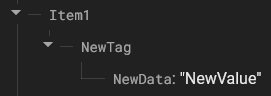
Above? Inside “item1”?
If you want to add new values to an existing tag, in this case “NewTag”, without overwriting the whole node, you just need to perform a PUT while specifying in the header X-HTTP-Method-Override: PATCH.
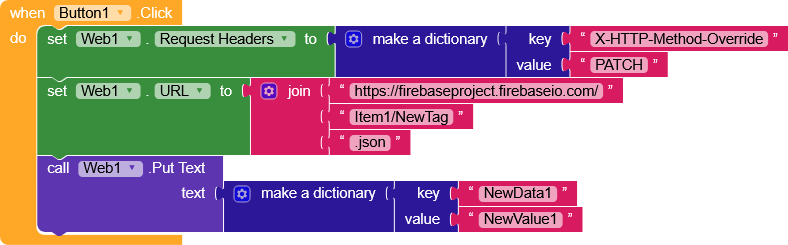
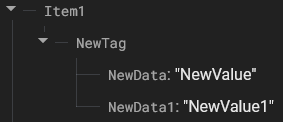
The only “problem” is adding data to a list since there isn’t really a built-in way to do it, but it’s not impossible.
Option1
doing a POST Firebase will create key/value node with unique keys.

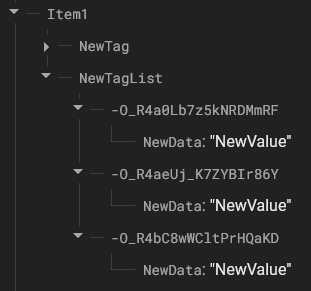
Option2
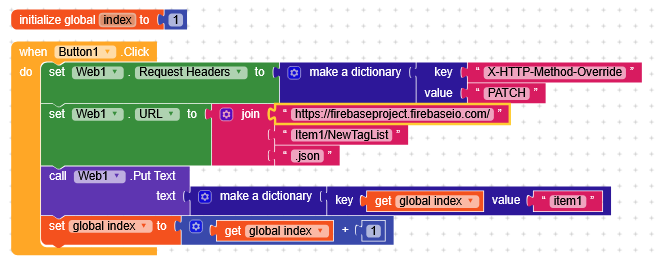
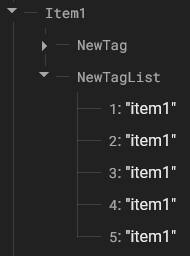
We save the position of the last element and keep incrementing step by step (not recommended, since if we don’t carefully check changes on the database, two users could end up overwriting each other’s data).