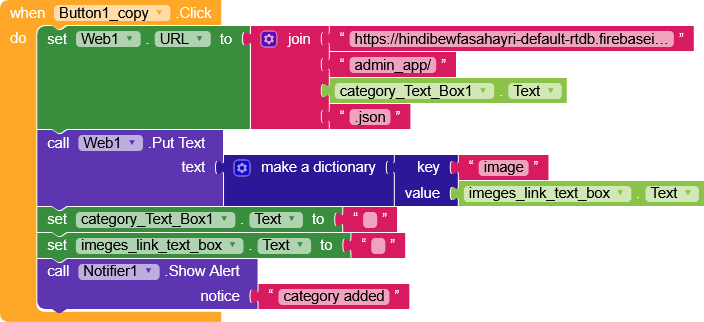
I have a problem with the button event in screen 1, when I add a link and text in the text box, I want to see this structure in Firebase,
{
“Categories”: {
“Motivation”: {
“image”: “https://example.com/motivation.jpg”,
“data”: {
“1”: “Believe in yourself and all that you are.”,
“2”: “Dream big and dare to fail.”,
“3”: “Success is not final, failure is not fatal.”
}
},
“Love”: {
“image”: “https://example.com/love.jpg”,
“data”: {
“1”: “Love is not what you say, love is what you do.”,
“2”: “In true love, there is no ending.”,
“3”: “You are my today and all of my tomorrows.”
}
},
“Friendship”: {
“image”: “https://example.com/friendship.jpg”,
“data”: {
“1”: “Friendship is the golden thread that ties the heart of all the world.”,
“2”: “A real friend is one who walks in when the rest of the world walks out.”,
“3”: “Good friends are like stars, you don’t always see them but you know they’re always there.”
}
}
}
}
But it doesn’t seem to be happening
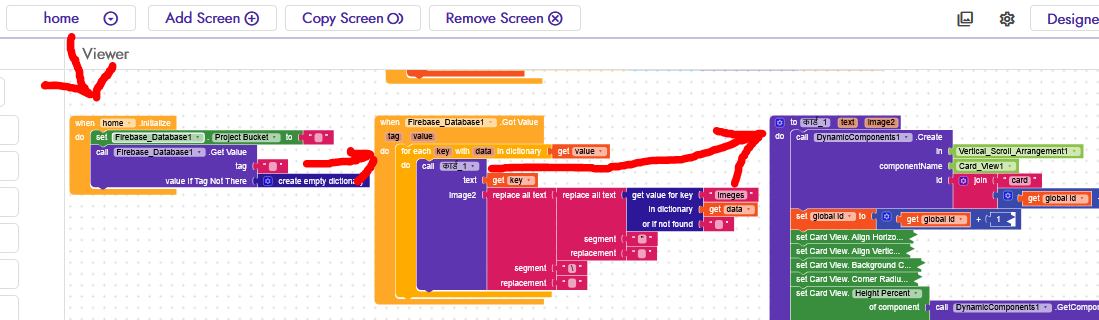
And I can’t get the data from the db on the home screen, which is what confuses me, I’m trying but …
Why are you using this method, instead of getting the data manually with when screen1intiallize? Just get the data and use it, what if you enter incorrect value?
On screen 1 there is an admin system, from which in the future I can send data in the form of images and text directly, and the sent data can be displayed on the home screen, which is what I need.
Also you marked your post as solution, why? Does that mean you fixed it?
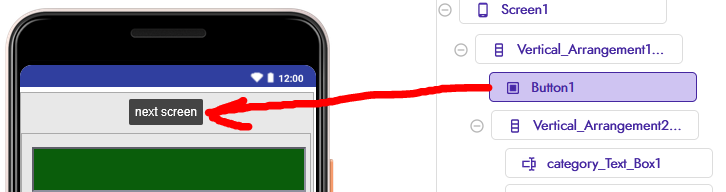
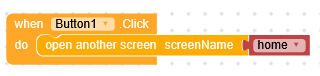
Edited can you focus on fixing the issue first? Also screen one it’s a door, anyone need to enter inside should pass through that door (screen one) so admin panel can’t be in screen one
this post seems to be very relevant to my question, I also want to create a similar project, but there are some differences, I want to send data of this type from my app to Firebase first, and then load it into the app, but I don’t want anything called a project bucket, I just want to see the tag, when I load the data, I also want to store the image in it, this project is very similar to my project, only I want to configure the admin app
{
“Motivation”: {
“image”: “https://example.com/motivation.jpg”,
“data”: {
“1”: “Believe in yourself and all that you are.”,
“2”: “Dream big and dare to fail.”,
“3”: “Success is not final, failure is not fatal.”
}
},
“Love”: {
“image”: “https://example.com/love.jpg”,
“data”: {
“1”: “Love is not what you say, love is what you do.”,
“2”: “In true love, there is no ending.”,
“3”: “You are my today and all of my tomorrows.”
}
},
“Friendship”: {
“image”: “https://example.com/friendship.jpg”,
“data”: {
“1”: “Friendship is the golden thread that ties the heart of all the world.”,
“2”: “A real friend is one who walks in when the rest of the world walks out.”,
“3”: “Good friends are like stars, you don’t always see them but you know they’re always there.”
}
}
}
}
And I wanted this data in this format.
Have you tried using the Web component?
Unfortunately, Firebase doesn’t correctly save the data in JSON format, with the Web component you can use dictionaries directly, which are very convenient.
In Tim’s guide you really have everything you need, but briefly, to insert data into your Firebase using the Web component (let’s remember that in my opinion the Firebase component is not recommended except for the .DataChanged function)
You set the URL by specifying the tag where you’re going to write in the URL.
If you want to add new values to an existing tag, in this case “NewTag”, without overwriting the whole node, you just need to perform a PUT while specifying in the header X-HTTP-Method-Override: PATCH.
We save the position of the last element and keep incrementing step by step (not recommended, since if we don’t carefully check changes on the database, two users could end up overwriting each other’s data).
Have you already studied a bit how the RecyclerList works?
At the bottom of the topic, there is also a well-made example.
Anyway, I see that you’re specifying a bucket marathi_qoute that doesn’t exist in your DB.
You should create a node above everything called marathi_qoute and put the items inside it.
I also see that you don’t have an updated version of RecyclerList.
Download version 1.0.3 from GitHub and update it.