im trying to make a login page that only allows 1 user per device, when theyre trying to log in on another device, the system will detect the new device and not letting the new device to log in on the same account (Using firebase please)
Woah great idea, but what if they don’t want to use the registered account anymore? For example, I have lost my login credentials and the reset password isn’t working  . I will make another account with new credentials.
It’s very important and best idea, but you must have service that will provide all emergency, since you mentioned firebase you’re safe.
You will needed something like this
Kodular has a component called Device Utilities → Get Device ID.
This gives you a unique ID for each phone.
Example:
ABC12345XYZ
Maybe in your firebase you should make node like this
Users
└── username
└── deviceID: “ABC12345XYZ”
Then you will check each time user logins compared with the current Device  and value from database
I don’t know if I get what you are referring to
1 Like
Okay, but what if I’ve already created a dedicated account for each user in Firebase and I don’t plan on having them create their own account or change their password?
I’m already using the device ID component, but I plan on using the ID as some sort of validation to prevent other devices from using the same account.
So, how does the device ID become a validator for that account?
You cannot do it just by using only device ID.
If you have login system via email or mobile or any social media (if user use multiple mail, this idea too will fail) then it may possible.
If user use multiple devices and multiple emails or account How can you control it?
If you allow login only by fb authentication it may quite possible
1 Like
what if i dont use google or other type of log in? just simple email/password login on firebase
the reason im trying to make this because im making an app that need some kind of subscription, if they pay for the app then ill give them the account to access it, but i dont want them to use in any other device, just a singular device
Let me try it, I will provide a feedback soon if I successfully made it
1 Like
As of i know you can prevent multiple login from single device but you cannot restrict them to login from anyother device using other accounts.
Imagine, i sign in using account 1 and you save the device id and login id in your fb.
Now again i am sign in from another mobile using another account. Here how you will know me that i am the one who sign up early?
If you use firebase authe or email login, you can check up saved device id and loggin details and you can restrict them or me to prevent multiple login from same device.
Try this, if possible.
During sign up get loggin details and device details and save in fb.
Next time if i try to login then check first whether the loggin details exists in fb, if exists get device id. If the device id matches with saved id allow log in.
If loggin details not found save it meanwhile check the device id exists in the saved details or not. If not save else throw you cannot login from anyother device
If loggin details found but the saved device id is not matches throw error alert.
This alone you can do it. But you cannot stop me login from other device using another id
1 Like
This is possible, one account is used by only one device, if device changed then user logged out from previous device automatically. Moreover than this, if forgets his password then he can reset new password and there is no need of manual work, everything will be automatic. Such kind of security is used by premium apps. If you want this kind of setup you can hire me to build it 
1 Like
And what if you used the deviceID as the email?
Something like 98gqg3279834hj4@something.com and as the password the username?
This way, on a given device the “email” will always be the same.
The only drawback is that you’ll have to handle account resets manually,
assuming users write their data inside the “data” node under their UUID, if someone needs to reset their credentials you’ll have to delete the old account, make them create a new one, and replace the old data/UUID with the new one so they don’t lose any data.
Unfortunately I’m not home today and I don’t have the possibility to run any tests to check if this method is effective.
Smart move
All these ideas i like them all
I did some test
Its possible and very easy.
Here what i have tried
First am storing user login info
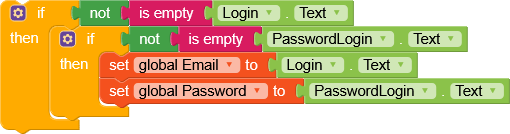
For later use,
Before user login am check whether the the device is already used
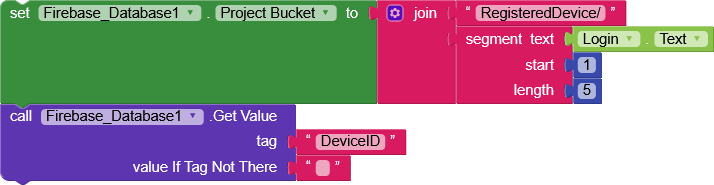
For security am using user email first 5 letters, eg from Ibrahimjaetc am having Ibrah connected to the bucket

This was already made when user was Signing Up.
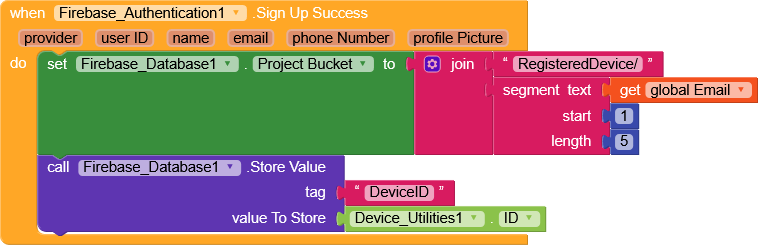
Then its create data as
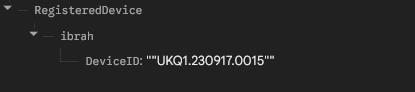
On getValue
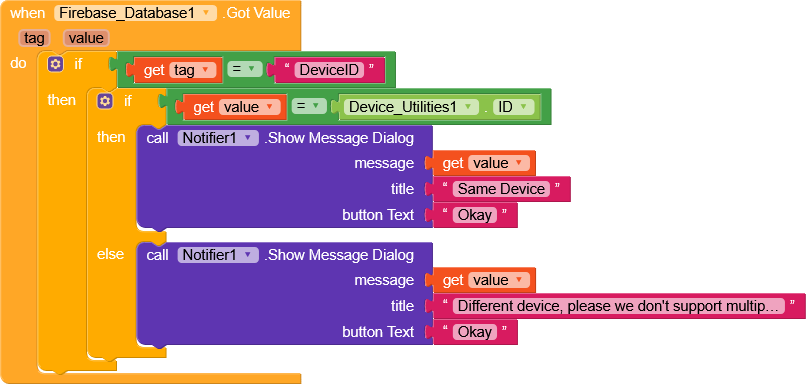
Or
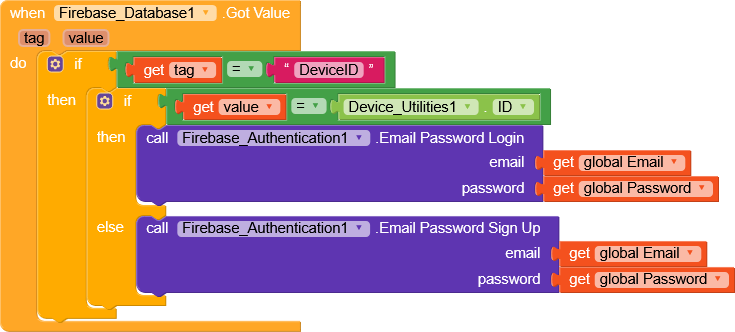
Guys you can polish it up if i missed somewhere

2 Likes
Thanks for the idea!
But it seems like users have to create their own accounts first, then their IDs will be saved. But I want to emphasize that accounts are already created for those who have access or have paid for the app.
If users do have to create accounts first, what about the whitelisting method? They can create accounts as they please, but they can’t access the app as they please; they have to be whitelisted before they can access it. Also they still can’t use the account on multiple devices.
Whatever you can imagine, everything is possible…
Who is going to create account for the user? It’s possible but I guess there’s a lot of things to be involved then am considering you to hire a developer to work for you.
Or else you have created account status once user registration done, then add two different screen, screen1 for free users with data from FB and second you will update user account yourself moving user status from free user to paid user, very simple
Logics can be, if get value free open a free screen where user will be asked to pay, if get value paid the open paid screen, I don’t know how to explain it but obviously it possible
1 Like