How do I open a URL in my app instead of the web browser?
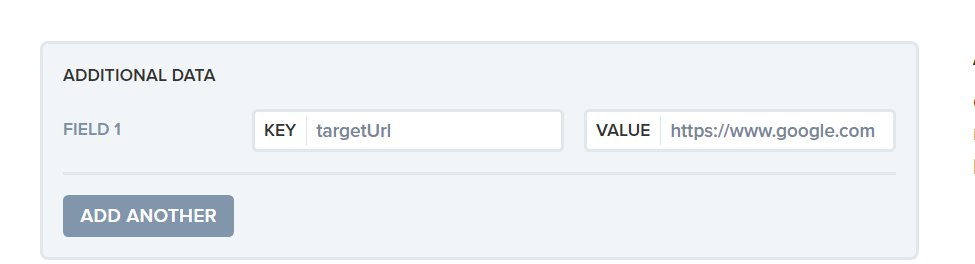
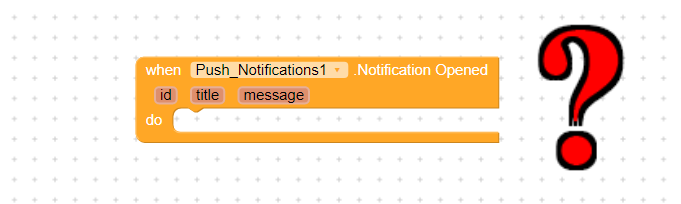
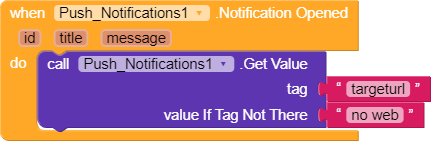
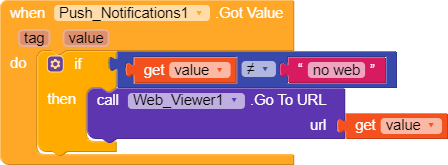
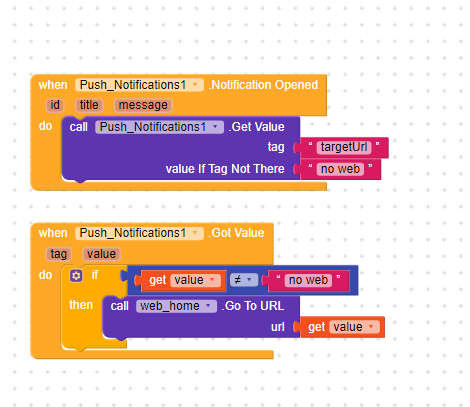
ANDROID - The Launch URL feature on the dashboard or the url field on the REST API automatically opens the web browser on the mobile device when the notification is tapped on. If you would like to open the URL inside your app instead of the browser, you need to send your notification with custom data that can read by your app’s SDK. If you’re using our dashboard to send notifications, the sending notification options allows you to include additional data to be sent with your notification. If you’re using our API to send notifications, you can set the ‘data’ field to a JSON object hash of extra custom data. For example, you could set targetUrl for the key and https://google.com as the value. Then in your app’s code read the targetUrl value from additionalData in the NotificationOpened callback (name depends on the OneSignal SDK used). Github Android Example
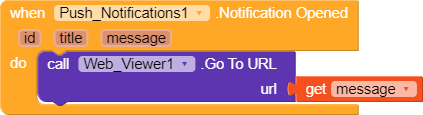
No. I will write text with information content (eg campaign) in the message field. What I want to do is, just like I’m told;
open the destination url address within the application with webview.
You might think I’m a little hasty. I don’t want to break the rules. But I really need help with that. I don’t want to pay other companies. I think that this problem will be solved in Kodular … Those who have knowledge about it can help?
No. I will write text with information content (eg campaign) in the message field. What I want to do is, just like I’m told;
open the destination url address within the application with webview.
@ImranTariq
I did it like you said. But when I click on the notification, the application opens and the home page loads. The address I entered does not open. So the program opens normally.
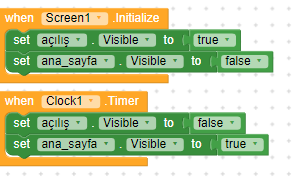
I made a splash screen in the program. first opening screen, then webview screen opens. I wonder if roblem could have originated from this?