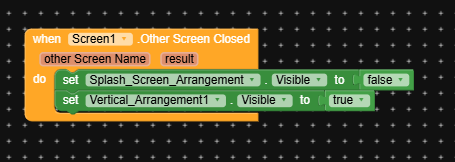
If you still face the same issue use these blocks in Screen1
1 Like
When I press the back button, the splash screen appears first, even though I used the blocks you told me to use.
Could you please clarify exactly which blocks I need to implement? I tried them but nothing happened.
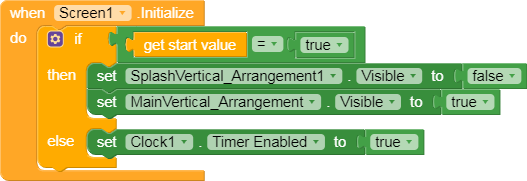
Try it like this, though am not sure if it will work as your needs,
On screen one initialize check the condition of opening
On Clock
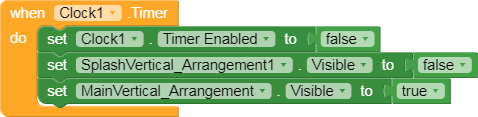
To avoid going back to screen 2 add this block

On button click/Back pressed
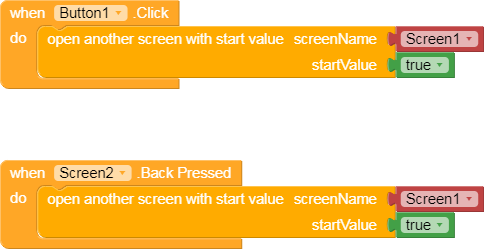
Have a good day
1 Like
I’ll join in as well 
(Ibrahim’s version slightly modified)
Screen1
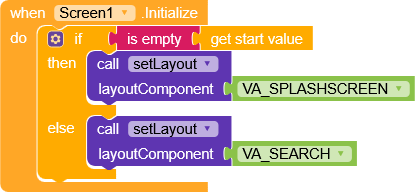
At the first launch
startValue will be empty and therefore VA_SPLASHSCREEN will be displayed.
Screen2
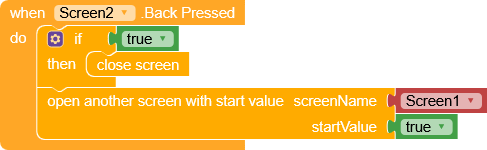
On Screen2, with the back button we will set
startValue to true and close the screen, Screen1 will be initialized but this time it will open VA_SEARCH because startValue isn’t empty.
2 Likes
As per all your blocks I found nothing which can cause splash arrangement once invisible to visible again when closing Screen2. This never happens unless and until you are ‘closing Screen1’ or using ‘Companion App’ or used block ‘When OtherScreenClosed’ or a clock component anywhere which is causing such issue.
1 Like
There clock component that handles the splash visible or invisible, I don’t know how he/she handled it, but this might be solved by now due to all suggestions dropped in this topic
1 Like
Thank you both.
Both methods worked very effectively.
I appreciate your effort.
Thank you. I found that both methods mentioned worked well for me. Thanks again for your input.
2 Likes
This topic was automatically closed 30 days after the last reply. New replies are no longer allowed.