Managing multi-user lists in Firebase - Reopening the topic

In a previous post, Mr. Gianlluca expertly showed me how to save data to Firebase: Managing multi-user lists in Firebase - Analytics results
At that time, “Tag” was the name of the hypermarket. The structure has changed now. Since all my other records use the user ID (Firebase Authentication), I wanted this one to use it as well.
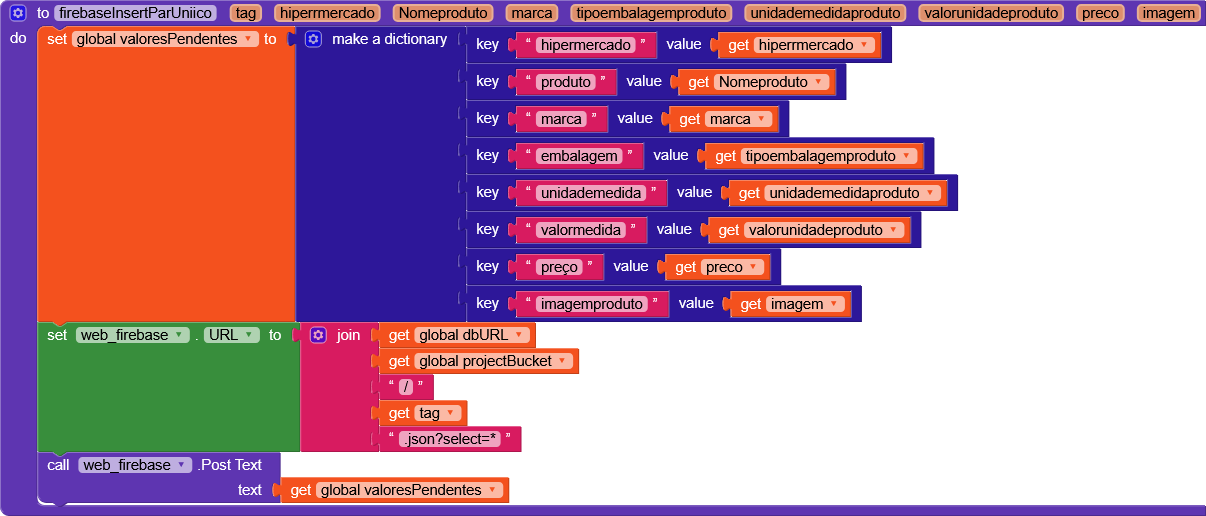
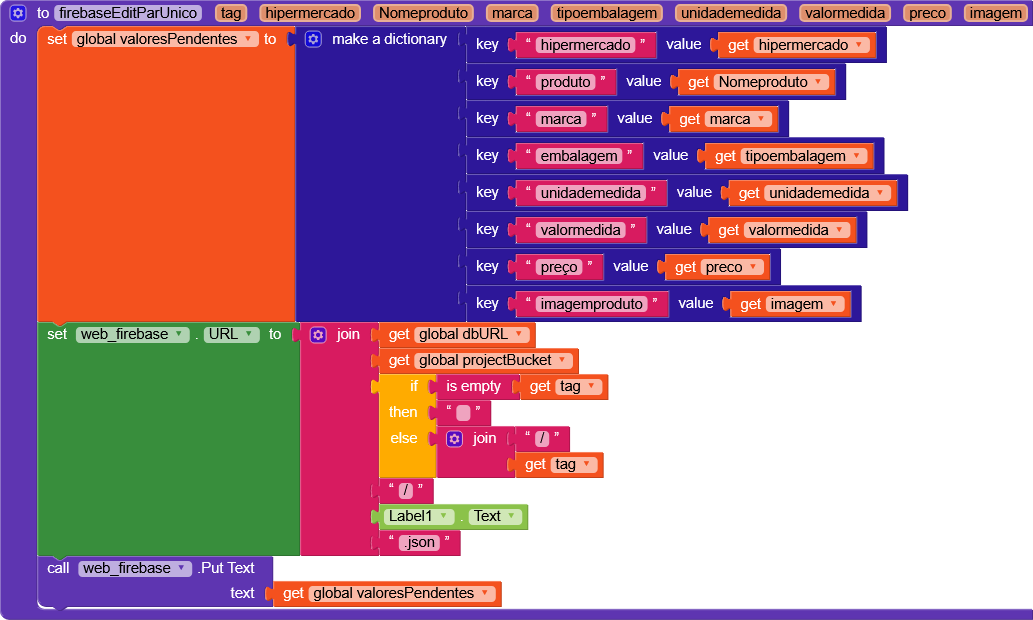
@RaYzZz In the other model for editing or deleting records, a spinner was used where the user selected the hypermarket (tag) to retrieve the list. Once the list was open, they could click the edit icon to view the records or click delete to remove them.
If the Tag serves as the user ID, how do we handle editing and deleting the records?

Hi dear,

Before trying to find a solution to this problem, I wanted to ask if you’d be interested in using a recent extension of mine.

It’s a Web component with added support for response headers.
This allows you to also retrieve the headers and therefore use the ETag, which is the native method to check whether a list has already been modified before applying your own changes.

Edit:
Now that I’ve reread what you wrote, I’m having a hard time understanding exactly what you’re trying to achieve.

If the tag is now the user’s ID, do you mean that each user should write to their own node? Should there also be a public node?

Please add a few more details, perhaps including the Firebase structure you would like to use.

Yes, I’m interested.
Did you do any test project?

Unfortunately no, I’m currently working on a community guide that’s taking up quite a lot of my time, since there are many things I need to study that I wasn’t fully familiar with.

If I don’t lose track of this topic, once I’m done I’ll try to create an example project on the extension page.

Regarding this, can you give me a bit more information?

No problem. Regarding the question, I’m going to change the database storage structure and run some tests. If I have any questions, I’ll post them here. Thanks again.

@RaYzZz since you are busy with other work and studies, I will leave here the structure I would like to store and the one I attempted to store.
This would be the ID for the tags cadastro_pessoa and hipermercado, as well as the others that would follow.

{
  "supermarket": {
    "eGy4W7PtpyTY2r5mGbIzCTuaErz2": {
      "cadastro_pessoa": {
        "bairro": "",
        "celular": "",
        "cep": "",
        "cidade": "",
        "complemento": "",
        "email": "",
        "imagem_perfil": "",
        "logradouro": "",
        "nome": "",
        "numero": "",
        "uf": "MG"
      },
      "Hipermercado": {
        "BH": {
          "embalagem": "",
          "imagemproduto": "",
          "marca": "",
          "preço": "",
          "produto": "",
          "unidademedida": "",
          "valormedida": ""
        },
        "Villefort": {
          "embalagem": "",
          "imagemproduto": "",
          "marca": "",
          "preço": "",
          "produto": "",
          "unidademedida": "",
          "valormedida": ""
        }
      }
    }
  }
}

Here is what I made in Kodular:

{
  "supermarket": {
    "cadastro_pessoa": {
      "eGy4W7": {
        "bairro": "",
        "celular": "",
        "cep": "",
        "cidade": "",
        "complemento": "",
        "email": "",
        "imagem_perfil": "",
        "logradouro": "",
        "nome": "",
        "numero": "",
        "uf": ""
      }
    },
    "hipermercado": {
      "eGy4W7": {
        "BH": {
          "embalagem": "",
          "imagemproduto": "",
          "marca": "",
          "produto": "",
          "unidademedida": "",
          "valormedida": ""
        },
        "Villefort": {
          "embalagem": "",
          "imagemproduto": "",
          "marca": "",
          "produto": "",
          "unidademedida": "",
          "valormedida": ""
        }
      }
    }
  }
}

Which of these would look better?

Hi,

If your next goal is to run queries on this structure, you should change it quite radically.

For example, you could divide all the data into top-level nodes, all supermarkets under supermarkets, all products under products, etc.

root
 supermarkets/
 stores/
 brands/
 categories/
 products/
 offers/
 priceHistory/
 users/

This way, you can run global queries such as “all products below a certain price” or “only products from a specific supermarket.”

If, on the other hand, each user should only be able to see their own data, you can create a node with the user’s ID directly under the root and then store all their data underneath it.

However, I’d recommend keeping related data grouped together.
For example, you could put all the information such as bairro, celular, etc. inside an info node.

{
	"cadastro_pessoa": {
		"info": {
			"bairro": "",
			"celular": "",
			"cep": "",
			"cidade": "",
			"complemento": "",
			"email": "",
			"imagem_perfil": "",
			"logradouro": "",
			"nome": "",
			"numero": "",
			"uf": "MG"
		},
		"Hipermercado": {
			"x": "..."
		}
	}
}

This way, you can retrieve all of that information /info.json together without having to split out individual fields such as hipermercado.