My app installs successfully, but after opening it only shows a white screen and doesn’t load anything.
Hi dear,
does it work in the Companion?
Do you have any layouts that should be visible immediately?
Do you have any blocks in Screen.Initialize? If so, could you show them?
Hi, thanks for the response.
Yes, I am using a Splash Screen on Screen1 .
The blocks are working in Companion, but only shows a white screen.
And after installation the app only shows a white screen . The blocks are not working i, but the installed APK is stuck on the white screen only. i have showing same problem my app olds apps befor fews days.
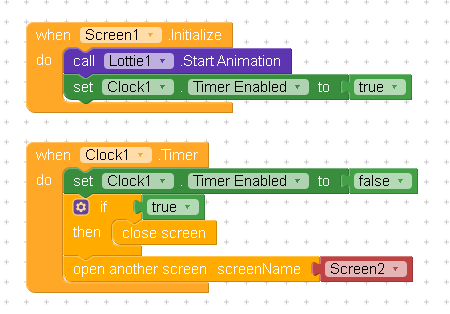
So you don’t see anything in either the APK or the Companion?
Or does it work in one of the two? Sorry, I didn’t quite understand 
How did you set the timer interval?
What happens if you disable the StartAnimation block temporarily?
Also switch screens correctly: first open the new screen, then close the old screen
Taifun
Hi, thanks for your help.
My apps work perfectly in the Kodular Companion, but after building and installing the APK, all apps show only a white screen and do not load.
This happens with both old and new APKs.
you are repeating yourself and unfortunately did not answer the questions
Taifun
I just noticed this here in my app, in the companion it works perfectly but when I install the APK there is only a white screen.
Do you use OneSignal component?
Check logs.
No! I don’t use the One Signal component in my app, and even so the screen only goes white after installing the Apk, in cpmpaniom it works normally.
I had the same problem and it was related to One Signal even though I didn’t have the extension in the project or what I did was delete this in the AIA in the Screen1.scm file:
“NavigationBarColor”:“&HFFF6F6F6”,
“OneSignalAppId”:“8b7f49a0-e284-46ba”, <— DELETE THIS LINE AND THE COMMA
“OpenScreenAnimation”:“zoom”,
Yes, I deleted the One Signal device with the ID. You should have another ID.
I was having a similar problem, and it was resolved after I removed the OneSignal app ID from the API keys. I had previously removed the OneSignal component but forgot to delete the corresponding API key.
1 Like
Thanks, this worked for me. Step by step: Delete onesignal extension > delete onesignal APPID key which is in project settings.
For me it’s the other way around, the application opened in the companion works normally but doesn’t show the images, however after being downloaded the application works normally, what could it be?
All my apps got the same white screen, and all of them was because the OneSignal API 