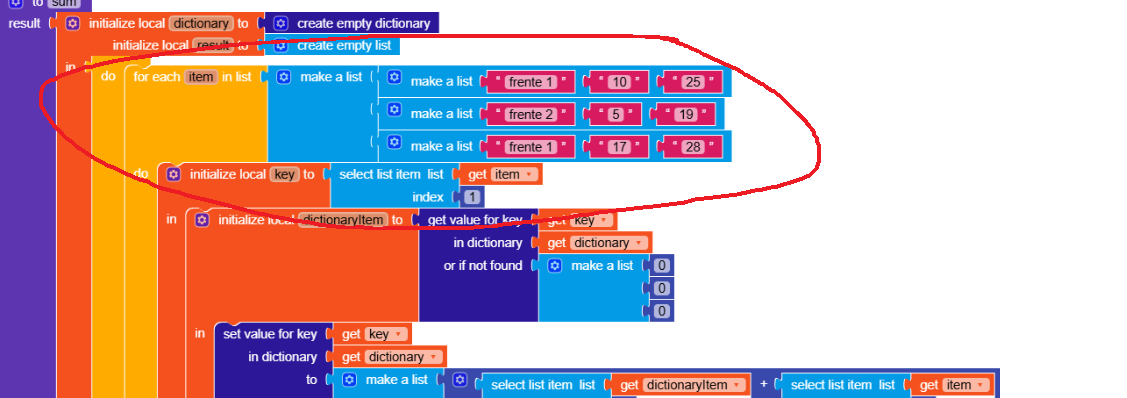
Change here
tinydb
Bring the data directly from TinyDB.
Isn’t it enough to simply connect the TinyDB GetValue block? 
In this case, do I have to save it in column view to pull it up and perform the calculations?
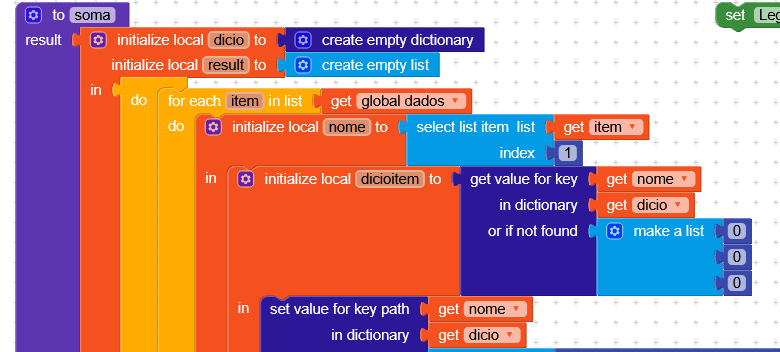
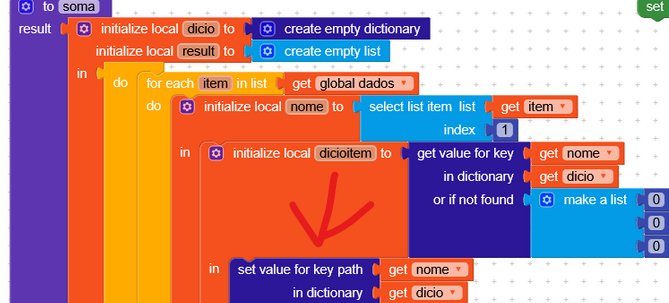
The procedure I provided takes a list of lists (like the gviz query you were running) and returns the formatted data.
Sorry, I don’t really understand what you mean 
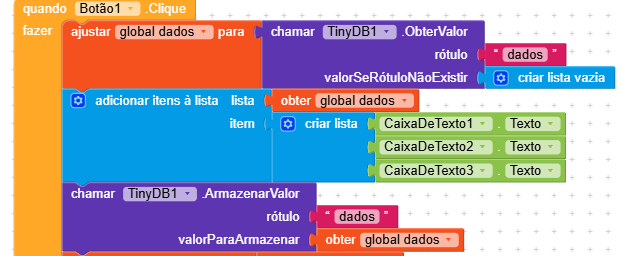
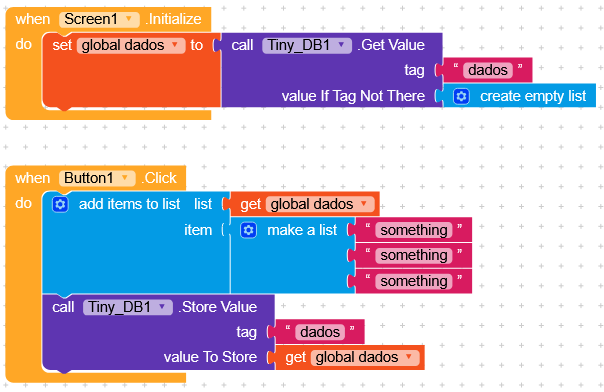
If global_dados doesn’t change in other procedures, you can initialize global_dados with TinyDB.GetValue in Screen.Initialize, and then you can always update the variable and save it to TinyDB.
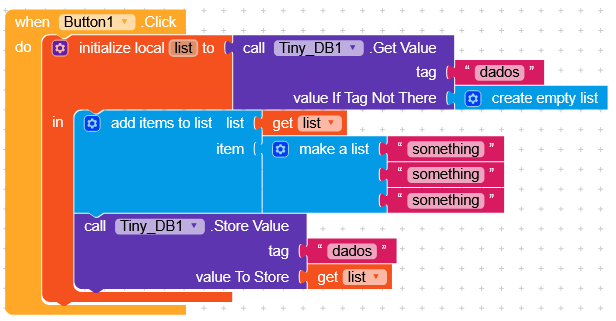
Or you can create a procedure that always gets the value from TinyDB.
Or
// Event: when Button_Calcular is clicked
when Button_Calcular.Click do

// ====== PART 1: RETRIEVE DATA ======
// Get the data saved in TinyDB
set global lista_dados to call TinyDB1.GetValue
    tag: "dados_frentes"
    valueIfTagNotThere: create empty list

// ====== PART 2: PREPARE SUM STRUCTURE ======
// Create a dictionary that will store the sums by front
set global somas to create empty dictionary

// ====== PART 3: ITERATE THROUGH EACH RECORD ======
// For each item (dictionary) in the data list…
for each item in list global lista_dados do

// — 3.1: Extract values from the current record —
set frente to get value for key "frente" in dictionary item
set idx1 to get value for key "indice1" in dictionary item
set idx2 to get value for key "indice2" in dictionary item

// — 3.2: Check if this front ALREADY EXISTS in the sums —
if not get is key frente in dictionary global somas then
    // If it does NOT exist, create a new dictionary for this front
    set frente_dict to create empty dictionary

    // Initialize the sums with ZERO
    set value for key "soma_indice1" in dictionary frente_dict to 0
    set value for key "soma_indice2" in dictionary frente_dict to 0

    // Add this dictionary to the sums dictionary
    set value for key frente in dictionary global somas to frente_dict
end if

// — 3.3: Get the dictionary for this front —
set frente_dict to get value for key frente in dictionary global somas

// — 3.4: ADD index 1 —
// Get current sum value
set soma_atual_idx1 to get value for key "soma_indice1" in dictionary frente_dict
// Add the new value
set value for key "soma_indice1" in dictionary frente_dict to soma_atual_idx1 + idx1

// — 3.5: ADD index 2 —
set soma_atual_idx2 to get value for key "soma_indice2" in dictionary frente_dict
set value for key "soma_indice2" in dictionary frente_dict to soma_atual_idx2 + idx2

end for each

// ====== PART 4: SHOW RESULTS ======
// Create text to display on the screen
set texto_resultado to ""

// For each front in the sums dictionary…
for each frente_key in get keys global somas do
    // Get the data for this front
    set frente_dict to get value for key frente_key in dictionary global somas

    // Build the text: "Front 1, 30, 24"
    set texto_resultado to join
        texto_resultado
        frente_key ", "
        get value for key "soma_indice1" in dictionary frente_dict ", "
        get value for key "soma_indice2" in dictionary frente_dict
        " " // line break
end for each

// Show the result in the Label
set Label_Resultado.Text to texto_resultado

end
can help
Translated by RaYzZz (please always use English when writing in the community)
I posted it.
I forgot to translate.
Thank you.
But it’s still not working.
Can you help?
I’m having a bit of trouble understanding it (I hope it wasn’t made with AI ).
Also, theoretically, just from how it’s written, you can already create the blocks simply by following what’s described.
If you can, just tell me what data you have as input and what data you want as output, because I think the whole process can be optimized.
Even though I thought this would have solved it
It didn’t solve the problem. The sum with the result is incorrect or there’s a display error.
But let’s go:
I have 3 input lists:
1 - Front 1, 10, 20
2 - Front 2, 5, 10
3 - Front 1, 5, 8
Now I ask for the overall result like this:
Front 1, 15, 28
Front 2, 5, 10
And so on.
I’ll process this result later.
This does exactly what you’re asking for , you just need to give it the data list as input.
(
(Front 1, 10, 20)
(Front 2, 5, 10)
(Front 1, 5, 8)
)
You want to solve it with extension or without extension? 
It will be without
I’ll look at the result for a better presentation.
Everything seems correct, what error are you getting?
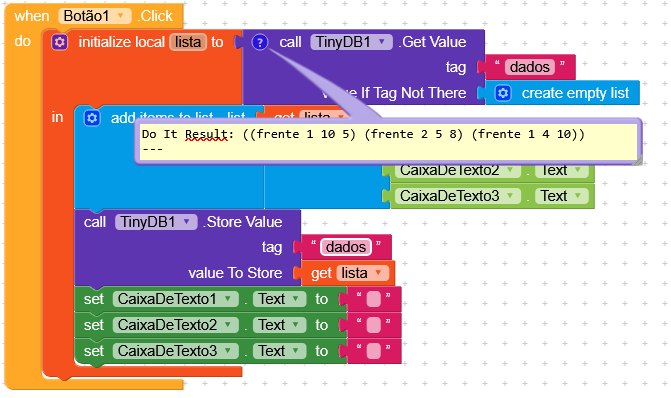
Try using Do it, since it doesn’t generate the apply-to-args error and lets you clearly read what the actual error is.
After saving the list, are you setting global_dados with the values from TinyDB?
try this
Thank you very much.
Everything’s alright now.
Thanks.
Now let’s move on to the response treatments.