Is Firefox the solution? Not everyone uses Firefox, but this is a common problem, hopefully it will be fixed. 

1 Like
At the moment, yes Firefox works as a workaround because it uses a different browser engine (Gecko) instead of Chromium, where this drag issue seems to appear.
However, it’s not an ideal long-term solution, as many users rely on Chrome/Edge.
The issue looks browser-engine related rather than project-specific.
Using Firefox helps for now, but a proper fix on the Kodular would be the best long-term solution so drag-and-drop works consistently across all browsers. Hopefully the Kodular team can address the Chromium compatibility issue soon so drag-and-drop works consistently across all browsers.
5 Likes
Dear Kodular Team/Community,
I am experiencing a critical issue with the Kodular platform where I am unable to drag any components within the Blocks Editor. This problem has persisted for the past two days, and I have already tried the following troubleshooting steps:
-
Tested on three different PC devices – the issue remains consistent across all of them.
-
Tried using a different account – the problem still occurs, ruling out account-specific issues.
Despite these attempts, the Blocks Editor remains unresponsive when trying to drag components, severely hindering my ability to develop projects.
Could someone please assist with this issue? Has anyone else encountered a similar problem, or is there a known solution? Any guidance or fixes would be greatly appreciated.
Thank you in advance for your support.
Before creating new post please search in community.
Please have a look on this : Drag&Drop issue in Kodular Creator Block window
Current solution : Use Firefox
Thank You bro…
1 Like
Current solution : Use Firefox
Firefox worked for me. But why is not working on chrome?
Hi @Luciano2,
Welcome to community!
Firefox works because it uses the Gecko engine, while Chrome/Edge use Chromium, and the issue appears to be related to how Chromium handles SVG-based elements and pointer/mouse events.
Kodular blocks are rendered as SVG, and Blockly relies on precise -
mousedown → mousemove → mouseup event handling and SVG coordinate calculations to start dragging.
In Chromium, recent changes in pointer events, hit-testing, or SVG event propagation seem to prevent the drag from initializing correctly, even though hover still works (blocks turn yellow).
This makes it a browser-engine compatibility issue, not a project or account problem. Firefox avoids it because its SVG and event handling behaves differently.
Hope It’ll fixed soon 
1 Like
This morning I opened the Kodular, but how come I can’t take the block?
Thank’s
Use firefox
I checked out Kodular Fenix (v1.5D.0) Bug Tracker before creating a new topic
Describe your issueMost of the time blocks do NOT work.
Sometimes blocks can be dragged, but most of the time they cannot.
I often need to refresh the page many times (sometimes 10 times or more) until blocks start working again.
Steps to reproduce the issue1. Open any project in Kodular Creator
- Go to Blocks editor
- Try to use “make a list” mutator
- Try to drag “item” into the list
Expected BehaviourItems and blocks should be draggable normally into the list and blocks area.
Actual BehaviourDrag & drop works randomly.
Sometimes it works, but most of the time items and blocks cannot be dragged.
Show your BlocksScreenshots are attached below.
Android version
Use firefox browser
Hey Comminity,
my problem is i cant pick any Blocks from the List..
when i write it in the search i can pick it but not from the List.
I have try it from google chrome and from edge but the same thing..
I show you a picture what i mean
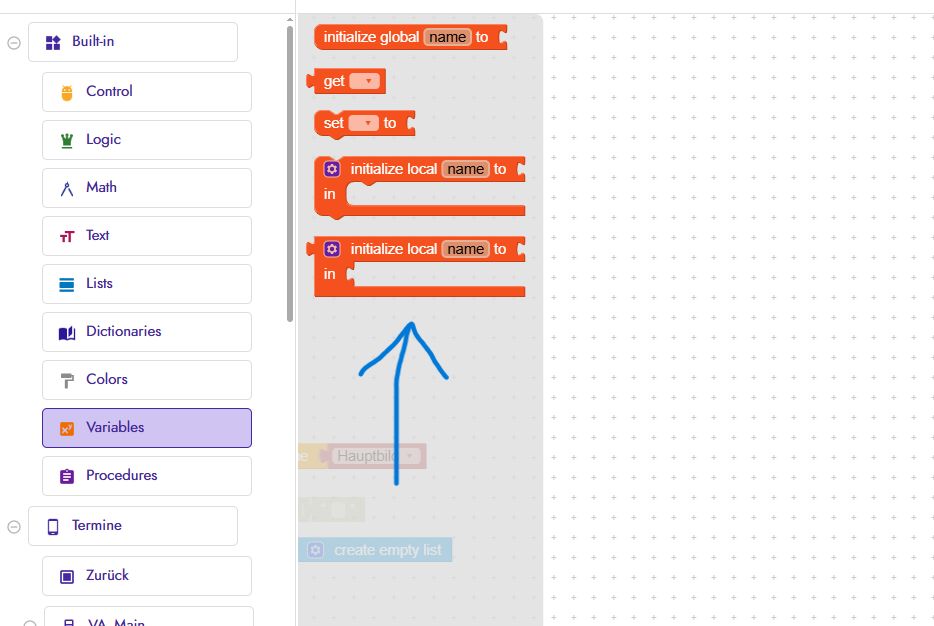
when i want do pick this blocks, i cant hold it so i cant but it in the workplace, no double click works nothing
some have the same problem? or someone know how do fix it?
Hi @JustDave,
Use Firefox.
2 Likes
Continuing the discussion from Drag&Drop issue in Kodular Creator Block window:
Currently the Firefox browser seems to be a workaround for that issue
Also the only language supported in Kodular community is English, you can write it and translate to English using Google and post here
Good day
Hi, since last week I am unable to drag new components from the pallete into my aplication page.
Tried Chrome and Edge but no joy.
1 Like

This problem mainly affects Chromium-based browsers (Chrome, Opera, Brave, Edge, etc.) and occurs not only with Kodular but also with others.
Quick solution: use Firefox
If you want to continue using your browser, you can do the following:
- Type the block you want to use on the canvas. For example, if you need to use the Join block, type “join” and select the block. Now, if you need to concatenate more items to the join (it will not let you drag it), just copy and paste one of the ones that are already there. Now, if you need a component loop method, just type “set/get Button1.Text” or “when Button1 click.”
If you need a variable type “get/set variable”.
Once you get used to it, it’s very useful. It also autocompletes, so you don’t have to type everything.