Drag&Drop issue in Kodular Creator Block window

I’m experiencing a blocking issue in Kodular Creator. After working on a project without any issues for weeks, suddenly dragging and dropping from the semi-transparent menus in the Blocks window no longer works.
By semi-transparent menus I mean the drop-down menu that appears by clicking on an item in the block category list (for example, by clicking Control the drop-down menu with if..then, for each.., etc. appears) and the drop-down menu that appears by clicking the backpack. In these drop-down menus, it’s impossible to pick up elements and place them on the workspace. Strangely, if I start the drag-and-drop by placing the pointer on an empty portion of the block, such as the recess of the “while test do” block, the drag-and-drop works. Moreover:

  • once it happens on the project in question, the problem occurs on all the other projects of the same user also, both on Edge and Chrome; clearing browser cache and browsing data do not help
  • the problem seems to originate from some inconsistency within the specific project, because it reappeared on a different PC when importing the project into a new Kodular user account
  • once this occurs, the problem persists on all projects even if you delete all existing projects and recreate a new one.

I hope someone can give me some guidance on the cause of the problem and how to fix it.

2 Likes

What you feel is none of us were experience it. Can you provide us any video?

I have a few questions because this is happening to me too:

  1. This happens when you hover the cursor over the blocks, without clicking.

So, without clicking, when you hover the cursor over the blocks, they turn yellow as if you selected them all?

  1. Even if you click, you can’t place them.
  2. Are you using one of these browsers: Brave, Edge, or Chrome?

If so, try installing the Firefox browser, since from what I’ve researched, there’s a problem with the Chromium engine and touch events.

Because browsers like Brave, Microsoft Edge, Google Chrome, and Opera share the same base engine.

And Firefox doesn’t use Chromium.

In fact, I’m hoping that what’s happening to me is the same as what’s happening to you, and when I switched to Firefox, it works normally.

Ok, tabastea, what’s happening to me is exactly the same as what’s happening to you. Also for me switching to Firefox solves the problem :slightly_smiling_face:

Sure, here is the video

2 Likes

Bloks drag and drop problem. please fixed this problem.

1 Like

Please elaborate
Provide as much details as necessary for others to understand what you are taking about
Also a video could help
Up to now your "bug report " is useless

Taifun

1 Like

Seems maybe something is going on with Kodular creator, recently also user reports something similar, am not able to use creator now to confirm this issue

Have you tried changing browser? Mostly to other without chromium

I checked out Kodular Fenix (v1.5D.0) Bug Tracker before creating a new topic

Describe your issue

When opening the side panel with the blocks, it’s not possible to drag them out.

We have discussed something similar recently

Maybe it can help you

Please help/explain. Why can’t I take the block from the left and put it on the desktop? Until recently I was able to take blocks and create the application normally.
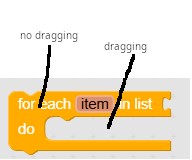
Thanks in advance!

Hello, @Keko_Electronic

https://community.kodular.io/t/block-cant-drag-to-the-canvas/312233/2?u=ibrahim_jamar

when I switched to Firefox, it works normally

2 Likes

Help me the blocks are not draggable Why?

Try Firefox
Taifun

I can’t drag components into blocks in Block interface.

Try Firefox
Taifun

I can’t select blocks in the Blocks section. Is this problem only happening to me? I’ve refreshed the page and tried again, but the error persists.

I created different projects and continued with them, but the problem persisted.

Hi,
Before creating new post please search in community.

Please have a look on this : Drag&Drop issue in Kodular Creator Block window

Current solution : Use Firefox

2 Likes