I generated my website with AI using Base44. The system automatically creates almost everything on its own. The only part that is not generated by me is the login system. The login page and its URL already exist as a fixed, pre-built feature from the provider. I cannot change this URL; I can only use it to log users in.
Because of this, the login page has a different URL than my main website. This causes problems in the Kodular WebViewer, since it only accepts one home URL and opens other URLs—like the login URL—in an external browser.
I’m not entirely sure, but you’ll start at the login page. Once you log in there, you’ll be redirected to the main app. Inside the app, everything works normally. The login page still has its own URL, and my main page has a different URL.
You can either visit the website directly or download the app—it’s free. Since you’re in Italy or have an Italian flag, you can download it if you want and take a look.
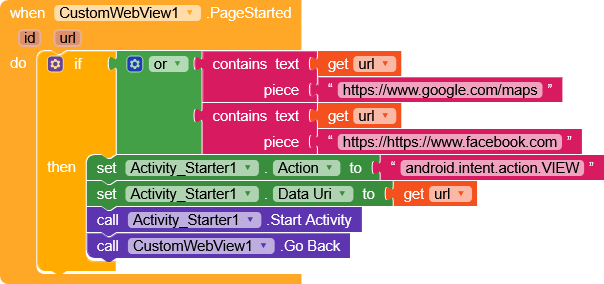
It’s finally working, thanks a lot! Just one small thing: if you access Google Maps through the app, it will first open in the browser. There, you’ll need to accept cookies. I’ve translated it so you can see it in English.
Once you accept the cookies, it will redirect you to the correct destination on Google Maps. The annoying part is that you’ll have to accept the cookies every time. Not a huge problem, but it would be great if you knew a way to fix that.
Ah, I found the solution! I selected Brave as the browser engine, and it was clearing all cookies as soon as I left the website. That’s why it wasn’t working.
Okay, so now it’s all working! Thank you so much again. I spent a long time dealing with this bug, tried so many things, and nothing worked so I really appreciate your help.
One last question. Since users can already add their own website or Facebook page, would it be possible for these links to open in a separate browser or in the Facebook app?
Now i have another problem, a part of my app is to upload events, restaraunts, clubs, services with images. But now they block the gallery to open. How can i fix it? Thank you for your help.
Hello RaYzZz,
Yes, but this is related to the solution we just implemented for the previous problem.
Since we added those blocks, they are now blocking image uploads. Before adding the blocks, uploading images from the gallery always worked. After we added the blocks to handle Google Maps, the app now has this issue.
Hello,
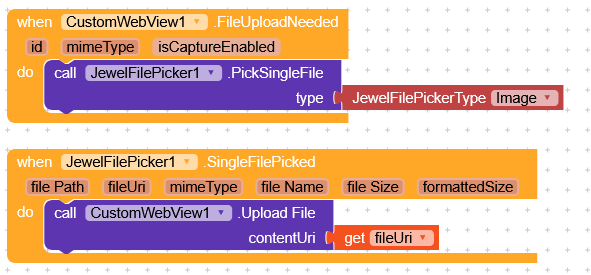
I am now using the File Picker Extension. It works: the phone gallery opens, I can select images, tap “Select,” and the gallery closes again. After that, the file should upload.
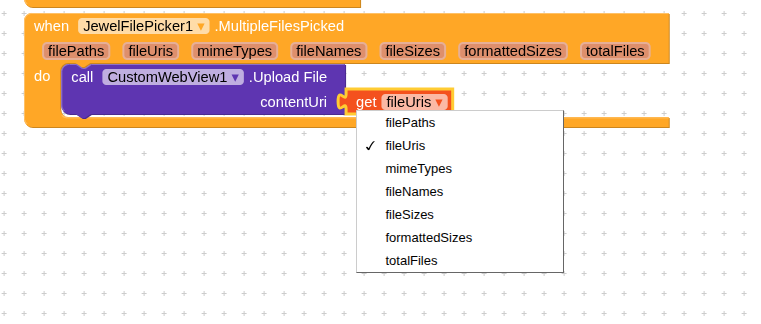
But the upload does not work. I played around with this block (I tried all options):
It doesnt work so I checked my website in the webviewer again. The website only accepts URLs. How can I convert the selected image from an URI (or whatever) into a URL so my website can accept and upload it?
I tried to add the Blocks but it doesnt work mybe because they use a VerticalArrangment instead of the Coustom Webviewer and they dont use the JewelFile extension. So what should i do??