Following the release of the 2025.10.2 patch, I have encountered a critical User Interface (UI) issue. I understand this patch aims to fix the Status Bar visibility problem in SDK 35, but this resolution seems to have introduced a significant side effect regarding safe area insets.
Issue: My fixed-position top menu bar (position: fixed; top: 0; in CSS) is now being rendered underneath (obscured by) the Android system’s Status Bar.
Result: Due to this overlap, the navigation buttons located at the very top of the header are unclickable, severely impacting application usability.
2. Technical Analysis and Severity
To verify that this issue stems from the native WebView code and not my web content, I attempted all standard web-side solutions:
viewport-fit=cover Meta Tag: Added this directive to the HTML <head>.
CSS env() Variables: Applied padding-top: env(safe-area-inset-top, 0) to the header element.
None of these standard and modern CSS solutions are working. This strongly suggests that the 2025.10.2 patch is either blocking the WebView from receiving or is improperly setting the safe-area-inset-top value in the native layer (Window Insets management).
CRITICAL POINT: While it is technically possible to apply a hardcoded CSS value (e.g., padding-top: 30px;) to push the header down, this is not a viable long-term solution. This hack introduces unnecessary and aesthetically poor top padding on older Android devices or standard browsers, destroying the UI consistency we strive for across different platforms and OS versions.
3. Resolution Expectation
Please investigate the Window Insets handling that was changed in the 2025.10.2 patch. Our web content must begin immediately below the system-defined Safe Area. We urgently require a native fix that ensures the env(safe-area-inset-top) variable correctly returns the Status Bar’s dynamic height to the WebView’s CSS engine.
This is a critical UI/UX issue that directly affects the usability and cross-device consistency of the application. I request prompt review and inclusion in the next patch release.
Same issue is happening to me , android 15 and 16 users are facing issue that android status bar (battery + time and date) is overlapping with my application status bar .
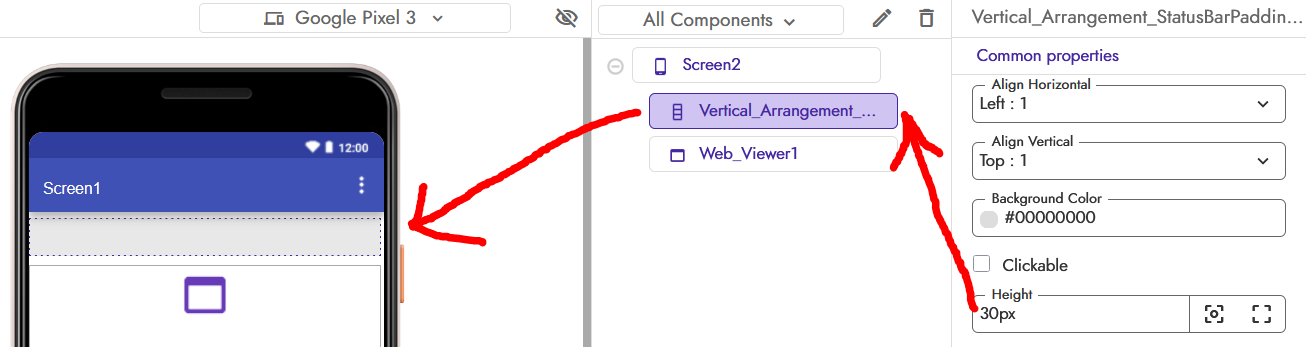
Thanks for an elaborate bug report. Sorry that the latest affected apps using webviews. We are looking into fixing this. In the meanwhile, you can try to use an empty Label component with height equal to the status bar height as a padding above the Webviewer component.
The Ultimate Solution: Dynamic Safe Area Inset Management
Thank you for confirming the temporary workaround. While we appreciate the quick suggestion to use a hardcoded Label component as padding, we must point out that this introduces a new, significant UI problem:
UI Inconsistency: Using a fixed height (e.g., 30px) will create an unnecessary top padding on older devices or devices that properly render the Status Bar outside the WebView area. This degrades the user experience by adding an unwanted blank space.
The only definitive and cross-device compatible solution is to dynamically retrieve the exact Status Bar height from the native Android system and pass it to the WebView.
Required Solution: Native Height Retrieval and Dynamic CSS
To ensure both modern compatibility and legacy consistency, we need the Kodular team to expose a simple function to retrieve the required safe area inset.
We require a method to directly access the Window Insets data via the Kodular blocks, allowing us to implement the following process:
Native Retrieval: Expose a new function/property in the Screen or Webviewer component (e.g., Webviewer1.getStatusBarHeight()) that returns the exact top inset value (in DP or Pixels) from the Android Activity’s WindowInsets.
Block Logic: We will retrieve this value using a Kodular block.
Dynamic Application (Via JS): We will use the existing and working Web_Görüntüleyicisi1.Evaluate JS block to inject the necessary padding directly into our HTML/CSS.
The Block Logic and Web Implementation
This approach avoids the env(safe-area-inset-top) bug while achieving the same dynamic result:
// JS to be evaluated in the WebView:
// Assuming 'native_height' is the value passed from Kodular Blocks (e.g., 30)

var height = [native_height_from_blocks];
var header = document.querySelector('.bg-black.fixed-top');

if (height > 0) { // Only apply padding if the device actually has an inset (new device)
    if (header) {
        header.style.paddingTop = height + "px"; // Push header content down
    }
    document.body.style.paddingTop = (50 + height) + "px"; // Push body content down
}
This method eliminates the need for any fixed padding hacks, ensuring that:
Old Devices (Zero Inset): The height will be 0, and no extra space will be applied.
New Devices (Non-Zero Inset): The correct dynamic height will be applied, making the buttons clickable.
We strongly urge the development team to prioritize exposing this crucial Status Bar Height / Top Inset value through the Kodular block system as the definitive solution to the UI overlap issue.
Tell me you’re not using AI to reply, anyway I think you remember that we have Device utilities that can give you device API SDK version as @pavi2410 mentioned the workaround then you can use the Device utilities to get android version then you will decide whether to hide the labe (in older version) or not (latest version)
Also try using percentage value which will be good in all devices
Thank you for your feedback and technical assistance. I have an important observation regarding the Status Bar issue:
Testing with the Companion App: When testing live using the Kodular Companion App, the Status Bar appears correctly separated and distinct from the WebViewer content, even on the newest devices (i.e., no content hiding occurs).
Testing with Exported APK: However, when I export the application as an APK and install it on a device, the Status Bar overlaps the WebViewer content, causing the top of the content to be hidden.
This discrepancy suggests that the Companion App is not accurately reflecting the final APK’s true full-screen/system bar behavior. The Companion App seems to have a built-in status bar compensation that the compiled APK lacks.
It would be extremely helpful if your development team could update the Companion App to more closely mimic the system bar behavior of the final, compiled APK to ensure more reliable development and testing.
For as a Temporary solution i set an Layout with height of 3 % and add a condition if android version 15 or Higher then layout set to Visable else False …
Hello. I must clarify my previous observation, as I believe there was a misunderstanding regarding the nature of the issue.
The problem is not that a component disappeared; the core issue is that the testing environment (Companion App) is outdated.
Testing Inconsistency
The key issue is the lack of parity between the Companion and the compiled APK:
Companion App: Renders the WebView in the Legacy System (Status Bar reserved, WebView is not full-screen).
Compiled APK: Renders the WebView using Modern Edge-to-Edge (WebView is full-screen).
Essential Request
We urgently request that the Companion App be updated to render the WebView in the Modern Edge-to-Edge (full-screen) mode to align its system bar behavior with the compiled APK. This alignment is critical for reliable development.

 The Ultimate Solution: Dynamic Safe Area Inset Management
 Required Solution: Native Height Retrieval and Dynamic CSS
 The Block Logic and Web Implementation