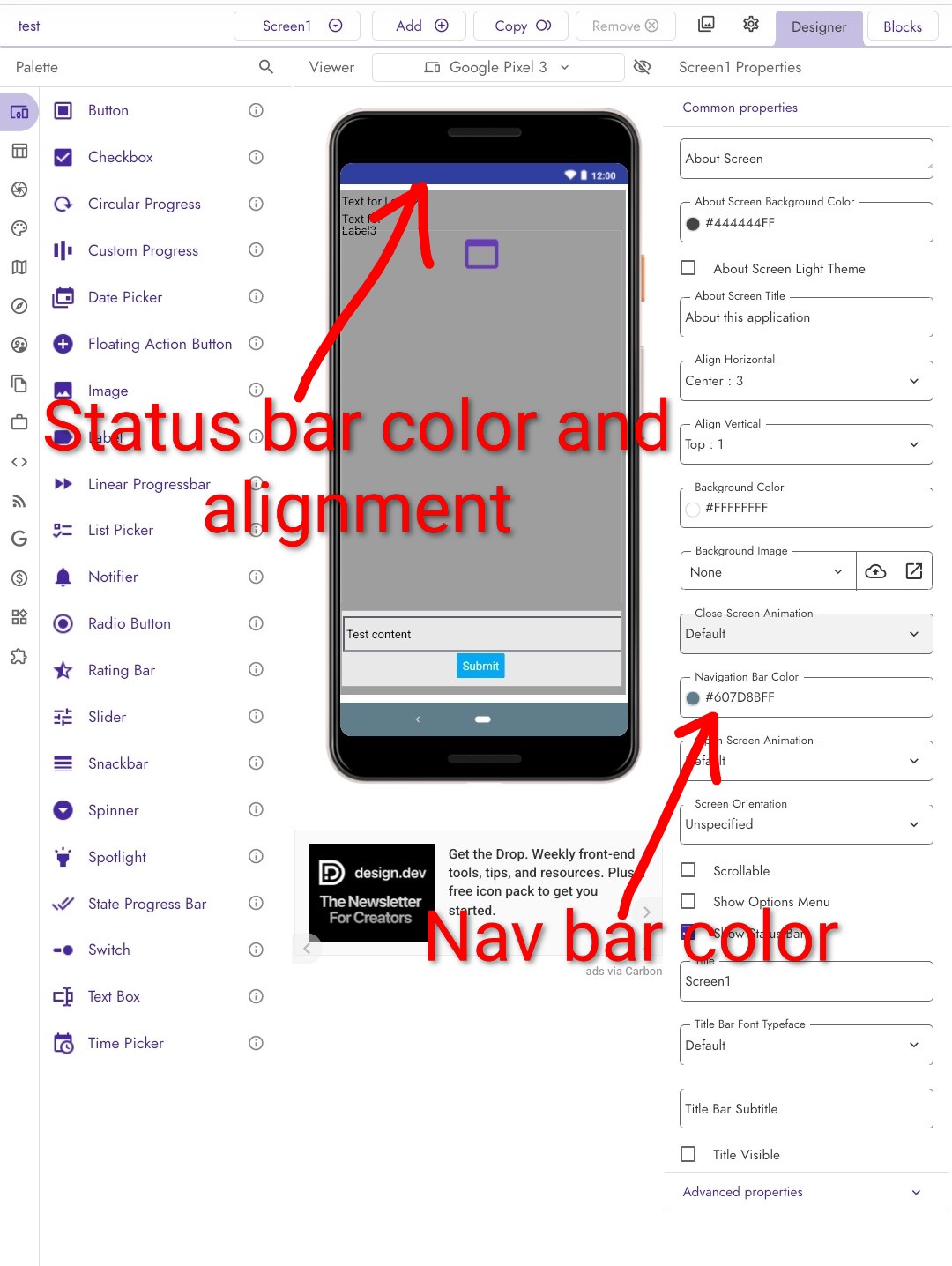
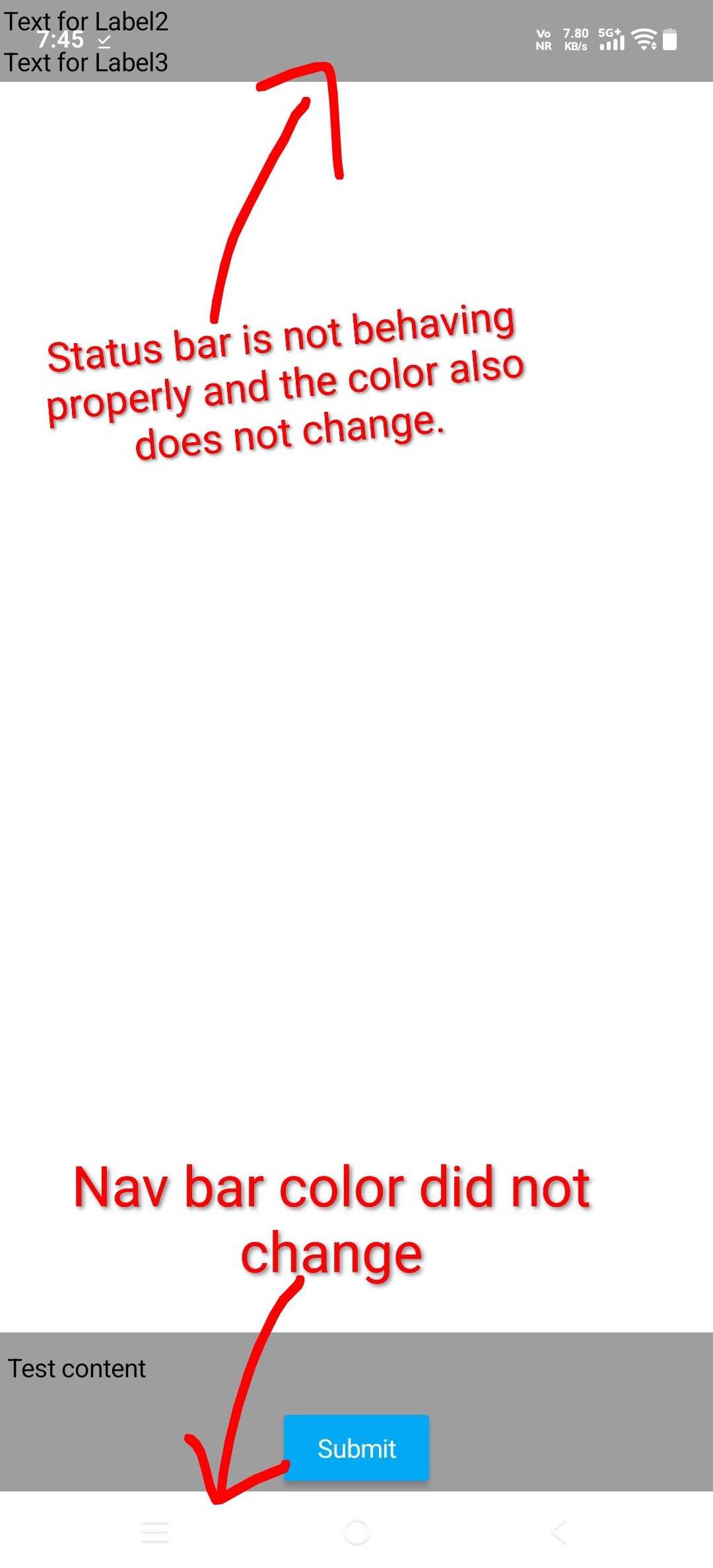
When exporting an APK from Kodular and installing it on a device, the status bar does not appear, and the navigation bar color does not change even when a different color is set in the project settings or blocks.
While temporary workarounds exist, they act as band-aid solutions. A proper, native fix is required.
Steps to reproduce the issue
Create a new project in Kodular
Set a custom Navigation Bar Color (different from default)
Export the project as an APK
Install the APK on an Android device
Launch the app
Expected Behaviour
The status bar should be visible
The navigation bar color should change to the color set in the project
UI should respect the configured system bar colors after installation
Actual Behaviour
The status bar does not appear
The navigation bar color remains unchanged, ignoring the configured color settings
Behavior only occurs after exporting and installing the APK
Show your Blocks
No specific blocks used. Issue occurs using default screen settings and standard configuration.
Android version
Android 15
Additional note
This issue affects the final exported APK and not the live preview.
Kindly let us know when this issue will be fixed officially, as relying on workarounds is not a long-term solution.
Please don’t belittle those who offer you this platform for free.
There have been several updates recently with many bug fixes, so it doesn’t seem fair.
I would say this statement is quite unfair, as there’s much more work than what you see in the Kodular Creator releases.
For the past months, much of our efforts have been invested in getting Kodular Creator out of Google Cloud Platform. Yes, we will eventually run out of their infrastructure.
And you may be wondering, what’s the benefit. First, more performance, as we will get larger instances and hopefully you should experience less lag. And second, finally reducing the upload AIA file size limit.
Also, we have been rewriting Kodular Auth and My Kodular with newer technologies. Sometimes they were quite slow to load, so we are basically doing them again from scratch. We will also host them outside of Amazon Web Services, which should as well improve their performance.
We understand that the Kodular team is working diligently to deliver the best possible user experience, despite operating with a limited team. We recognize that this can naturally slow development and feature releases, and we appreciate the effort being put into maintaining and improving the platform.
That said, as members of the community, many users would value greater visibility into the current state of Kodular’s development. Having access to a roadmap or regular progress updates would help users better understand what is actively being worked on and what to expect in the future.
In addition, it has been some time since we last heard any updates regarding Kodular and MIT App Inventor collaboration–related news. While it is completely understandable that the team may be focused on ongoing development and may not always have time for public announcements, even brief updates would be helpful. Clear communication allows users to stay informed and feel more confident about the platform’s direction.
For many developers, this concern comes from genuine investment. Users have dedicated significant time and effort into building their projects on Kodular, and without regular updates, some may worry about the long-term stability of the platform and the future of their work.
As a dedicated Kodular user, I want nothing more than to see Kodular continue to grow, evolve, and succeed. Increased transparency through periodic updates or an official roadmap would greatly help reassure the community and strengthen trust in the platform.
Update on Issue: APK Export on Android 15+ Breaks Status Bar Visibility and Navigation Bar Color Configuration
I am writing to provide an important update regarding my previously reported issue. Through further testing, I have confirmed the specific scope of the bug:
✅ Confirmed Working: The exported APK functions correctly on Android 14. The status bar is visible, and the configured navigation bar color is applied as intended.

❌ Confirmed Bug: The described issue occurs specifically and consistently on devices running Android 15 and above. After installation, the status bar remains hidden, and the navigation bar color does not change from the system default.
This new information precisely isolates the problem to a compatibility regression with Android 15/API level 35. The issue is not present in prior versions of the OS but manifests in the latest version, indicating a change in how system theming or window management is handled post-export from the Kodular environment.
Could the kodular development team please investigate the compatibility with Android 15’s theming engine? This confirmation should help narrow down the root cause. Thank you.
Yes, it works on Android 15; I haven’t tested it on other versions. I started creating the extension because of a problem I was having. If the status and navigation bars are hidden when the app launches, they appear when you swipe and don’t hide again.
When you make the navigation bar appear by swiping up from the bottom (12’ of the video) with the extension it hides again, without it Kodular just leaves it permanently and does not hide it again automatically.