Hello everyone, I'm trying to set a custom ringtone in an app built with Kodular (or MIT App Inventor). Previously, I used multiple screens, and it wo

Now I rebuilt everything on a single screen using two Vertical Arrangements and a global variable selezionato to manage the selected file.

My logic is:

  • Button 1 → set global selezionato to “Suono1.mp3”
  • Button 2 → set global selezionato to “Suono2.mp3”
  • Button “Set Ringtone” → copies the file to /storage/emulated/0/Ringtones/ and sets it as ringtone using TaifunSettings.RingtoneSet

But it doesn’t work. Nothing happens. No file is copied, no ringtone is set, no error message appears.

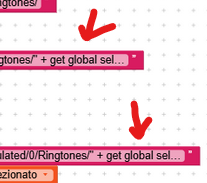
I tried using join “/storage/emulated/0/Ringtones/” + get global selezionato, but it makes no difference.
I also tried playing the file with Sound1.Play before copying, but it doesn’t play.

I’m using Android 11+. Could this be a permission issue or a problem with accessing the Ringtones folder?

Does anyone have a working example with multiple sound files on a single screen?
I can share screenshots of my blocks if needed.

Thank you so much to anyone who can help :folded_hands:

Hi Valentino,

Welcome to the Kodular community,

I believe the WRITE_EXTERNAL_STORAGE permission should be enough.

Do you intend to upload the app to the store?
(because I’m quite sure that with this permission it wouldn’t be approved)

It would really help if you provided a screenshot of your relevant blocks, so we can see what you are trying to do, and where the problem may be.

To get an image of your blocks, right click in the Blocks Editor and select “Download Blocks as Image”. You might want to use an image editor to crop etc. if required. Then post it here in the community.

Taifun

Hi @Taifun, thank you for your reply and for offering to help.

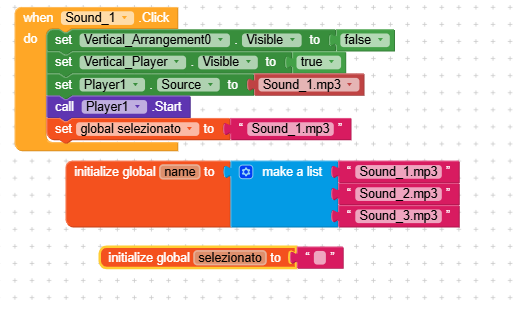
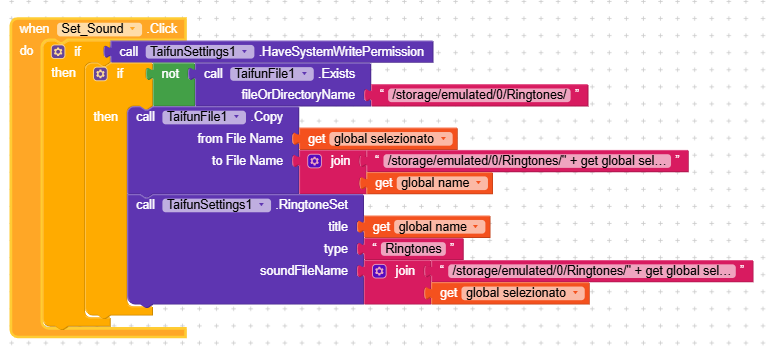
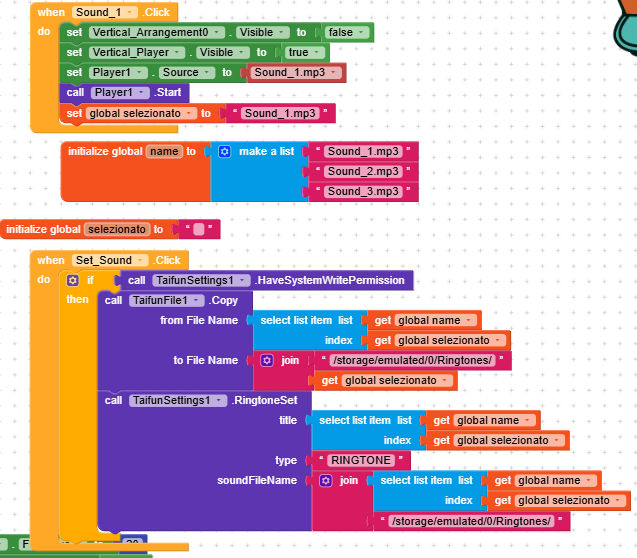
As requested, I’m sending the screenshot of the blocks I’ve built using your TaifunSettings extension. I’ve changed the filenames for privacy, but the logic is exactly the same.

Here’s what the blocks do:

  1. When the user clicks on a sound label (e.g. Sound_1), the app:

    • Hides the initial arrangement
    • Shows the player
    • Sets the player source to the selected MP3
    • Starts playback
    • Saves the filename in a global variable
  2. When the user clicks the “Set Sound” button:

    • Checks for system write permission
    • Verifies that the Ringtones folder exists
    • Copies the selected MP3 to /storage/emulated/0/Ringtones/
    • Calls TaifunSettings1.RingtoneSet with:
      • title: global name
      • type: Ringtones
      • soundFileName: /storage/emulated/0/Ringtones/ + global selezionato

I’ve tested this many times, but the ringtone is not being set. Could you please check if something is wrong or missing?

Thanks again for your support!


You check whether you have the permissions, but I don’t see the actual permission request anywhere, so I imagine that condition never actually becomes true.


There’s no need for this part.

Yes, there are a few errors…

From the documentation

Check, whether we have system write permission or not. Returns true or false. In case of false, the Android permissions menu of the app will be opened automatically.

Which means you are doing this correctly, but that’s the only thing which is correct in your blocks

You only try to copy if the folder does not exist… this does not make sense, because usually the folder exists, therefore always copy the file

If you use my file extension and want to copy a file from the assets then the from filename must start with 2 slashes

//Sound_1.mp3

The to filename can’t be a list… global variable name is a list. Also you have some strange understanding how to use the join and text blocks, see again what @RaYzZz already said… For the first sound the following path would be correct

/storage/emulated/0/Ringtones/Sound_1.mp3

This path should be the same for the RingtoneSet block
type btw. is RINGTONE and not Ringtones, see the documentation at App Inventor Extensions: Settings | Pura Vida Apps

Do the tutorials to learn the basics, especially learn how to use the join block and use Do it to debug your blocks

A very good way to learn App Inventor or Kodular is to read the free Inventor’s Manual here in the AI2 free online eBook App Inventor 2 Book: Create Your Own Android Apps … the links are at the bottom of the Web page. The book ‘teaches’ users how to program with AI2 blocks.

There is a free programming course here Course In A Box and the aia files for the projects in the book are here: App Inventor 2 Book: Create Your Own Android Apps

How to do a lot of basic things with App Inventor are described here: How do you...? .

Also do the tutorials Our Tutorials! to learn the basics of App Inventor, then try something and follow the Top 5 Tips: How to learn App Inventor

Taifun

1 Like

Dear Taifun,

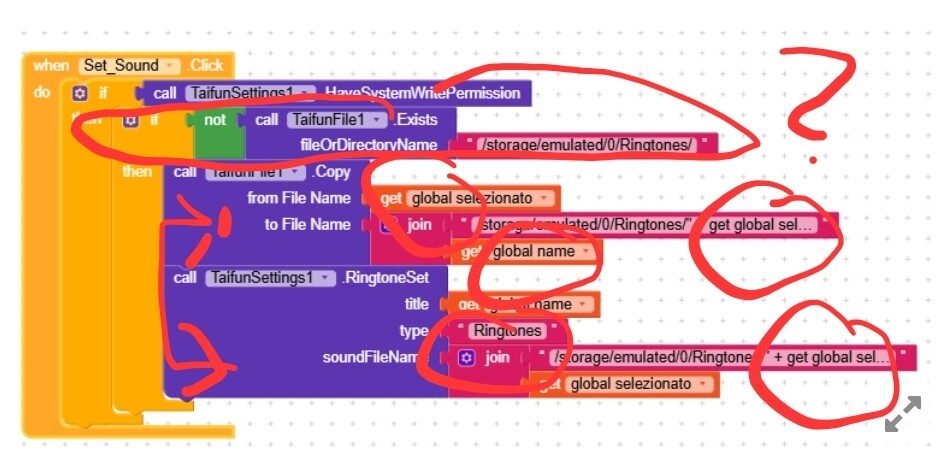
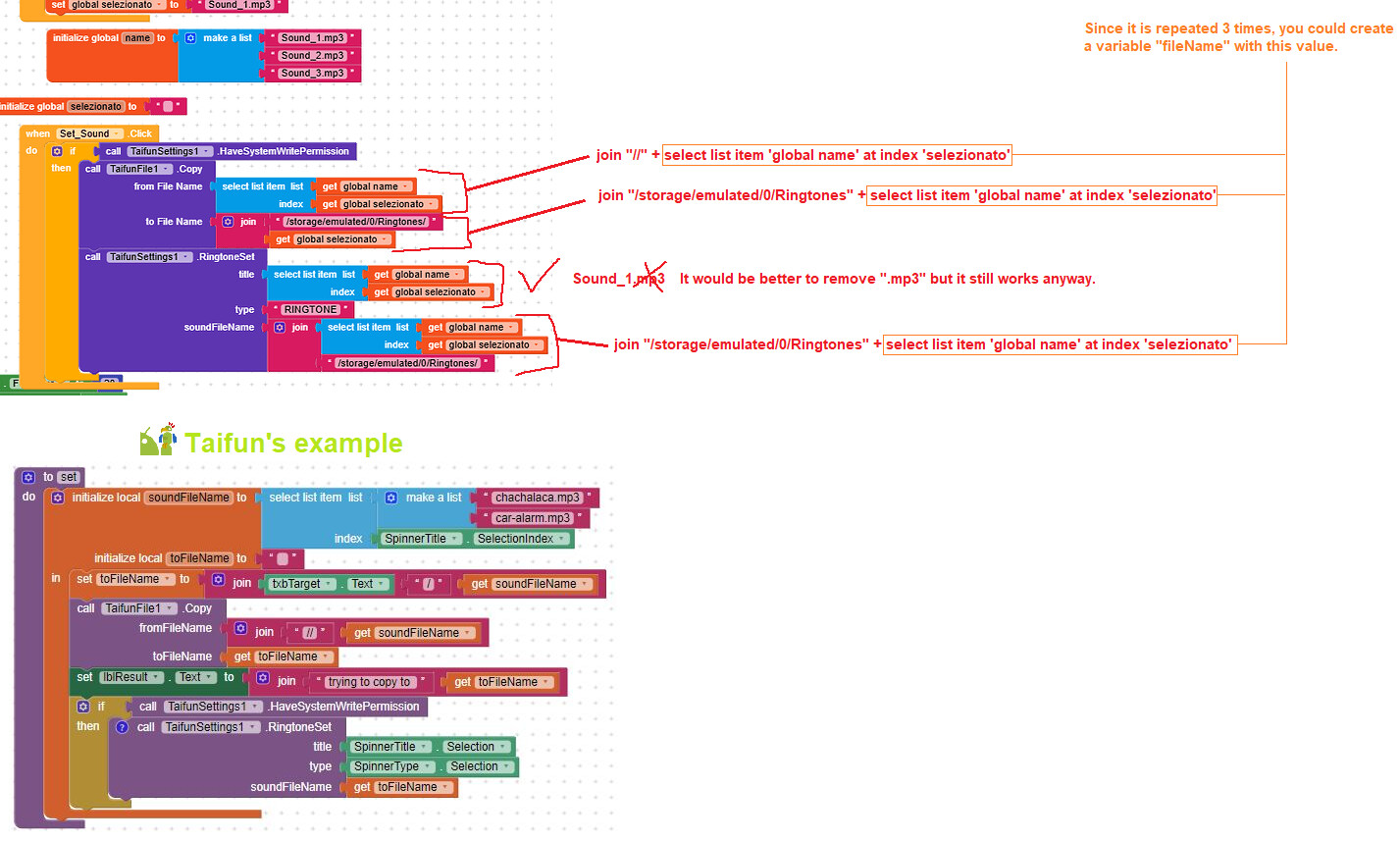
Thank you again for your support and for sharing your notes and screenshots. I’ve followed your instructions carefully and rebuilt the blocks as shown in the attached image.

As you can see, I’m using the global list “name” with values like “Sound_1.mp3”, “Sound_2.mp3”, etc., and selecting the correct item based on the global “selected” index. The file is copied correctly to the Ringtones folder, and the path seems valid.

However, when I click the “Set” button, nothing happens. The ringtone is not set, and I don’t see any system response. Previously, when I used a fixed MP3 file one at a time, it worked perfectly. But now, using the list, it doesn’t work anymore.

Could you please take a look at the attached image and let me know if something is wrong or missing? I would really appreciate your insight.

Thank you again for your time and attention.

Best regards,
Valentino

Hi dear,

Taifun’s documentation is very clear,

Though if you look closely there are still some imperfections.
Unfortunately, I have no way to run a test right now, but I believe it should be done this way.

Have a nice day

1 Like

selectionado should be rhe list index and NOT the list item

use the companion app together with Do it to debug your blocks, see also tip 4 here App Inventor: How to Learn | Pura Vida Apps

see also Live Development, Testing and Debugging

Taifun

Hello everyone, I’m attaching the picture of the blocks I prepared. I have read the manual, but unfortunately I cannot understand how to apply it to my case, so I still cannot set the file as a ringtone.

I kindly ask if someone can explain to me block by block, in a clear and practical way, how to do it correctly.

Please don’t just send me back to the manual: if every time someone has a problem they are sent to the manual, then we might as well go to the library, buy the manual, and close the forum.

I am also willing to pay anyone who can provide me with the correct comparison of working blocks, already tested.

Thank you very much to anyone who will have the patience to help me.

You forgot the 2 slashes

Why don’t you use Do it for debgging as suggested earlier?

Also as already said

You created the filename

storage/emulated/0/Ringtones/1

The blocks in RingtoneSet are also wrong.
It looks like you are randomly putting some blocks together

There is Do it available for Debugging… what about now starting to use it?

You also can send me your project by PM - personal message and I will adjust it for you
See your PM. Please do not add the project into the public community as it is a paid extension.

Taifun

Hi Taifun,
Thank you for your reply.
I tried to send you a private message from your profile, but I couldn’t find the “Message” button.
Could you please tell me how I can send you the .aia file privately?
I created a test project with 3 sample sounds, just for you to check the block configuration.
Thanks again!
Valentino

Just answer the PM I sent you yesterday
EDIT: I just sent another one
Alternatively send me an email

Taifun

[Uploading: RingtoneTest.aia…Hi Taifun,
I tried to send you a private message from your profile in the Kodular Community, but I couldn’t find any button to click.
I also tried to upload my .aia file in the Community, but it doesn’t work — the upload keeps spinning and never finishes.
In addition, on the Pura Vida Apps website there is no button to send a direct message.
How can I send you the file privately?
Thank you!
Valentino

I’m glad for you, that this did not work, because uploading a project into a public community which contains a paid extension would violate my terms and conditions.

As I can see, you found my stackoverflow profile, but you were neirher able to find the 2 PMs I sent to you nor were you able to find my email address on my contact page.

Taifun
PS: I will close this thread. Please contact me by email or answer my PMs.

You can access your PMs here: Profile - Valentino1 - Kodular Community Everybody else gets an access denied page