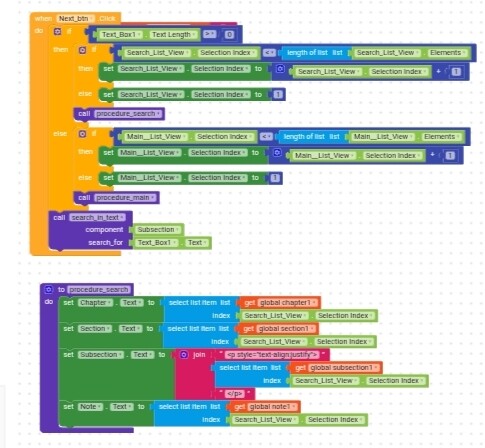
when i seach any text it should be highlight or colour should be change
now i used this

it worked if i searched and pick element but if i click next or previous button then subsection label not change
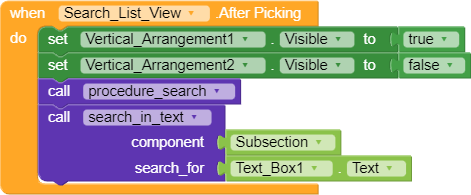
and so that i did not get next text
when i seach any text it should be highlight or colour should be change
now i used this
Hi dear,
you should explain better how your app works and what you are trying to achieve, maybe also showing the code in the buttons you mentioned.
it’s difficult to imagine how it’s supposed to work if you don’t explain it clearly, I also think it can be done much more simply, but you need to give me more details
If I search some text then search list view appear and if click on particular item then label open, and next and previous button appear. If I click on next the text in label will be from next searched item.
In this if I click on search list item then the searched text in label colour changed.
Now if I click on next the next text will appear in Chapter, section label but not appeared in subsection label, this is problem
I’m really struggling to understand, try recording your screen and posting it here, thanks.
Hey @RaYzZz I asked chatgpt for assistance for easy understanding maybe it’s correct
Yes. The author is describing a UI flow and data-binding problem in a search-driven reader interface (likely in Kodular / App Inventor–style blocks). Below is a structured interpretation of what he is trying to build and where the issue occurs.
This strongly suggests:
currentIndex is updated for Chapter/SectionFor example:
SearchResults_ChaptersSearchResults_SectionsSearchResults_SubsectionsWhen clicking Next, only two lists are accessed, not the third.
when SearchListView.AfterPickingwhen NextButton.ClickIn simple terms:
“How do I make the Subsection label also change correctly when using Next/Previous navigation after selecting a search result?”
He is trying to build a searchable reader with next/previous navigation, but his Next button logic does not update the Subsection label from the filtered search results, even though Chapter and Section do.
If you want, I can:
Just tell me which one you need.
Much better indeed  ,
,
but since the initial explanation wasn’t well defined, I’m afraid the AI may have imagined what it thinks is wanted, and I’m not sure it actually matches what Sagar wants.
If they also had an image or a video showing what he means, it would be much better, also because I believe that
Thanks anyway for the help