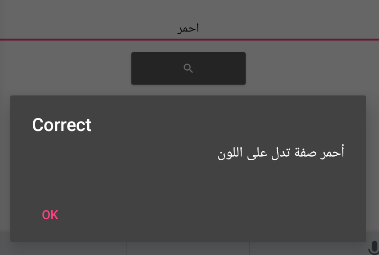
Issue: Exact Match Condition Not Triggering When Using CSV Word Correction Logic

I’m developing an app that uses a CSV file containing three columns: the first column is the wrong word, the second column is the correct word, and the third column is the explanation.

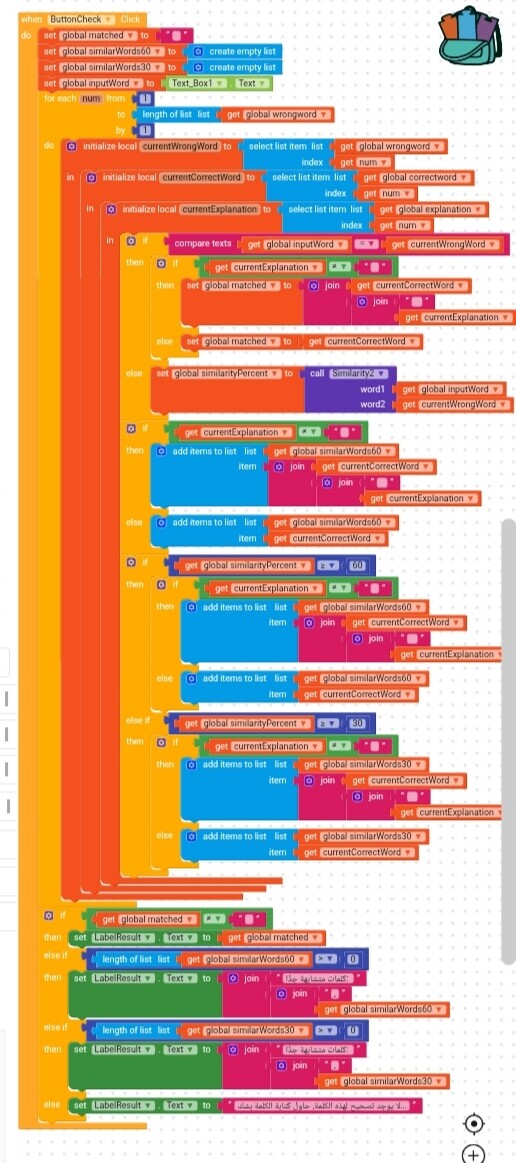
The app should let the user enter a word, and if it exactly matches a wrong word, it should display the correct word and the explanation if available. If there’s no exact match, it should check for similarity at 60%, and if that’s also not found, then check similarity at 30%.

But the problem is, when I test the app and enter a word that exactly matches one of the wrong words, these conditions don’t execute at all. It jumps straight to the last condition saying “No correction found.”
Please, help me!

Hi dear,

hadn’t we already solved this topic?

Do you still want to use your method anyway?

1 Like

I don’t understand this method. I’m not familiar with blocks. I tried to learn them so I could make the app, but I couldn’t.
Could you please explain it in a way that helps me understand how to apply it, or provide me with a link that explains it?
Thank you again.

Here’s a more detailed explanation.

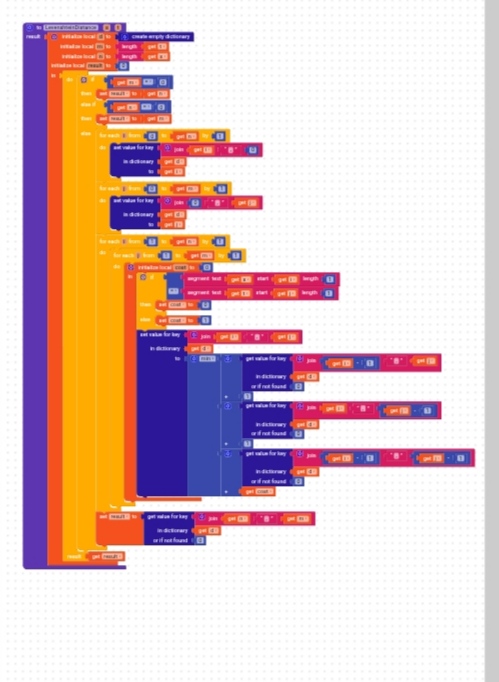
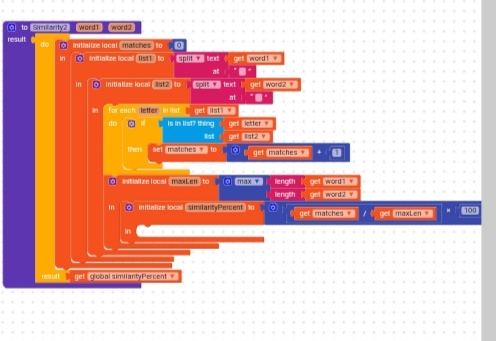
Levenshtein distance

The similarity is calculated using the Levenshtein Distance, which is an algorithm for measuring how similar two words are.

Here you can find more details about how it works, but for your needs you can just copy it as it is.
https://people.cs.pitt.edu/~kirk/cs1501/Pruhs/Spring2006/assignments/editdistance/Levenshtein%20Distance.htm

Tip

If you open the images of the blocks and save them in their original format, you’ll be able to drag them into your workspace so you won’t have to copy them manually block by block
(the image must be saved directly from Kodular workspace, screenshots don’t work).


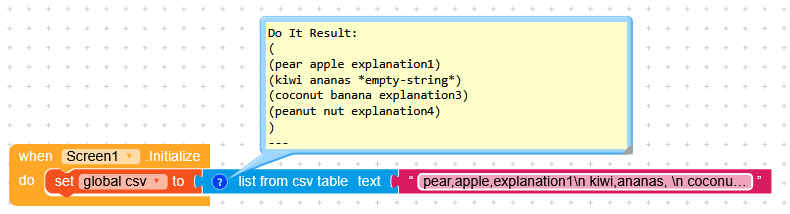
First, we convert the CSV list (text) into a list of lists for Kodular.

CSV
pear,apple,explanation1\n
kiwi,ananas, \n
coconut,banana,explanation3\n
peanut,nut,explanation4
List of lists
(
(pear apple explanation1)
(kiwi ananas  )
(coconut banana explanation3)
(peanut nut explanation4)
)


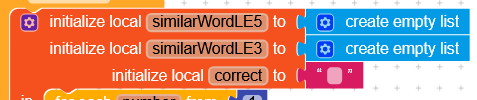
We create 3 variables:

  • similarWordsLE5: the words that will have a score of 5 compared to our word,
  • similarWordsLE3: the words that will have a score of 3 compared to our word

the closer the score is to 0, the more similar the word will be

  • correct(0 Levenshtein distance points): which was like your matched variable.


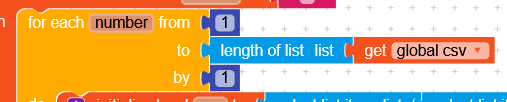
We make a loop from 1 to the length of the CSV list.


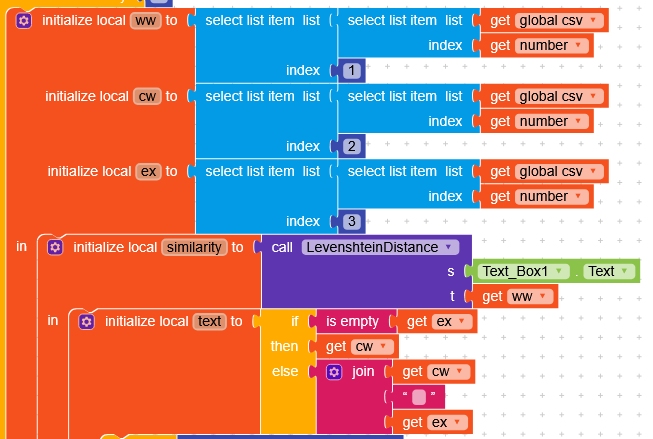
In each loop we create 5 variables (I’ll give you an example referring to the first loop):

  • ww: wrong word “pear”,
  • cw: correct word “apple”,
  • ex: explanation “explanation1”,
  • similarity: will calculate the Levenshtein distance between the word in the textbox and the wrong word,
  • text will write only the correct word if the explanation is empty, otherwise it will also add the explanation cw ex.


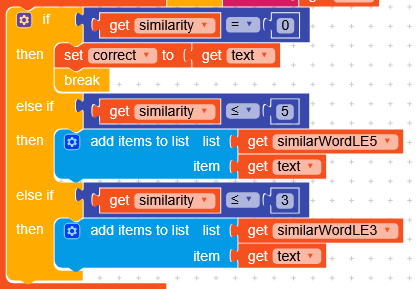
If the word has a Levenshtein distance of 0 (similarity = 0) compared to the wrong word (an exact match), we set correct to the value of text and stop the loop (stopping it will exit the loop and move on to the part I’ll explain next).

If the word is not equal, it is added to one of the two lists, similarWordsLE5 or similarWordsLE3.


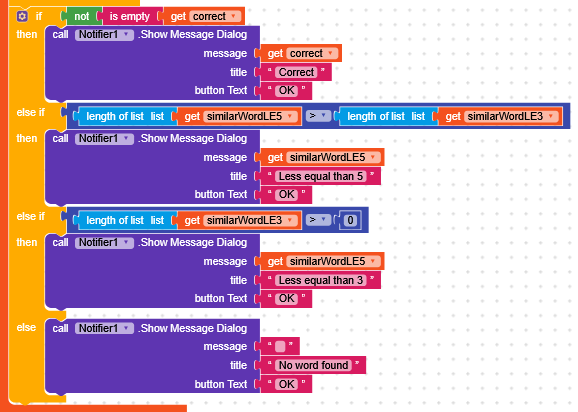
If correct is not empty, we write its value in a message dialog.

If the length of similarWordsLE5 is smaller than similarWordsLE3,
we write a message with the list of words with a score of 5 (meaning that if the less similar words are more than the similar ones, the word is actually wrong) and we display a message with that list.

If similarWordsLE3 is greater than 0 (at least one similar element), we display a message with that list.

Otherwise, we display a message informing that there are not even any words similar to the one we wrote.

I hope I explained myself clearly.

Even though I would have done it differently, I tried to keep your reasoning as much as possible so as not to change the logic too much.

Happy :kodular:oding!

1 Like

I’m very grateful for your help. I followed the instructions you gave me.
If possible, could you please write the blocks of the similarity (LevenshteinDistance) for me as well, or explain how to build it?
I would really appreciate it.
I’ve tried many times to create it myself and searched for tutorials, but unfortunately, I couldn’t find anything in either Arabic or English.
And I’m sorry for any inconvenience.

Hi Noor

What do you mean?


In the previous post I had shown you the function.
and

As well as being able to save it in the backpack from the project I provided you.

1 Like

Thank you vey much for your help.
I did what you exactly said but still shows me this message Runtime Error

Argument () to ‘apply-to-args’ has wrong type (gnu.mapping.Values) (expected: procedure) at gnu.kawa.functions.ApplyToArgs.applyN(ApplyToArgs.java:170) at gnu.mapping.ProcedureN.apply1(ProcedureN.java:31) at io.makeroid.companion.Screen1.processException(Screen1.yail:10101) at io.makeroid.companion.Screen1.dispatchEvent(Screen1.yail:10157) at com.google.appinventor.components.runtime.EventDispatcher.delegateDispatchEvent(EventDispatcher.java:242) at com.google.appinventor.components.runtime.EventDispatcher.dispatchEvent(EventDispatcher.java:198) at com.google.appinventor.components.runtime.Form$3.run(Form.java:1030) at android.os.Handler.handleCallback(Handler.java:938) at android.os.Handler.dispatchMessage(Handler.java:99) at android.os.Looper.loop(Looper.java:237) at android.app.ActivityThread.main(ActivityThread.java:8163) at java.lang.reflect.Method.invoke(Native Method) at com.android.internal.os.RuntimeInit$MethodAndArgsCaller.run(RuntimeInit.java:656) at com.android.internal.os.ZygoteInit.main(ZygoteInit.java:967)
Note: You will not see another error reported for 5 seconds.

I don’t know why and I tried all the day but nothing happened.

Definitely you’re calling something empty. Eg select item list can you show us your relevant blocks

1 Like

Always a pleasure to help you,

Is your CSV file made up of rows that each contain 3 elements?


Did you follow the advice or did you recreate the blocks manually?

1 Like

I used the aia that you gived me and entered my csv text.
Yes they are 3 columns and each rows contains 3
But the csv has many rows more than 700 row.
Here is the blocks


Does the error occur as soon as you open the app or when you press the button?

When I open the app to test it
And it didn’t allow me to press on any button or write in the text box

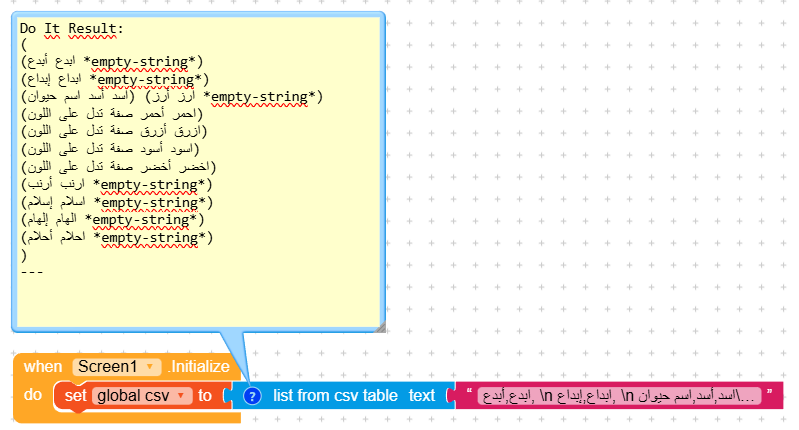
So the error is in the Screen Initialize.
I really think your CSV isn’t formatted correctly.
Could you post it here? maybe not all of it, since it’s many rows :grin:

1 Like

ابداع,إبداع,
اسد,أسد,اسم حيوان
ارز,أرز,
احمر,أحمر,صفة تدل على اللون
ازرق,أزرق,صفة تدل على اللون
اسود,أسود,صفة تدل على اللون
اخضر,أخضر,صفة تدل على اللون
ارنب,أرنب,
اسلام,إسلام,
الهام,إلهام,
احلام,أحلام,
احسن,أحسن,
احسان,إحسان,
اكل,أكل,
اكلا,أكلًا,
انت,أنت,
اعوذ,أعوذ,
اسم,اسم,
اسمان,اسمان,
ابن,ابن,
ابنان,ابنان,
ابنتان,ابنتان,
افتح,افتح,
اقرا,اقرأ,
اجتمع,اجتمع,
I think so.
Tell me how I can add it, I put \n after each row with a distance only when there is no explanation, and with no distance when there is explanation
I put it like that
ابدع,أبدع, \n
ابداع,إبداع, \n
اسد,أسد,اسم حيوان\n
ارز,أرز, \n
احمر,أحمر,صفة تدل على اللون\n
ازرق,أزرق,صفة تدل على اللون\n
اسود,أسود,صفة تدل على اللون\n
اخضر,أخضر,صفة تدل على اللون\n
ارنب,أرنب, \n
اسلام,إسلام, \n
الهام,إلهام, \n
احلام,أحلام, \n
Is that true or there is anything wrong?

I copied and pasted it into the project I had sent you, and the app loads correctly.


1 Like

so what is the problem?
Is the number of rows pose a problem because the number of rows exceeds 700?
and there is 2 forms of the word احمر that should be shown when the user write it.
أحمر صفة تدل على اللون
احمر فعل ماضي

I tried with 1000 and didn’t encounter any problems.
Obviously, it takes a bit longer to check the words, but it works.
Make sure to write

element,element,element\n

and not

\nelement,element,element

image

I don’t understand what’s written :grin:, but make sure to write wrongWord,correctWord,explanation\n.

1 Like

Many thanks, I appreciate the great effort you put into helping me.
I don’t know what’s wrong with me; I just tried following your instructions, but to no avail.
Are there many links to the Kodular website?
Can you provide me with the link to the website you use?

:blush:

What do you mean?

1 Like

I use this link to create the app:
https://creator.kodular.io/#5844279722246144
Is this the same link you use?
I was thinking that maybe there are different versions of Kodular, and I might be using an old version, so the blocks can’t be executed.
I don’t know what to say. I know my question is a little weird, but I’m really tired of the app and haven’t been able to do anything with it yet..