Here I am, sorry again for the long wait 
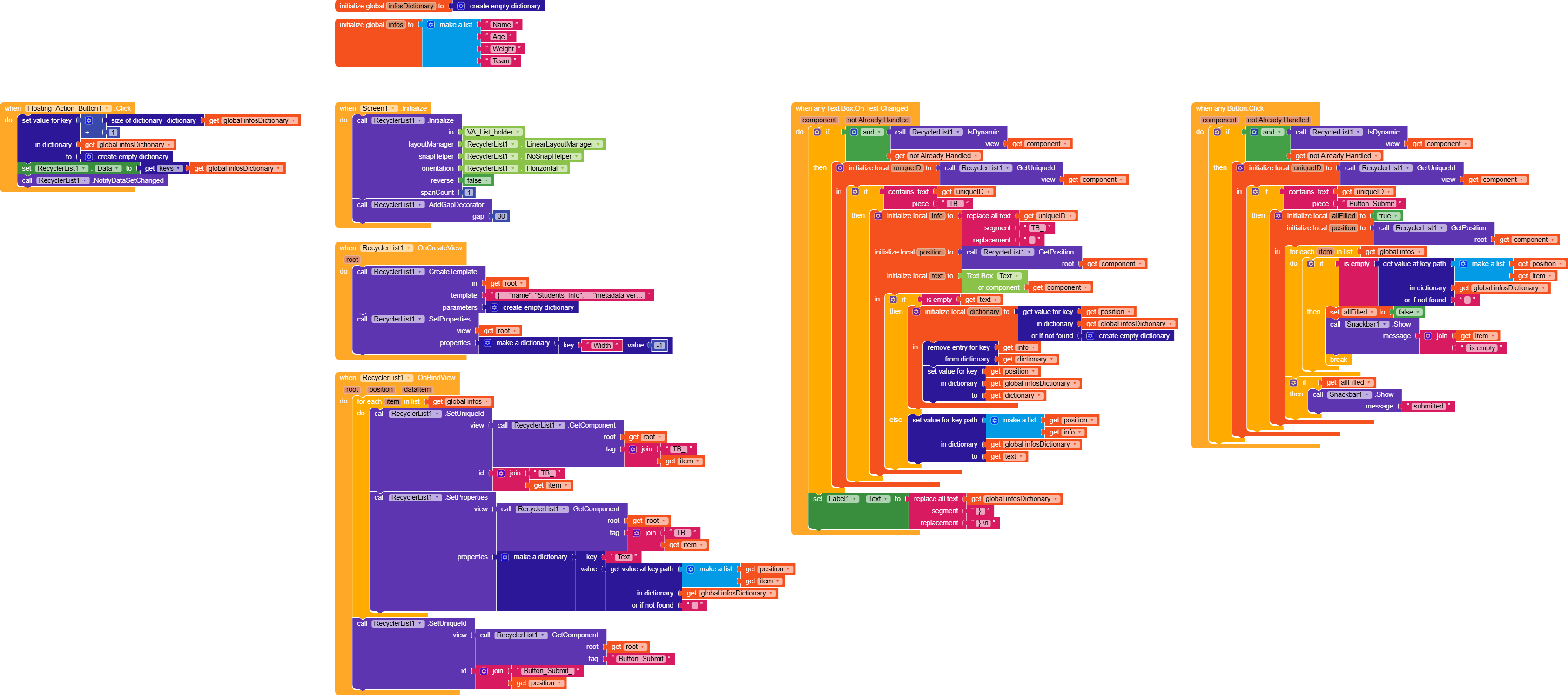
Let’s start with the variables:
Screen.Initialize
Here we initialize the RecyclerList.
I added a small gap to have some space between one form and the next.
OnCreateView
Here we create the template (I had to remove the TableArrangement because it conflicted with the RecyclerList) and set the root’s width to automatic.
OnBindView
For each info in infos, we assign a unique ID to TB_XXXX, then set its text to the value of key XXXX in the dictionary infosDictionary (if it doesn’t exist, set TB_XXXX.Text to ""). We also assign an ID to the button.
FAB.Click
Every time we click the FAB, we add a numeric key to the infosDictionary with an incremental number (size of dictionary + 1).
We then set RecyclerList.Data to the keys of infosDictionary.
This block returns a list with the dictionary keys (1 2 3 4 5 …), and finally, we refresh the RecyclerList dataset.
Any TextBox.OnTextChanged
Here, briefly, we check whether the textbox is dynamic and hasn’t been handled yet.
We get the uniqueID (TB_XXXX).
If it contains TB_, we extract the info (XXXX), its position, and its text and save them in the respectively variables.
If the text is empty, we remove the key from infosDictionary, otherwise, we save it.
(In this version, I added a label so you can visually see how the dictionary fills up)
Any Button.Click
As before, we check whether we’re actually clicking a dynamic button.
We create a boolean variable allFilled to check if all fields are filled and a variable position.
For each element in infos, we check whether the corresponding key in the dictionary is empty, if it is, we set allFilled to false and exit the loop and showing a snackbar that indicates what field is empty.
At the end of the loop, we check if allFilled remains true, if so, we display a snackbar.
That’s it!
If you still have any doubts, let me know.
AIA (updated with minor fixes)
Students_Info_Edit2.aia (163.7 KB)
 , I really need to go to bed because I have to go to work very early tomorrow.