Hi Friend I create a Image well by local Image.. there I want to create Tik mark on the upper corner when I click the Image to select it…how could I make it?
Something Like -
1 Like
Yes similar tikmark but can it create in card view?
that’s already in CardView. 
Please advised how to create tikmark
Please discuss how to create it
it’s easy you will need 3 things -
- Dynamic CardView
- Dynamic Image
- Floating View - Extension
And run a Procedure similar to -


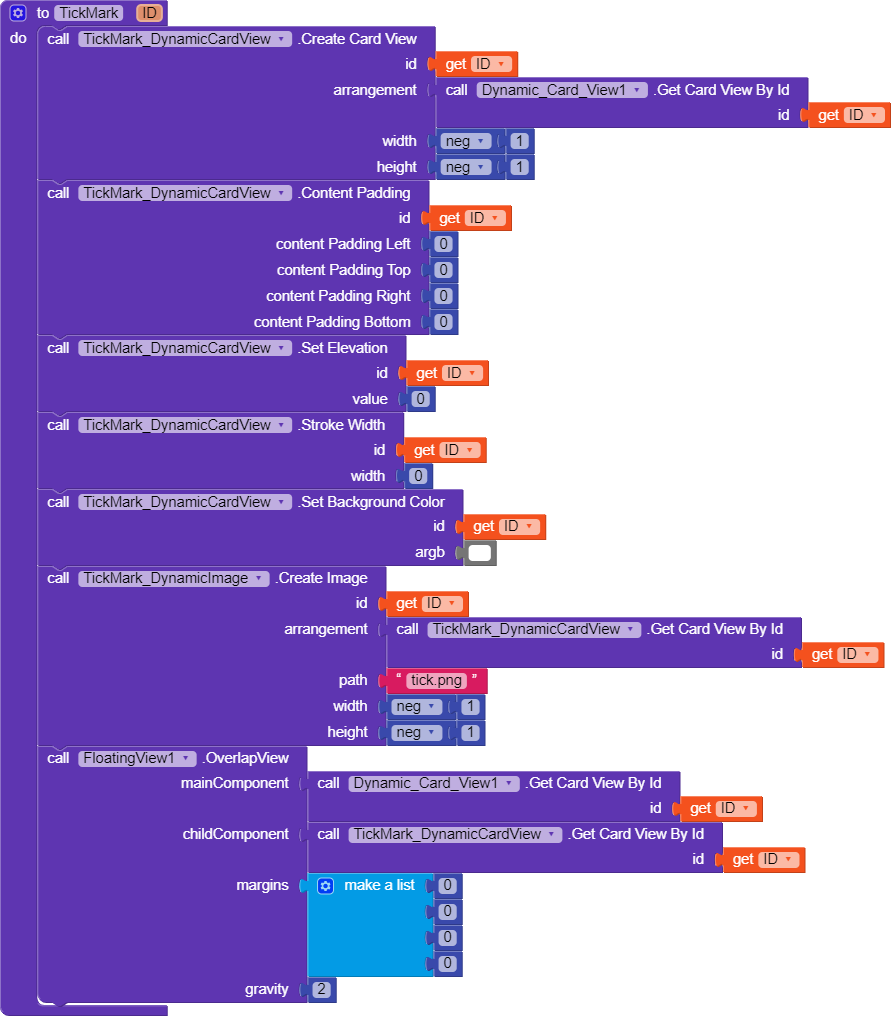
if the Main Component is Clicked for the 1st time then -
This Procedure First creates a Dynamic CardView.
Then a Dynamic Image inside the Dynamic CardView.
Finally the Floating View Extension moves the created Dynamic CardView along with Dynamic Image to the desired Gravity of the Main Component.
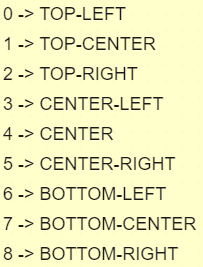
Gravity Value -
if the Main Component is Clicked for the 2nd time then -
it Deletes the Created Dynamic CardView and Dynamic Image indide it.
4 Likes
Great guide @ADDYLIN 
Actually it’s not a Guide. 
ThankYou for your Appriciation.
You can do as said by @ADDYLIN.
If you don’t want to use extension, you can do as follows:


Edit: I made a mistake at first. 
2 Likes
Hey can u provide the apk also  so everyone 1st try and make it
if it was for @golumaths100
then also share me the .aia of your solution.
else if it was for me
Try my Notes App it’s implimented their.
This Sounds Contradictory to your first statememt. 
1 Like
I was also confused at first. But yeah, if it was for me then here’s the AIA file. It’s just a basic app which will clear your logic.
example1.aia (49.1 KB)
1 Like
Haha LOL …
floating view extention where I get?
Search in Community.
i Edited this Post -
[ Removed CardView Blocks, they were not necessary for your case ]
Edit - they were very necessary
so at First I couldn’t understand the main components in floating view (overlap view blocks)..at your first suggesion..
So now you got it ,
or i need to explain/explain again  .
.
I try to got it..but how dismis tikmark again click.. so what can i do?