Hello,
I need some help.
I want to add a back button on the second page, but it didn’t work.
The second page contains a view pager with swipeable pages, similar to the WhatsApp app, where you can swipe between different screens side by side.
Is it possible to add a bottom bar that includes the home page as the first page? When the user enters the second page, the bottom bar with the home page button should still be visible, so if they press it, it goes back to the home page.
Next to it, there should be a button to share the app.
I have watched many videos, but none of the methods worked for me.
Thank you in advance.
1 Like
Can you show what have you tried so far.
1 Like
Hi Noor!
You could create your own custom bar using a HorizontalArrangement and some full-clickable CardViews.
Edit:
Since examples are very important, I’m leaving you this very simple project that does this.

BottomBarViewPager.aia (4.9 KB)
I didn’t quite understand how you want the share button, but since we’re using a custom bottom bar now, you can put whatever you want inside it.
1 Like
Hi, thank you both for your replies and for taking the time to share an example project.
I think there was a misunderstanding, or maybe I didn’t explain my case clearly.
So far, I am using two separate screens in my app.
The first screen shows a splash screen, then automatically opens the main screen when the clock timer ends. On the main screen, there is a button that opens the second screen.
The second screen contains a ViewPager with about six swipeable pages, similar to WhatsApp.
What I want to do is add a bottom bar that contains a Home button and a Share button.
This bottom bar should be visible on both screens.
When the user is on the main screen, the Home button will be inactive because the user is already on the home screen, but the Share button should work normally.
When the user is on the second screen, pressing the Home button should return the user to the main screen, and the Share button should also work there.
Thank you again for your time and effort.
Between one screen and another you would have to recreate the bottom bar every time, but that’s not very professional.
You should use virtual screens instead.
In a project I sent you in another post there was the setLayout function that uses virtual screens, use that.
1 Like
I have made the title bar visible on the second screen. Is it possible to add a back button and a share icon on the title bar? Would that be better?
And could you please tell me how to do that as well?
For back button you could use these blocks
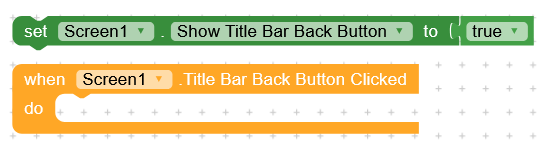
I strongly recommend creating a custom title bar, just like the bottom bar, using a Horizontal Arrangement.
1 Like
Is this extension available on your side?
There are no extensions, it’s done with native components.
1 Like
Ok, I will give it a try, and if I encounter any problems, I would appreciate your help.
Thank you very much!