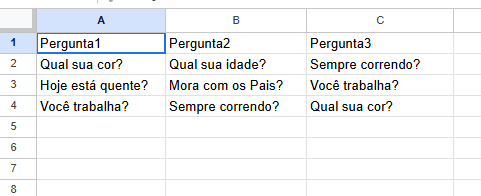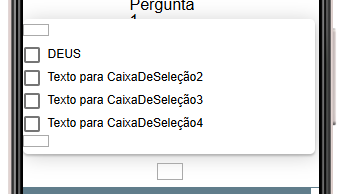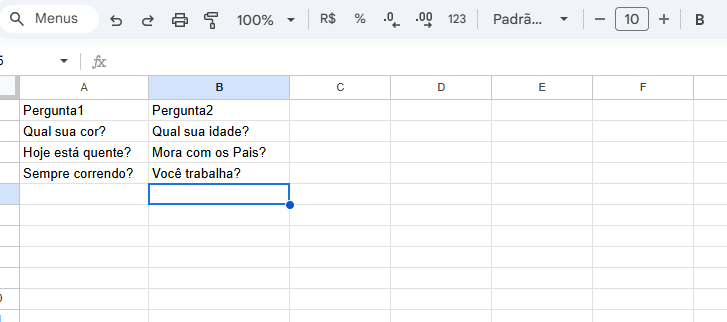
Now, with this data, I want to create a checkbox for each column
with 3 questions.
Here are 3 questions in column A
plus 3 in column B
with a checkbox
Ideas???
Ideas???
Why did you left from this thread without completing it and jumping to another??
Did you find a solution? If yes then tell us how?
On top of that, you should explain better what are trying to archive
Solution found with our friend in the previous solution topic…
I just marked it as a solution at that time…
now I’m trying to pull data from the spreadsheet and put it into questions with checkboxes.
In the previous topic you were using textboxes for open-ended answers and checkboxes for true/false ones, correct?
If so, how are you separating these questions? Column A for true/false and column B for open answers?
This is what I didn’t understand very well, why do you want to put a question in a checkbox? Are you sure you don’t want to use multiple-choice answers instead?
This is a research paper.
It has one question and four possible answers.
Whenever the researcher changes the questions, they can simply update it in Sheets.
In this topic we addressed a similar problem.
Read from google and display in app
I didn’t understand anything…
But I’m analyzing how I can use this model to my advantage.
Get col b data in csv format using web.get method, convert into list and put into check box
Okay, let’s go.
I’ll follow your topic. At the end of the questions, when there are no more questions, could you save the selected answers in TinyDB?
If so, how would that step work?
Use this to download data from Google Sheet.
or this (Google section)
As soon as you receive the data, use TinyDB.StoreValue to save your table.